NVE: aggiornamento cumulativo non riuscito a 4 di 18 "This package version YYYY-R#-v# is already installed"
Summary: Verifica se il pacchetto da installare è la versione più recente (4 di 18): questa versione del pacchetto YYYY-R#-v# è già installata!
This article applies to
This article does not apply to
This article is not tied to any specific product.
Not all product versions are identified in this article.
Symptoms
Il rollup del sistema operativo NetWorker Virtual Edition (NVE) non riesce al passaggio 4 di 18 "This package version YYYY-R#-v# is already installed!"
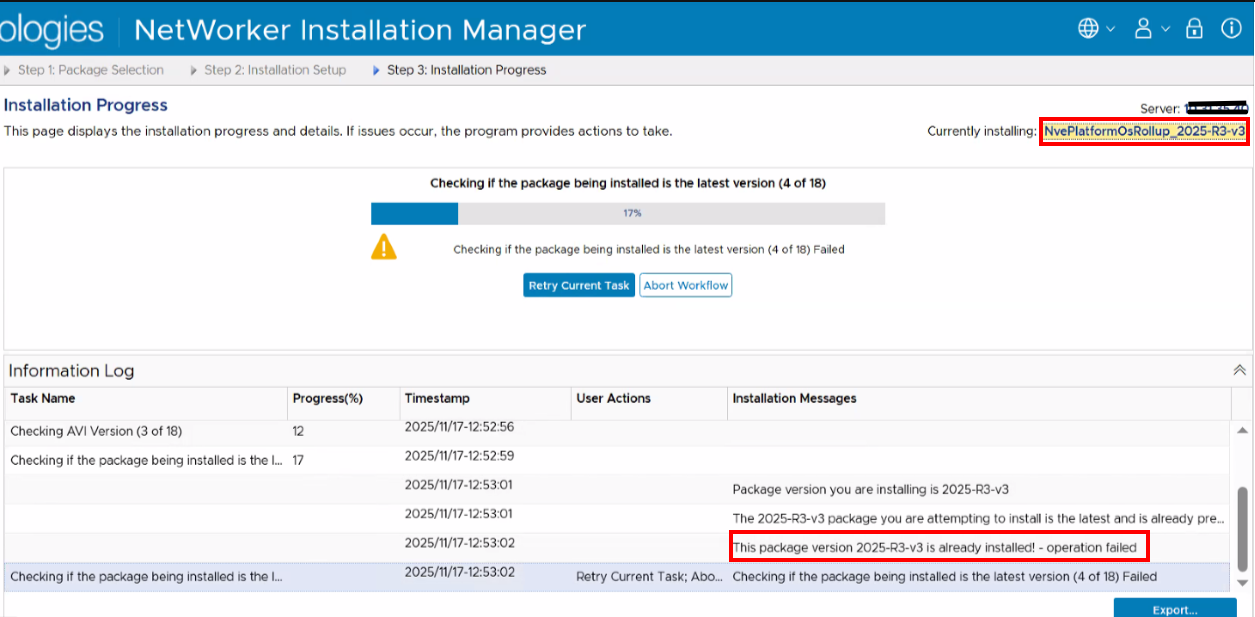
Il /data01/avamar/repo/temp/*/tmp/workflow.log Mostra:
2025-12-08 12:28:08 (-0500) 47384385583780 INFO: Report home message: 2025-12-08 12:28:08 -0500|usdc1-nwrbkpv07.pbi.global.pvt|unknown|NveOsRollup|19.12.0.86|/space/avamar/repo/temp/NvePlatformOsRollup_2025-R2-v3.avp_1765214841316/tmp|AvPlatformOssuPackageVersionCheck|Checking if the package being installed is the latest version (4 of 18)|ERROR: AvPlatformOssuPackageVersionCheck::do  This package version 2025-R2-v3 is already installed! - operation failed
2025-12-08 12:28:08 (-0500) 47384385583780 ERROR: This package version 2025-R2-v3 is already installed! - operation failed
2025-12-08 12:28:08 (-0500) 47384385583780 INFO: post: This package version 2025-R2-v3 is already installed! - operation failed
Cause
Durante un precedente tentativo di installazione cumulativa si è verificato un problema, ad esempio: NVE: Mancato avvio del servizio AVI dopo l'aggiornamento del sistema operativo 2025 R2-v3
Si è verificato un problema con post_errata_installation File XML associato al rollup precedente.
Resolution
- Aprire una sessione SSH su NVE e accedere come amministratore.
- Passare a root:
sudo su - - Verificare se l'installazione più recente di NVE è il Rollup:
avosrollup -V
nve:~ # avosrollup -V
Avamar Platform OS Security Rollup:
OS[SLES12.5] Version[2025-R2-v3] Installation Time[2025-10-17-13-01-37]
Ciò indica che il rollup è già installato nel sistema. Tuttavia, il processo non è stato ancora completato.
- Verificare se il rollup è
post_errata_installationIl file XML esiste:grep package-survey /usr/local/avamar/var/package-survey-*-post_errata_installation*.xml
nve:~ # grep package-survey /usr/local/avamar/var/package-survey-*-post_errata_installation*.xml
:::::
/usr/local/avamar/var/package-survey-SLES12.5-post_errata_installation-2025-10-17-13-01-37.xml:<package-survey version="2025-R2-v3"/>
/usr/local/avamar/var/package-survey-SLES12.5-post_errata_installation-2025-10-17-13-01-37.xml:<package-survey>
/usr/local/avamar/var/package-survey-SLES12.5-post_errata_installation-2025-10-17-13-01-37.xml:</package-survey>
- Rimuovere i file xml associati al pacchetto segnalato come "già installato"
nve:~ # mv /usr/local/avamar/var/package-survey-SLES12.5-post_errata_installation-2025-10-17-13-01-37.xml /tmp
nve:~ # mv /usr/local/avamar/var/package-survey-SLES12.5-pre_errata_installation-2025-10-17-13-01-37.xml: /tmp
- Riavviare il servizio AVI:
avinstaller.pl --restart - Accedere all'interfaccia utente di NetWorker Install Manager, continuare il processo di aggiornamento cumulativo cliccando su "Retry Current Task".
Additional Information
Affected Products
NetWorker Family, NetWorkerArticle Properties
Article Number: 000403292
Article Type: Solution
Last Modified: 24 مايو 2026
Version: 4
Find answers to your questions from other Dell users
Support Services
Check if your device is covered by Support Services.