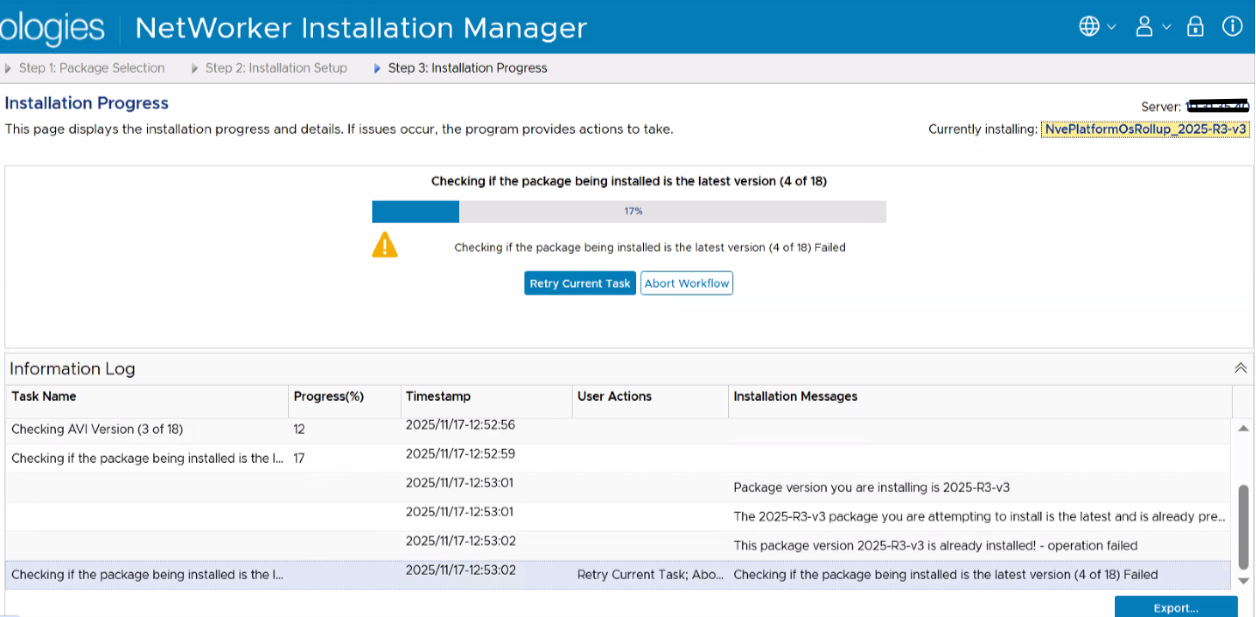
NVE 匯總更新在 18 項當中的 4 項失敗
Summary: 症狀: 檢查安裝的套裝是否為最新版本 (4/18) - 已安裝此套裝版本 xxxxx!
Symptoms
workflow.log
2 中的錯誤025-12-08 12:28:08 (-0500) 47384385583780 INFO: Report home message: 2025-12-08 12:28:08 -0500|usdc1-nwrbkpv07.pbi.global.pvt|unknown|NveOsRollup|19.12.0.86|/space/avamar/repo/temp/NvePlatformOsRollup_2025-R2-v3.avp_1765214841316/tmp|AvPlatformOssuPackageVersionCheck|Checking if the package being installed is the latest version (4 of 18)|ERROR: AvPlatformOssuPackageVersionCheck::do This package version 2025-R2-v3 is already installed! - operation failed2025-12-08 12:28:08 (-0500) 47384385583780 ERROR: This package version 2025-R2-v3 is already installed! - operation failed2025-12-08 12:28:08 (-0500) 47384385583780 INFO: post: This package version 2025-R2-v3 is already installed! - operation failed
Cause
修正 NWREE-28382 記錄 的問題後,請參閱 https://www.dell.com/support/kbdoc/000366911
無法繼續升級程序
此問題報告於 NWREE-28679
Resolution
1) 檢查 NVE 是否最新安裝的匯總# avosrollup -VAvamar Platform OS Security Rollup:OS[SLES12.5] Version[2025-R2-v3] Installation Time[2025-10-17-13-01-37]
這表示系統上已安裝匯總。但是,它尚未完成該過程。
2) 檢查更新後匯總 xml 檔案是否存在 nve193:~ # grep package-survey /usr/local/avamar/var/package-survey-*-post_errata_installation*.xml
:::::/usr/local/avamar/var/package-survey-SLES12.5-post_errata_installation-2025-10-17-13-01-37.xml:<package-survey version="2025-R2-v3"/>/usr/local/avamar/var/package-survey-SLES12.5-post_errata_installation-2025-10-17-13-01-37.xml:<package-survey>/usr/local/avamar/var/package-survey-SLES12.5-post_errata_installation-2025-10-17-13-01-37.xml:</package-survey>
3) 移除 xml 檔案# mv /usr/local/avamar/var/package-survey-SLES12.5-post_errata_installation-2025-10-17-13-01-37.xml /tmp# mv /usr/local/avamar/var/package-survey-SLES12.5-pre_errata_installation-2025-10-17-13-01-37.xml: /tmp
4) 重新啟動 avi 服務nve193:~ # avinstaller.pl --restart
5) 登入 NetWorker Install Manager GUI,按一下「重試目前工作」以繼續匯總更新程序。