PowerScale:アップグレード後にAD sudoコマンドが機能しなくなる
Summary: PowerScale OneFSをアップグレードすると、sudoコマンドでパスワードが3回要求され、コマンドの実行に失敗します。
This article applies to
This article does not apply to
This article is not tied to any specific product.
Not all product versions are identified in this article.
Symptoms
「System Admin」ロールのActive Directoryユーザー(この場合はADユーザー名は「PowerScale」)は、SSHエントリーを引き続き許可し、コマンドが次のように失敗します。
cluster-1# ssh DOMAIN\\PowerScale@cluster-1
(DOMAIN\PowerScale@cluster-1) Password:
PowerScale OneFS 9.12.0.1
Could not chdir to home directory /ifs/home/DOMAIN/PowerScale: No such file or directory
cluster-1% sudo -s

We trust you have received the usual lecture from the local System
Administrator. It usually boils down to these three things:

    #1) Respect the privacy of others.
    #2) Think before you type.
    #3) With great power comes great responsibility.

For security reasons, the password you type will not be visible.

Password:
Sorry, try again.
Password:
Sorry, try again.
Password:
sudo: 3 incorrect password attempts
cluster0-1%
エラー /var/log/auth.log は次のようになります。
2026-01-09T14:08:46.964341-05:00 <4.6> isi-9510-1(id1) sshd[9292]: Accepted keyboard-interactive/pam for DOMAIN\PowerScale from 10.20.48.1 port 31599 ssh2
2026-01-09T14:09:02.165862-05:00 <4.1> isi-9510-1(id1) sudo[9315]: DOMAIN\PowerScale : 3 incorrect password attempts ; TTY=pts/1 ; PWD=/ ; USER=root ; COMMAND=/bin/zs
Cause
sudoのアップデートにより、大文字のActive Directoryユーザー名が失敗しました。これは、Active Directoryユーザーにパスワードの入力を求めるプロンプトを表示する必要がある環境のみを対象としており、パスワードなしのsudoコマンドは影響を受けないことに注意してください。パスワードで保護されたプロンプトのエントリーは、 'isi_visudo' このように:
DOMAIN\\powerscale ALL=(ALL) PASSWD: ALLResolution
PowerScaleエンジニアリングはこの問題を特定しており、OneFS 9.13.0.2+に修正されています。ユーザーは、Active Directoryでユーザー名を編集して、すべて小文字にすることができます。
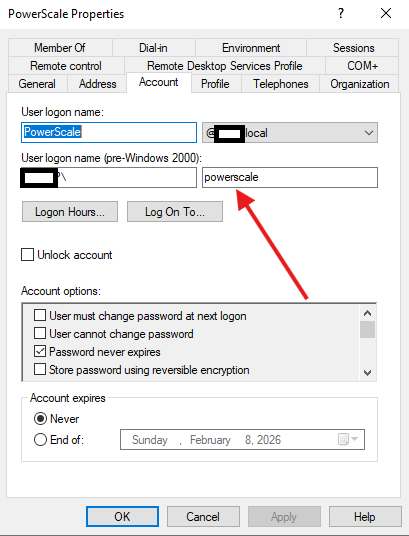
それでもユーザーが機能しない場合は、ログ収集を開始し、PowerScaleサポートにお問い合わせください。
Article Properties
Article Number: 000413077
Article Type: Solution
Last Modified: 23 يونيو 2026
Version: 2
Find answers to your questions from other Dell users
Support Services
Check if your device is covered by Support Services.