PowerFlex 4.8: Upgrade fails with error: No package matching 'java-17-amazon-corretto-devel'
Summary: PowerFlex software upgrade (gateway) is failing due to missing Java 17 package for CentOS 7 storage nodes in compliance bundle (IC or RCM).
This article applies to
This article does not apply to
This article is not tied to any specific product.
Not all product versions are identified in this article.
Symptoms
Update job is failing with following error message:
The <node> failed to configure whille running the task, "Install Corretto": No package matching java-17-amazon-corretto-devel' found available, installed or updated
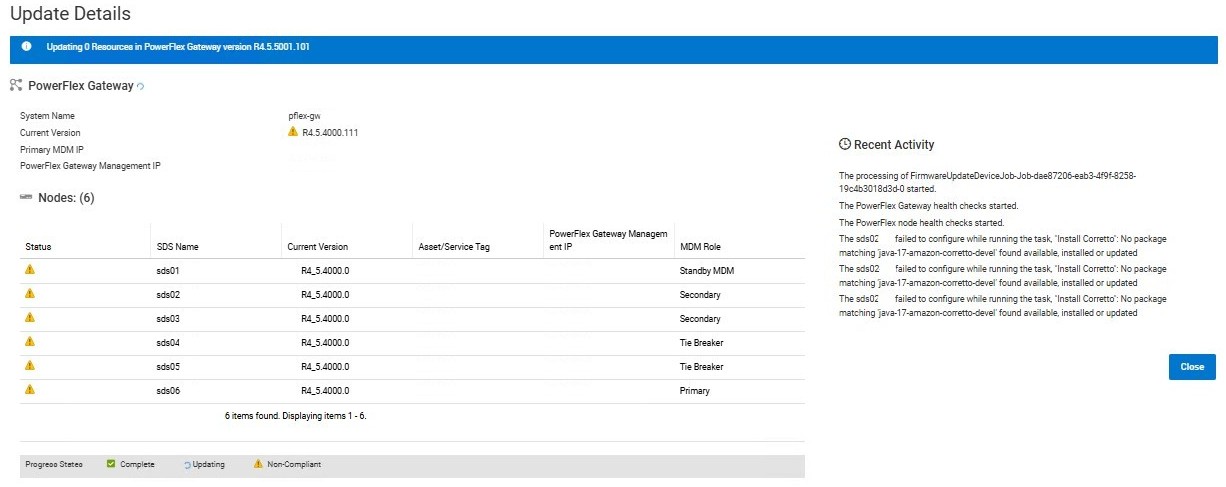
Conditions:
- CentOS 7 storage nodes
- PowerFlex Appliance or Rack
- IC 48.378.01 or 48.383.01
- RCM 3.7.8.1 or 3.8.3.1
PowerFlex Manager generates event:
code=70020063, name=FIRMWARE_UPDATE_FAILED., description=The firmware update for device block-legacy-gateway failed., severity=MAJOR, category=AUDIT, details={msgcode=VXFM00233, service_tag=block-legacy-gateway}
Cause
Compliance bundle is missing a package in its catalog for nodes running CentOS 7 (el7).
Java 17 is a prerequisite for running ActiveMQ on MDM nodes in this PowerFlex core release (4.5.5.1).
Resolution
A new RCM/IC bundle should be released soon with the missing package (as on 14/01/2026).
Two possible workarounds until fix is available:
- First upgrade to previous revision (IC 48.378.00 or 48.383.00 / RCM 3.7.8.0 or 3.8.3.0), then upgrade to target revision.
- Manually install missing package on all storage nodes, then refresh inventory and retry upgrade.
Manual installation of Java 17 on CentOS 7:
- Download package from corretto repository (GitHub):
wget "https://corretto.aws/downloads/resources/17.0.15.6.1/java-17-amazon-corretto-devel-17.0.15.6-1.x86_64.rpm" - Install package on each SO nodes:
sudo yum localinstall ./java-17-amazon-corretto-devel-17.0.15.6-1.x86_64.rpm
Products
PowerFlex rack, PowerFlex Appliance, PowerFlex appliance Intelligent Catalog Software, PowerFlex rack RCM SoftwareArticle Properties
Article Number: 000415930
Article Type: Solution
Last Modified: 23 يناير 2026
Version: 2
Find answers to your questions from other Dell users
Support Services
Check if your device is covered by Support Services.