PowerEdge: Difficulty Removing DC Power Connector Screws
Summary: Thread design on screws prevents extraction of screws.
This article applies to
This article does not apply to
This article is not tied to any specific product.
Not all product versions are identified in this article.
Symptoms
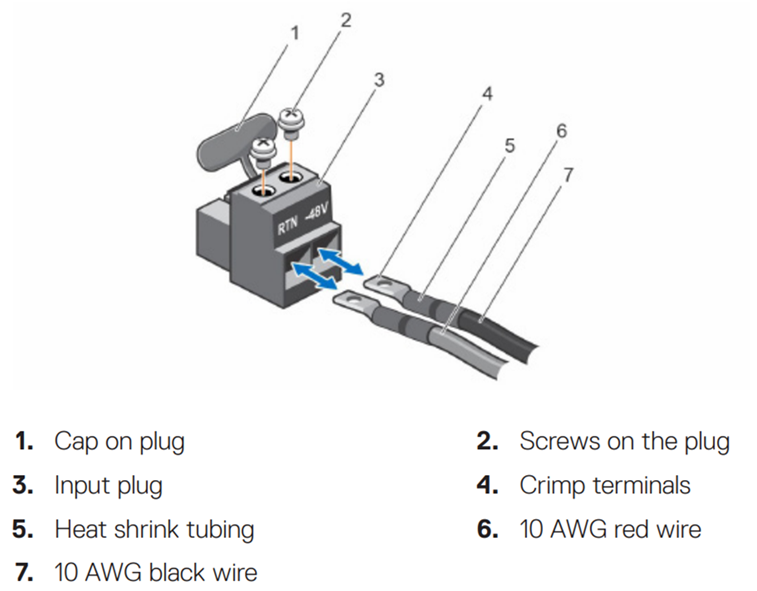
DC power connectors (Dell Part Number RN5T2) have terminal screws that fail to unscrew. The screws turn but do not extract. Item #2 in the following diagram displays the screws in question.
Figure 1: DC Power Connector
Cause
A short unthreaded area at the top of the screws prevents extraction.
Resolution
Dell Technologies Engineering recommends turning the connector upside down when removing the screws. This allows the screws to fall down to where the threads make solid contact. After this, the screws successfully extract.
Affected Products
OEMR R660, OEMR R760, OEMR XR8000r, OEMR XR8620t, PowerEdge R660, PowerEdge R760, PowerEdge XR8000r, PowerEdge XR8620tArticle Properties
Article Number: 000423792
Article Type: Solution
Last Modified: 24 مايو 2026
Version: 3
Find answers to your questions from other Dell users
Support Services
Check if your device is covered by Support Services.