Data Domain: NetWorker Unable to Create Cloud Tier Device for a Newly Added Cloud Unit
Summary: When attempting to create a Cloud Tier (CT) device for a newly added cloud unit, the process fails with the error "Unable to create the data movement policy for mtree **** and cloud unit ***. HTTP response 500 indicates an error." This issue is caused by stale or incorrect configuration values in the Data Domain properties within NetWorker Management Console (NMC). ...
This article applies to
This article does not apply to
This article is not tied to any specific product.
Not all product versions are identified in this article.
Symptoms
During the Cloud Tier device creation workflow, the following error appears:
Unable to create the data movement policy for mtree **** and cloud unit ***.
HTTP response 500 indicates an error.
Creation of the CT device fails.
Cause
The Data Domain properties configured in NMC contain stale or incorrect information, such as:
- Wrong management hostname
- Incorrect management username/password
- Old or invalid cloud unit name
- Stale management certificate associated with the previous cloud configuration
These stale entries prevent proper discovery of the new cloud unit and cause the CT device creation to fail.
Resolution
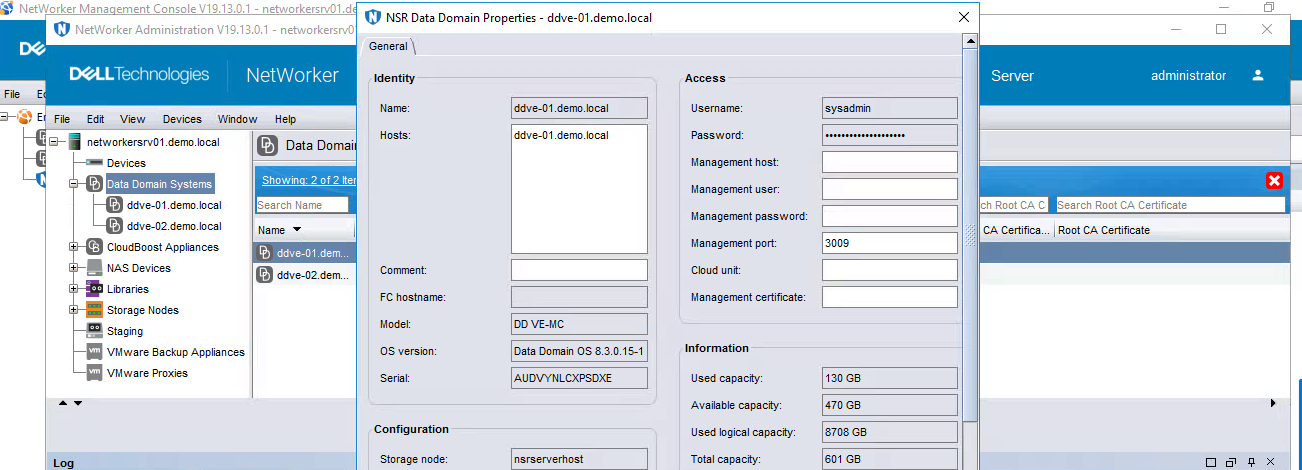
To clear stale Data Domain configuration in NMC and allow proper cloud unit detection:
1. Open Data Domain Properties in NMC
- In NMC, navigate to Devices
- Right‑click the Data Domain system
- Select Properties
2. Correct Management Credentials
Under the Data Domain properties:
- Verify and enter the correct management hostname
- Re‑enter the correct management username and password
3. Clear Stale Cloud Configuration Fields
Remove outdated values by clearing:
- Cloud Unit field
- Management Certificate field
This forces NMC to discard stale cached configuration.
4. Retry Cloud Tier Device Creation
Attempt to create the Cloud Tier device again on the new cloud unit.
The DD system now automatically:
- Retrieves the correct management certificate
- Detects the correct cloud unit
- Proceeds with CT device creation successfully
Affected Products
NetWorker Family, Data DomainArticle Properties
Article Number: 000437199
Article Type: Solution
Last Modified: 13 مارس 2026
Version: 1
Find answers to your questions from other Dell users
Support Services
Check if your device is covered by Support Services.