NetWorker 19.13: Administrator Password Cannot Be Updated Using authc_mgmt or NMC.
Summary: NetWorker 19.13.0.0 or 19.13.0.1 report "Access Denied" when attempting to change the Administrator password from the NMC or authc_mgmt command.
This article applies to
This article does not apply to
This article is not tied to any specific product.
Not all product versions are identified in this article.
Symptoms
The current NetWorker Administrator password is known; however, the password must be changed.
Using the existing Administrator password with command "
authc_mgmt -u administrator -p "##########" -e update-password," fails with an "Access denied" error.
[root@dlisasnwclap001:~]# authc_mgmt -u administrator -p "##########" -e update-password
Enter new password:
Confirm new password:
ERROR [main] (DefaultLogger.java:222) - Error while performing Operation:
com.emc.brs.auth.common.exception.BRHttpErrorException: 403 . Server message: Access is denied
       at com.emc.brs.auth.client.template.impl.DefaultBRResponseErrorHandler.handleError(DefaultBRResponseErrorHandler.java:66) ~[auth-cli-with-dependencies.jar:?]
       at org.springframework.web.client.ResponseErrorHandler.handleError(ResponseErrorHandler.java:63) ~[auth-cli-with-dependencies.jar:?]
       at org.springframework.web.client.RestTemplate.handleResponse(RestTemplate.java:953) ~[auth-cli-with-dependencies.jar:?]
       at org.springframework.web.client.RestTemplate.doExecute(RestTemplate.java:902) ~[auth-cli-with-dependencies.jar:?]
       at org.springframework.web.client.RestTemplate.execute(RestTemplate.java:801) ~[auth-cli-with-dependencies.jar:?]
       at org.springframework.web.client.RestTemplate.exchange(RestTemplate.java:712) ~[auth-cli-with-dependencies.jar:?]
       at com.emc.brs.auth.client.service.impl.DefaultBRLocalUserOpService.updateLocalUserPassword(DefaultBRLocalUserOpService.java:77) ~[auth-cli-with-dependencies.jar:?]
       at com.emc.brs.auth.cli.commands.AuthUserCommand.updatePassword(AuthUserCommand.java:245) ~[auth-cli-with-dependencies.jar:?]
       at com.emc.brs.auth.cli.commands.AuthUserCommand.execute(AuthUserCommand.java:123) ~[auth-cli-with-dependencies.jar:?]
       at com.emc.brs.auth.cli.core.AuthMgmtCmdExecutor.execute(AuthMgmtCmdExecutor.java:142) [auth-cli-with-dependencies.jar:?]
       at com.emc.brs.auth.cli.core.AuthMgmt.executeCommand(AuthMgmt.java:170) [auth-cli-with-dependencies.jar:?]
       at com.emc.brs.auth.cli.core.AuthMgmt.main(AuthMgmt.java:79) [auth-cli-with-dependencies.jar:?]
ERROR [main] (DefaultLogger.java:190) - Error executing command. Failure: 403 . Server message: Access is denied
Error executing command. Failure: 403 . Server message: Access is denied
[root@dlisasnwclap001:~]#
Also, when attempting to update the Administrator password through the NetWorker Management Console (NMC), the operation fails with the following error message:
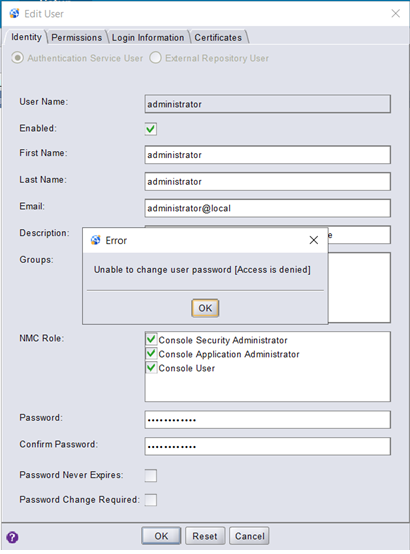
The NetWorker server is 19.13.0.0 or 19.13.0.1.
The NetWorker server is 19.13.0.0 or 19.13.0.1.
Cause
The issue has been identified as a NetWorker defect.
Resolution
This issue is addressed in NetWorker 19.13.0.2. Upgrade to this release (or later) for a code fix.
Workaround:
NOTE: The below workaround is only applicable if the current NetWorker Administrator password is known. Attempts to change the Administrator password using another account will also produce the "Access Denied" error; even if that user has "Security Administrator" rights. The following article details how to change the administrator password when the Administrator password is not known: NetWorker: How to reset the Administrator password. Alternatively, see the Additional Info section for steps to provide FULL_CONTROL access to an external (AD/LDAP) account or group.
-
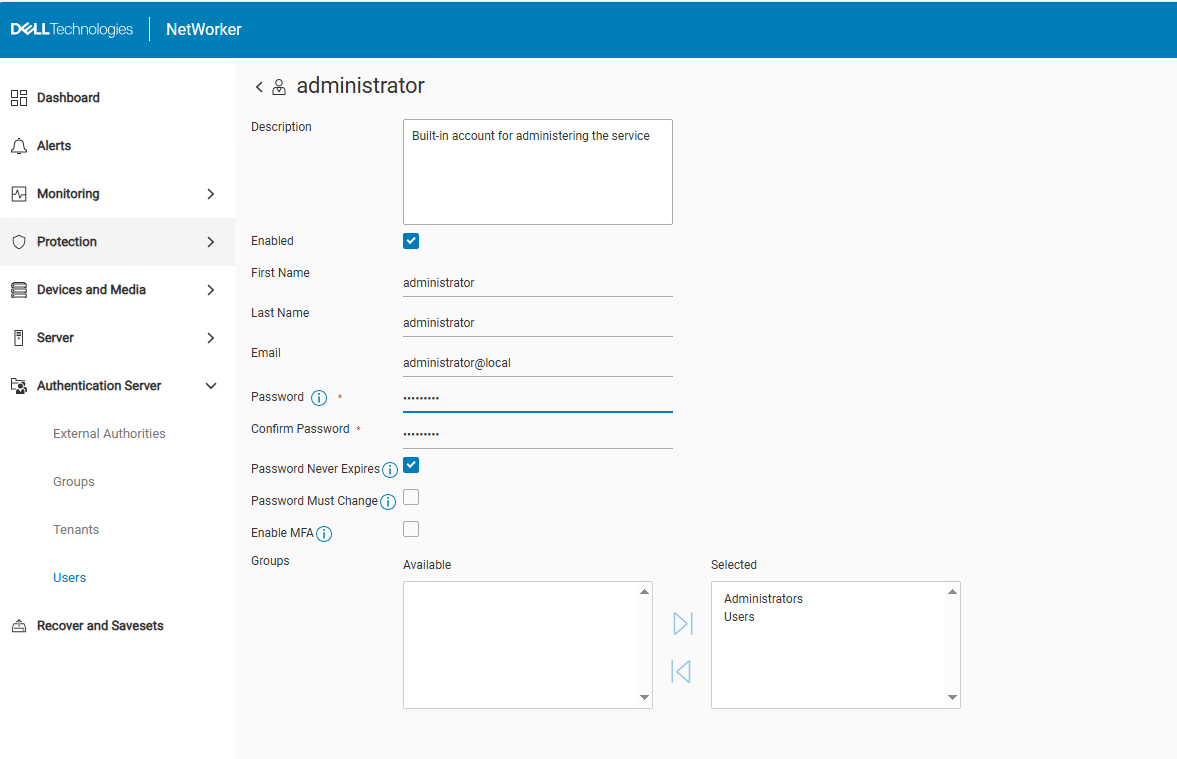
Access the NetWorker Web User Interface (NWUI):
https://nwui_server_name:9090/nwui -
Log in with the default Administrator account.
-
Go to Authentication Server -> Users.
-
Edit the Administrator user.
-
Change the password, the click Save,
Additional Information
By default, external accounts cannot be used to modify AUTHC security settings on the NetWorker server, even if they are part of the "Security Administrators" group. You must either:
- Use the NetWorker Administrator account.
- Grant FULL_CONTROL access to the external user or group; however, consider that this setting would effectively be granting an external account full administrative rights to the NetWorker server's security settings. This change must only be performed at the discretion of your Administration team. You must also know the current Administrator password in order to make this change. If the current Administrator password is not known, see: NetWorker: How to reset the Administrator password
To grant FULL_CONTROL to an external user or group, perform the following steps:
- Determine the correct AUTHC server used by the NMC and NWUI: NetWorker: How To Identify Which Server is the Authentication Server Used By NMC and NWUI
- Open an elevated prompt on the NetWorker AUTHC server.
- Enter the following command for the AD user or group you want to grant FULL_CONTROL access:
authc_config -u Administrator -p 'NetWorker_Administrator_Password' -e add-permission -D permission-name=FULL_CONTROL -D permission-group-dn="AD/LDAP_group_dn"
Example:
[root@nsr certs]# authc_config -u Administrator -p '!Password1' -e add-permission -D permission-name=FULL_CONTROL -D permission-group-dn="CN=NW_Admins,OU=Dell,dc=amer,dc=lan"
Permission FULL_CONTROL is created successfully.
[root@nsr certs]#
- Confirm the changes:
authc_config -u Administrator -p 'NetWorker_Administrator_Password' -e find-all-permissions
Example:
[root@nsr certs]# authc_config -u Administrator -p '!Password1' -e find-all-permissions
The query returns 2 records.
Permission Id Permission Name Group DN Pattern                Group DN
1             FULL_CONTROL    ^cn=Administrators,cn=Groups.*$
2             FULL_CONTROL                                    CN=NW_Admins,OU=Dell,dc=amer,dc=lan
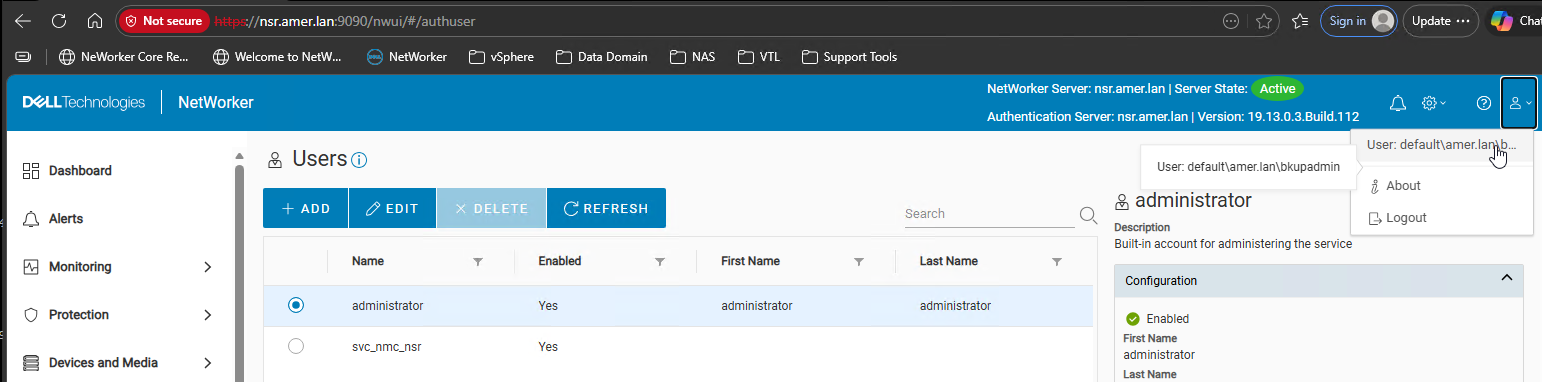
- The accounts granted FULL_CONTROL permissions now have Security Admin access to the NetWorker server. Pages like the "Users" tab no longer report Access Denied:
Affected Products
NetWorker Management ConsoleProducts
NetWorker Family, NetWorkerArticle Properties
Article Number: 000449235
Article Type: Solution
Last Modified: 11 مايو 2026
Version: 2
Find answers to your questions from other Dell users
Support Services
Check if your device is covered by Support Services.