PPDM: 외부 프록시에서 VMware Tools를 제거한 후 VM 백업이 실패함
Summary: 외부 프록시에서 VMware Tools가 제거되면 vCenter MOB FindByIp가 프록시 IP 주소에 대해 VM을 반환하지 않으므로 PowerProtect Data Manager의 백업 작업이 실패합니다.
This article applies to
This article does not apply to
This article is not tied to any specific product.
Not all product versions are identified in this article.
Symptoms
백업 작업 오류
백업 작업에서 프록시 IP에 대한 가상 머신을 찾을 수 없다는 오류를 보고합니다.
BackupVmSessions-74f0b3f4-7ef9-418a-af4c-5e051a1e8114.log: 2026-04-10T03:54:46.344Z ERROR:  [8ad9e3bde8139848;a7bb45904a854306] Unable to find the virtual machine for vProxy "x.x.x.x".  Found no virtual machines with IP address "x.x.x.x".
BackupVmSessions-74f0b3f4-7ef9-418a-af4c-5e051a1e8114.log: 2026-04-10T03:54:46.344Z ERROR:  [8ad9e3bde8139848;a7bb45904a854306] Unable to find identity (MORef) of vProxy's virtual machine: Unable to find the virtual machine for vProxy "x.x.x.x".  Found no virtual machines with IP address "x.x.x.x".
추가 표시기
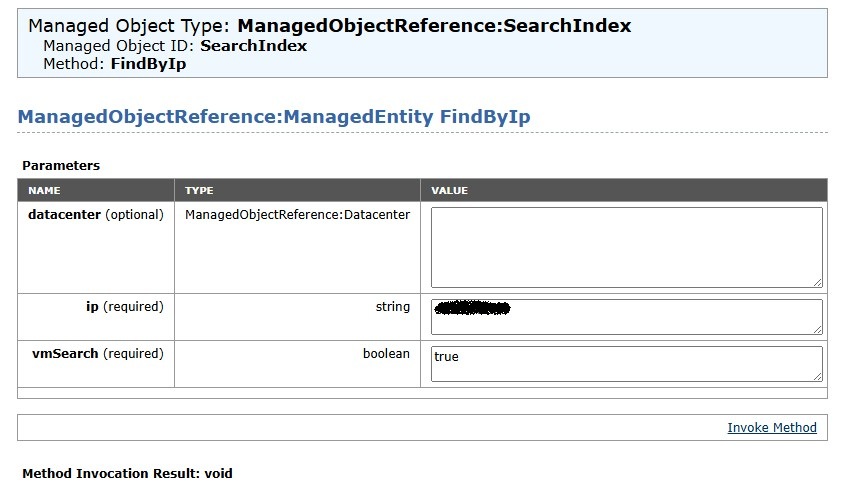
vCenter MOB에서 쿼리 FindByIp null을 반환합니다.
Cause
근본 원인
외부 프록시는 VMware Tools를 사용하여 해당 IP 주소를 vCenter에 등록합니다. VMware Tools가 제거되면 vCenter의 MOB(Managed Object Browser) FindByIp 메서드가 프록시 IP 주소와 연결된 가상 머신을 찾을 수 없어 null 응답 및 백업 실패가 발생합니다.
- vCenter MOB
FindByIpVMware Tools for IP-to-VM 매핑에 따라 달라집니다. - VMware Tools를 제거하면 이 매핑이 손상됩니다.
Resolution
누락된 VMware Tools를 복원하거나 프록시를 교체하십시오.
- 외부 프록시 호스트에 VMware Tools를 다시 설치합니다.
- 프록시가 vCenter에서 IP 등록을 다시 가져오는지 확인합니다.
- 다시 설치할 수 없는 경우 외부 프록시 어플라이언스를 재배포하십시오.
- 테스트 백업을 실행하여 문제가 해결되었는지 확인합니다.
주의: VMware Tools를 다시 설치하기 전에 프록시의 전원이 켜져 있고 네트워크에 연결되어 있는지 확인하십시오.
Affected Products
PowerProtect Data ManagerArticle Properties
Article Number: 000452946
Article Type: Solution
Last Modified: 02 يوليو 2026
Version: 2
Find answers to your questions from other Dell users
Support Services
Check if your device is covered by Support Services.