PPDM:在移除外部代理上的 VMware 工具後,VM 備份失敗
Summary: 當 VMware 工具從外部代理移除後,PowerProtect Data Manager 上的備份工作會失敗,因為 vCenter MOB FindByIp 不會傳回代理 IP 位址的虛擬機器。
This article applies to
This article does not apply to
This article is not tied to any specific product.
Not all product versions are identified in this article.
Symptoms
備份工作錯誤
備份工作報告錯誤,表示找不到代理 IP 的虛擬機器。
BackupVmSessions-74f0b3f4-7ef9-418a-af4c-5e051a1e8114.log: 2026-04-10T03:54:46.344Z ERROR:  [8ad9e3bde8139848;a7bb45904a854306] Unable to find the virtual machine for vProxy "x.x.x.x".  Found no virtual machines with IP address "x.x.x.x".
BackupVmSessions-74f0b3f4-7ef9-418a-af4c-5e051a1e8114.log: 2026-04-10T03:54:46.344Z ERROR:  [8ad9e3bde8139848;a7bb45904a854306] Unable to find identity (MORef) of vProxy's virtual machine: Unable to find the virtual machine for vProxy "x.x.x.x".  Found no virtual machines with IP address "x.x.x.x".
其他指標
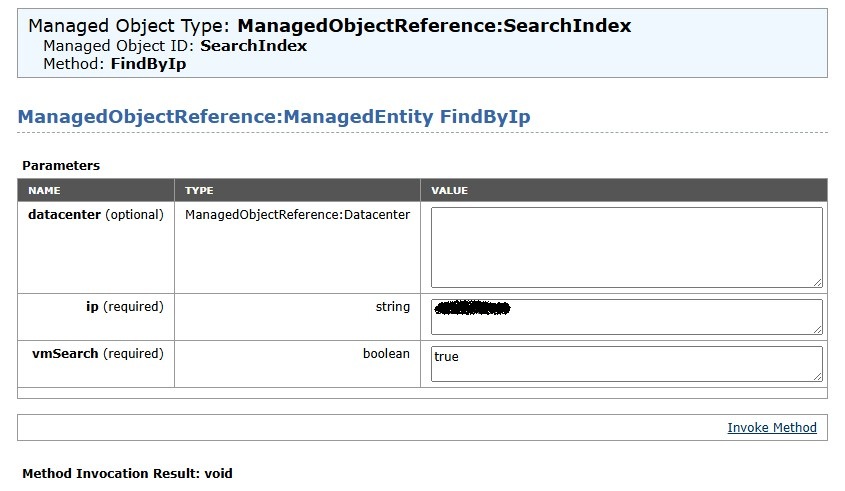
從 vCenter MOB 查詢 FindByIp 返回空值。
Cause
根本原因
外部代理會仰賴 VMware 工具向 vCenter 註冊其 IP 位址。移除 VMware 工具後,vCenter 的受管物件瀏覽器 (MOB) FindByIp 方法找不到與代理 IP 位址關聯的虛擬機器,導致 null 回應和備份失敗。
- vCenter MOB
FindByIp視 VMware 工具而定,以進行 IP 至 VM 的對應。 - 移除 VMware Tools 會中斷此對應。
Resolution
還原遺失的 VMware 工具或更換代理。
- 在外部代理主機上重新安裝 VMware Tools。
- 確認代理已在 vCenter 中重新取得其 IP 註冊。
- 如果無法重新安裝,請重新部署外部代理裝置。
- 執行測試備份以確認問題已解決。
警示:請確定代理已開啟電源且已連線至網路後,再重新安裝 VMware 工具。
Affected Products
PowerProtect Data ManagerArticle Properties
Article Number: 000452946
Article Type: Solution
Last Modified: 02 يوليو 2026
Version: 2
Find answers to your questions from other Dell users
Support Services
Check if your device is covered by Support Services.