PowerProtect Data Manager: File System Agent-Backup schlägt mit "SQLite database initialization failed" fehl
Summary: Das File System Agent-Backup schlägt mit dem Fehler "SQLite database initialization failed" fehl und weist auf einen fehlenden PLCTLP-Ordner in der Data Domain hin.
Symptoms
Das Backup des PowerProtect Data Manager-Dateisystem-Agent schlägt aufgrund eines Agent-Problems mit dem Fehler SQLite-Datenbankinitialisierung fehlgeschlagen. Das Protokoll des Anwendungs-Agent zeigt Folgendes an:
"failedSources": [
                    {
                        "taskId": "af5ce774-d0a0-47ce-a43a-cddc9fed363b",
                        "name": "D:\\",
                        "status": "FAILURE",
                        "subStatus": "",
                        "errorCode": "",
                        "errorMessage": "SQLite database initialization failed",
                        "remediation": "",
                        "vendorSpecificErrorMessage": "",
                        "alertArguments": []
Bei der ddfssv_cent Das Protokoll zeigt:
2026-04-17T13:01:06.135Z [TRACE_ID_87714f8f0c1af398_EXEC_ID_b694c97c2ccf7b27]0  12408 18308 0 ddfssv PowerProtect Data Manager notice DDP LOG: [18308:12408] ddp_stat() failed, Path //FS_Backup_TEST/PLCTLP-809cd829-eaa5-44d6-ab89-be8a61c7a293, Err: 5004-nfs lookup failed (nfs: No such file or directory)
2026-04-17T13:01:06.151Z [TRACE_ID_87714f8f0c1af398_EXEC_ID_b694c97c2ccf7b27]0  12408 18308 0 ddfssv PowerProtect Data Manager notice Unable to connect to data target: Retrieving statistics for '/FS_Backup_TEST/PLCTLP-809cd829-eaa5-44d6-ab89-be8a61c7a293' failed [5004] ([18308] [12408] Fri Apr 17 09:01:06 2026
	ddp_stat() failed, Path //FS_Backup_TEST/PLCTLP-809cd829-eaa5-44d6-ab89-be8a61c7a293, Err: 5004-nfs lookup failed (nfs: No such file or directory)
)..
Bei der vmdm.log Zeigt:
2026-04-19T07:00:05.315Z ERROR [] [https-jsse-nio-0.0.0.0-8447-exec-47] [00000000-0000-4000-a000-000000000000][][][TRACE_ID:b46dbf1aa2e28fc5;JOB_ID:8eb6926faaed5b17][] [c.e.b.s.u.CertificateUtils.checkExpiration(1391)] - Certificate is expired, state=EXPIRED
2026-04-19T07:00:05.315Z INFO [] [https-jsse-nio-0.0.0.0-8447-exec-47] [00000000-0000-4000-a000-000000000000][][][TRACE_ID:b46dbf1aa2e28fc5;JOB_ID:8eb6926faaed5b17][] [c.e.b.v.c.util.CommonUtils.getSSLThumbprint(245)] - Host DD_host.example.com thumbprint A747D9E2E98807A8F539A65354CA01AC287542D0
Eine neue Schutz-Policy-Erstellung schlägt fehl mit:
replmgr.2026-04-18.3.log.gz: 2026-04-18T22:30:36.966Z INFO [] [pool-32-thread-1] [00000000-0000-4000-b000-000000000000][][][TRACE_ID:ad91816c2d71de66;JOB_ID:8b9b1fe73fac21e9][] c.e.b.d.c.r.connection.DdRestClient.dataDomainLogin(159) -  hostname=DD_host.example.com username=ppdm-ddboost url=https://DD_host.example.com:3009/rest/v1.0/auth
replmgr.2026-04-18.3.log.gz: 2026-04-18T22:30:37.066Z ERROR [] [pool-32-thread-1] [00000000-0000-4000-b000-000000000000][][][TRACE_ID:ad91816c2d71de66;JOB_ID:8b9b1fe73fac21e9][] c.e.b.s.utils.CertificateUtils.checkExpiration(1391) -  Certificate is expired, state=EXPIRED
replmgr.2026-04-18.3.log.gz: 2026-04-18T22:30:37.067Z ERROR [] [pool-32-thread-1] [00000000-0000-4000-b000-000000000000][][][TRACE_ID:ad91816c2d71de66;JOB_ID:8b9b1fe73fac21e9][] c.e.b.d.c.r.connection.DdRestClient.executeDataDomainAuthRequest(213) -  Exception when trying to login, PowerProtect DD System = DD_host.example.com, username = ddboo error = NotAfter: Mon Mar 23 11:06:43 EST 2026
replmgr.2026-04-18.3.log.gz: 2026-04-18T22:30:37.067Z ERROR [] [pool-32-thread-1] [00000000-0000-4000-b000-000000000000][][][TRACE_ID:ad91816c2d71de66;JOB_ID:8b9b1fe73fac21e9][] c.e.b.d.s.s.StorageUnitRestImpl.login(480) -  Exception when logging in PowerProtect DD System, error:
com.emc.brs.datadomain.common.rest.connection.DdRestClientException: NotAfter: Mon Mar 23 11:06:43 EST 2026
Cause
Anmeldeversuche bei der Data Domain-Benutzeroberfläche schlagen mit ungültigen Anmeldefehlern fehl. Wenn Sie über SSH eine Verbindung mit der Data Domain herstellen, um Zertifikate zu überprüfen, wird angezeigt, dass das HTTPS-Zertifikat abgelaufen ist.
sysadmin@DD_host# adminaccess certificate show
Subject           Type            Application   Valid From                 Valid Until                Fingerprint
---------------   -------------   -----------   ------------------------   ------------------------   -----------------------------------------------------------
DD_host.example.com   host            https         Sun Jul 02 00:20:44 2023   Thu Mar 23 07:20:45 2026   5E:E6:C8:B2:76:8D:C1:96:15:E3:51:7B:86:35:5D:25:1F:91:A5:3B
DD_host.example.com   ca              trusted-ca    Mon Jul 03 07:20:44 2023   Sun Jul 01 07:20:44 2029   A6:48:F6:0E:D3:29:23:89:2C:6C:D8:E5:2B:84:2B:F9:01:62:C7:E7
Resolution
Das Data Domain-Zertifikat muss erneuert werden und anschließend muss das Zertifikat in PowerProtect Data Manager aktualisiert werden. Befolgen Sie die Anweisungen in Data Domain: Auf die Webnutzeroberfläche kann aufgrund eines abgelaufenen HTTPS-Zertifikats nicht zugegriffenwerden, um das Data Domain-HTTPS-Zertifikat zu erneuern.
Sobald das Zertifikat auf der Data Domain erneuert wurde, erneuern Sie das Zertifikat in PowerProtect Data Manager.
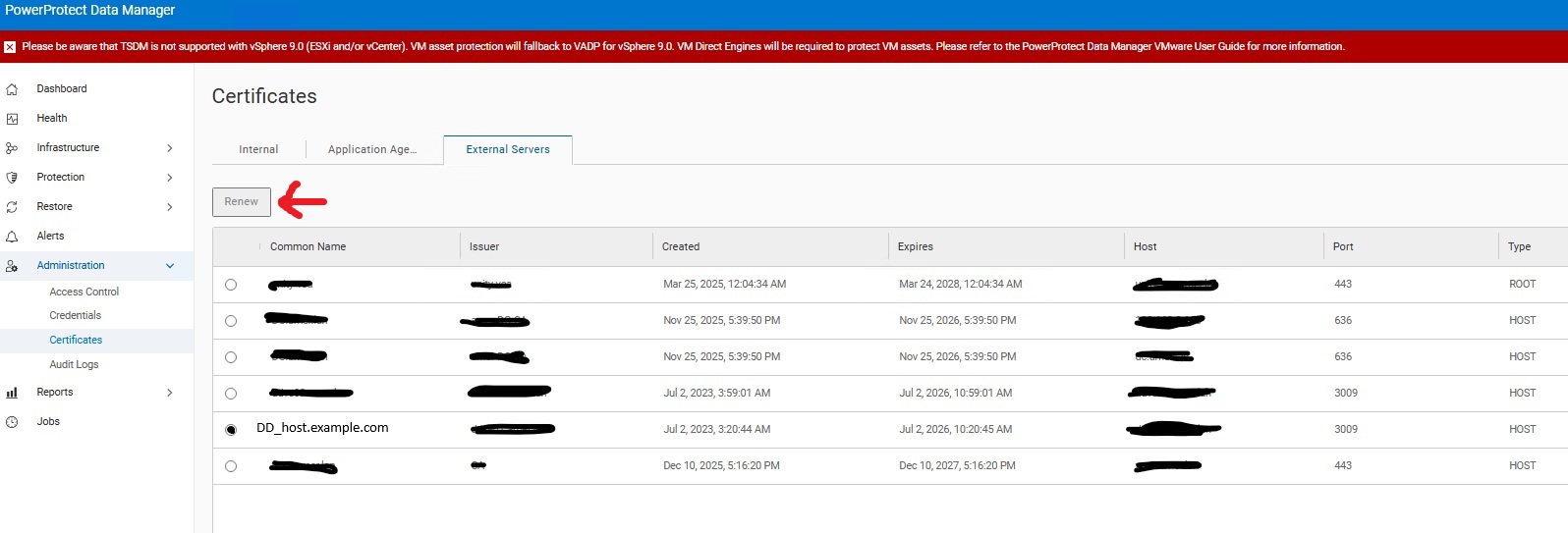
Für die betroffene Policy muss der fehlgeschlagene Konfigurationsjob neu gestartet werden, damit Data Domain den fehlenden Ordner erstellen kann.
