PowerProtect Data Manager : La sauvegarde de File System Agent échoue avec l’erreur « SQLite database initialization failed »
Summary: La sauvegarde de File System Agent échoue avec l’erreur « SQLite database initialization failed » et indique un dossier PLCTLP manquant sur le système Data Domain.
Symptoms
La sauvegarde de PowerProtect Data Manager File System Agent échoue en raison d’un problème d’agent avec erreur : échec de l’initialisation de la base de données SQLite. Le journal de l’agent d’application affiche les éléments suivants :
"failedSources": [
                    {
                        "taskId": "af5ce774-d0a0-47ce-a43a-cddc9fed363b",
                        "name": "D:\\",
                        "status": "FAILURE",
                        "subStatus": "",
                        "errorCode": "",
                        "errorMessage": "SQLite database initialization failed",
                        "remediation": "",
                        "vendorSpecificErrorMessage": "",
                        "alertArguments": []
La commande ddfssv_cent Le journal affiche les éléments suivants :
2026-04-17T13:01:06.135Z [TRACE_ID_87714f8f0c1af398_EXEC_ID_b694c97c2ccf7b27]0  12408 18308 0 ddfssv PowerProtect Data Manager notice DDP LOG: [18308:12408] ddp_stat() failed, Path //FS_Backup_TEST/PLCTLP-809cd829-eaa5-44d6-ab89-be8a61c7a293, Err: 5004-nfs lookup failed (nfs: No such file or directory)
2026-04-17T13:01:06.151Z [TRACE_ID_87714f8f0c1af398_EXEC_ID_b694c97c2ccf7b27]0  12408 18308 0 ddfssv PowerProtect Data Manager notice Unable to connect to data target: Retrieving statistics for '/FS_Backup_TEST/PLCTLP-809cd829-eaa5-44d6-ab89-be8a61c7a293' failed [5004] ([18308] [12408] Fri Apr 17 09:01:06 2026
	ddp_stat() failed, Path //FS_Backup_TEST/PLCTLP-809cd829-eaa5-44d6-ab89-be8a61c7a293, Err: 5004-nfs lookup failed (nfs: No such file or directory)
)..
La commande vmdm.log Montre:
2026-04-19T07:00:05.315Z ERROR [] [https-jsse-nio-0.0.0.0-8447-exec-47] [00000000-0000-4000-a000-000000000000][][][TRACE_ID:b46dbf1aa2e28fc5;JOB_ID:8eb6926faaed5b17][] [c.e.b.s.u.CertificateUtils.checkExpiration(1391)] - Certificate is expired, state=EXPIRED
2026-04-19T07:00:05.315Z INFO [] [https-jsse-nio-0.0.0.0-8447-exec-47] [00000000-0000-4000-a000-000000000000][][][TRACE_ID:b46dbf1aa2e28fc5;JOB_ID:8eb6926faaed5b17][] [c.e.b.v.c.util.CommonUtils.getSSLThumbprint(245)] - Host DD_host.example.com thumbprint A747D9E2E98807A8F539A65354CA01AC287542D0
La création d’une nouvelle politique de protection échoue avec :
replmgr.2026-04-18.3.log.gz: 2026-04-18T22:30:36.966Z INFO [] [pool-32-thread-1] [00000000-0000-4000-b000-000000000000][][][TRACE_ID:ad91816c2d71de66;JOB_ID:8b9b1fe73fac21e9][] c.e.b.d.c.r.connection.DdRestClient.dataDomainLogin(159) -  hostname=DD_host.example.com username=ppdm-ddboost url=https://DD_host.example.com:3009/rest/v1.0/auth
replmgr.2026-04-18.3.log.gz: 2026-04-18T22:30:37.066Z ERROR [] [pool-32-thread-1] [00000000-0000-4000-b000-000000000000][][][TRACE_ID:ad91816c2d71de66;JOB_ID:8b9b1fe73fac21e9][] c.e.b.s.utils.CertificateUtils.checkExpiration(1391) -  Certificate is expired, state=EXPIRED
replmgr.2026-04-18.3.log.gz: 2026-04-18T22:30:37.067Z ERROR [] [pool-32-thread-1] [00000000-0000-4000-b000-000000000000][][][TRACE_ID:ad91816c2d71de66;JOB_ID:8b9b1fe73fac21e9][] c.e.b.d.c.r.connection.DdRestClient.executeDataDomainAuthRequest(213) -  Exception when trying to login, PowerProtect DD System = DD_host.example.com, username = ddboo error = NotAfter: Mon Mar 23 11:06:43 EST 2026
replmgr.2026-04-18.3.log.gz: 2026-04-18T22:30:37.067Z ERROR [] [pool-32-thread-1] [00000000-0000-4000-b000-000000000000][][][TRACE_ID:ad91816c2d71de66;JOB_ID:8b9b1fe73fac21e9][] c.e.b.d.s.s.StorageUnitRestImpl.login(480) -  Exception when logging in PowerProtect DD System, error:
com.emc.brs.datadomain.common.rest.connection.DdRestClientException: NotAfter: Mon Mar 23 11:06:43 EST 2026
Cause
Les tentatives de connexion à l’interface utilisateur Data Domain échouent avec des erreurs de connexion non valides. La connexion à Data Domain via SSH pour vérifier les certificats indique que le certificat https a expiré.
sysadmin@DD_host# adminaccess certificate show
Subject           Type            Application   Valid From                 Valid Until                Fingerprint
---------------   -------------   -----------   ------------------------   ------------------------   -----------------------------------------------------------
DD_host.example.com   host            https         Sun Jul 02 00:20:44 2023   Thu Mar 23 07:20:45 2026   5E:E6:C8:B2:76:8D:C1:96:15:E3:51:7B:86:35:5D:25:1F:91:A5:3B
DD_host.example.com   ca              trusted-ca    Mon Jul 03 07:20:44 2023   Sun Jul 01 07:20:44 2029   A6:48:F6:0E:D3:29:23:89:2C:6C:D8:E5:2B:84:2B:F9:01:62:C7:E7
Resolution
Le renouvellement du certificat Data Domain doit être effectué, puis le certificat doit être mis à jour dans PowerProtect Data Manager. Suivez les instructions de la section Data Domain : Interface utilisateur Web inaccessible en raison d’un certificat https expirépour renouveler le certificat https Data Domain.
Une fois le certificat renouvelé sur le système Data Domain, renouvelez-le dans PowerProtect Data Manager.
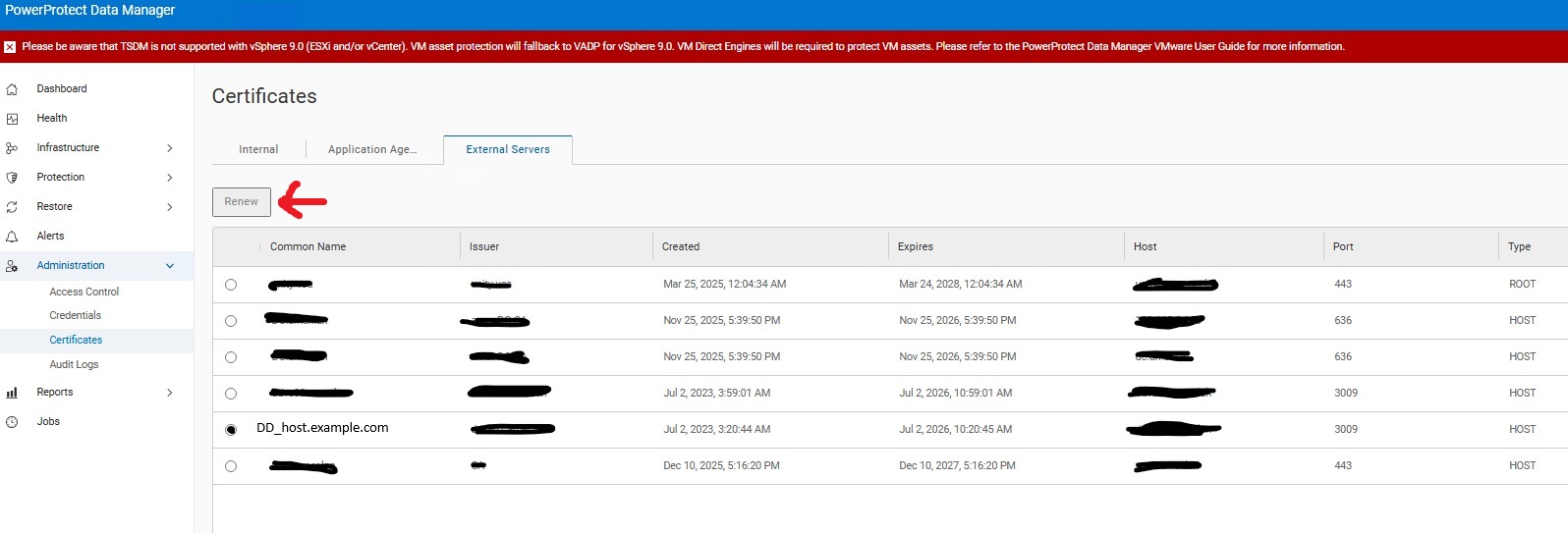
La règle concernée doit avoir redémarré la tâche de configuration en échec afin de permettre à Data Domain de créer le dossier manquant.
