PowerProtect Data Manager: NDMP Backups Fails with Error ABNDMP0003
Summary: Network Data Management Protocol (NDMP) backups fail with error: ABNDMP0003: Unable to backup the NDMP asset because an error occurred on the Accelerator node: code 176: fatal signal (error code 10026) ...
Symptoms
NDMP Backups are failing with the following error:
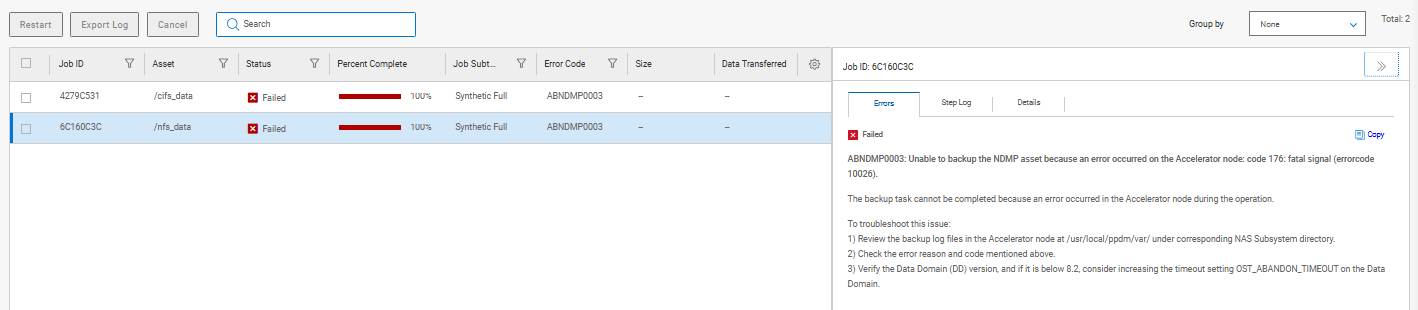
Errors

Status: Failed
ABNDMP0003: Unable to backup the NDMP asset because an error occurred on the Accelerator node: code 176: fatal signal (errorcode 10026).
The backup task cannot be completed because an error occurred in the Accelerator node during the operation.
To troubleshoot this issue:
1) Review the backup log files in the Accelerator node at /usr/local/ppdm/var/ under corresponding NAS Subsystem directory.
2) Check the error reason and code mentioned above.
3) Verify the Data Domain (DD) version, and if it is below 8.2, consider increasing the timeout setting OST_ABANDON_TIMEOUT on the Data Domain.
From the NDMP Accelerator node logs, the following can be seen:
2026-05-26 14:46:27 [TRACE_ID:ad6eafff27102c4e;JOB_ID:92c5a8b36c160c3c;TASK_ID:81dba472c2b6914f]  avndmp Info <5174>: - [/usr/local/ppdm/bin/avndmp] Reading /usr/local/ppdm/var/netapp_ndmp/ndmp.cfg
2026-05-26 14:46:27 [TRACE_ID:ad6eafff27102c4e;JOB_ID:92c5a8b36c160c3c;TASK_ID:81dba472c2b6914f]  avndmp Info <16178>: [/usr/local/ppdm/bin/avndmp] Command Line: /usr/local/ppdm/bin/avndmp --fileraddr=NETAPP_CLUSTER_IP --filertype=md5 --filerpswd=**************** --filerbrand=netapp --acceladdr=ACCELERATOR_NODE --fileruser=NDMP_USER --sysdir=/usr/local/ppdm/etc/netapp_ndmp --bindir=/usr/local/ppdm/bin --vardir=/usr/local/ppdm/var/netapp_ndmp --ctlcallport=41341 --ctlinterface=7003-NDMPBTASK_ID:0f2ada5e-54b1-49c4-81db-a472c2b6914f --logtag=TRACE_ID:ad6eafff27102c4e;JOB_ID:92c5a8b36c160c3c;TASK_ID:81dba472c2b6914f --logfile=/usr/local/ppdm/var/netapp_ndmp/NDMPBTASK_ID:0f2ada5e-54b1-49c4-81db-a472c2b6914f-7003-Netapp_Filer.log --ctlusessl=true
2026-05-26 14:46:27 [TRACE_ID:ad6eafff27102c4e;JOB_ID:92c5a8b36c160c3c;TASK_ID:81dba472c2b6914f]  avndmp Info <6673>: [ctl_listen] CTL listening on port 37967
2026-05-26 14:46:28 [TRACE_ID:ad6eafff27102c4e;JOB_ID:92c5a8b36c160c3c;TASK_ID:81dba472c2b6914f]  avndmp FATAL <5889>: [ctl_callhome] Fatal signal 11 in pid 8407
2026/05/26-13:46:28.00905 [TRACE_ID:ad6eafff27102c4e;JOB_ID:92c5a8b36c160c3c;TASK_ID:81dba472c2b6914f]  [ctl_callhome]  FATAL ERROR: <0001> uapp::handlefatal: Fatal signal 11
2026/05/26-13:46:28.00928 [TRACE_ID:ad6eafff27102c4e;JOB_ID:92c5a8b36c160c3c;TASK_ID:81dba472c2b6914f]  [ctl_callhome]  | 00000000005b7e3f
2026/05/26-13:46:28.00930 [TRACE_ID:ad6eafff27102c4e;JOB_ID:92c5a8b36c160c3c;TASK_ID:81dba472c2b6914f]  [ctl_callhome]  | 00000000005b8ce3

[...........]

2026/05/26-13:46:28.00955 [TRACE_ID:ad6eafff27102c4e;JOB_ID:92c5a8b36c160c3c;TASK_ID:81dba472c2b6914f]  [ctl_callhome]  | 0000000000606513
2026/05/26-13:46:28.00956 [TRACE_ID:ad6eafff27102c4e;JOB_ID:92c5a8b36c160c3c;TASK_ID:81dba472c2b6914f]  [ctl_callhome]  | 00007f6f8cca6f6c
2026/05/26-13:46:28.00957 [TRACE_ID:ad6eafff27102c4e;JOB_ID:92c5a8b36c160c3c;TASK_ID:81dba472c2b6914f]  [ctl_callhome]  | 00007f6f8cd2e338
2026/05/26-13:46:28.00966 [TRACE_ID:ad6eafff27102c4e;JOB_ID:92c5a8b36c160c3c;TASK_ID:81dba472c2b6914f]  [ctl_callhome]  ERROR: <0001> uapp::handlefatal: aborting program pid=8407, sig=11
2026-05-26 14:46:28 [TRACE_ID:ad6eafff27102c4e;JOB_ID:92c5a8b36c160c3c;TASK_ID:81dba472c2b6914f]  avndmp FATAL <5890>: [ctl_callhome] handlefatal: Aborting program with code 176, pid=8407, sig=11
Cause
This error happened because of the host OS from which the Accelerator node was installed to.
The avndmp process (version 20.1.0.1_10_1) is unresponsive with a Fatal Signal 11 (SIGSEGV — Segmentation Fault) immediately after successfully connecting to the NetApp filer.
The crash occurred in the ctl_callhome function, which is the call-home telemetry module that reports status back to the PowerProtect Data Manager server.
Resolution
Ensure to follow the pre-requirement and install the Accelerator node on a supported Linux Version.
The accelerator node supports only SLES 15 SP6.
Dell PowerProtect Data Manager 20.1 Network-Attached Storage User Guide page 38.