DP4400: How to Resolve Ghost Stale Disk Entries
Summary: Ghost or stale disk entries appear in the Appliance Configuration Manager when the iDRAC job queue or PTAgent/iSM cache becomes stale, causing health status mismatches between ACM and iDRAC. ...
This article applies to
This article does not apply to
This article is not tied to any specific product.
Not all product versions are identified in this article.
Symptoms
Observed Issues
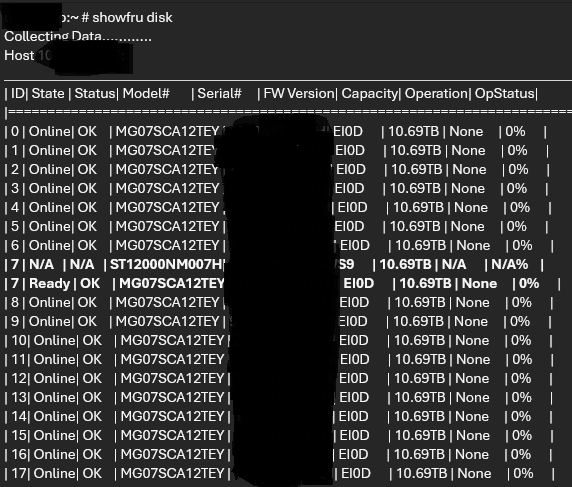
- Ghost or stale disk entry appears in the ACM after a failed disk is physically replaced.
- Physical disk shows "failed" in the ACM interface or CLI while the iDRAC UI reports the drive as healthy or rebuilding.
- False alerts, configuration errors, and the storage array cannot report its rebuild status.

Cause
Telemetry Retrieval Process
The Appliance Configuration Manager (ACM) uses the showfru command to obtain hardware telemetry from the iDRAC.
Data Path
- ACM → Dell PTAgent → iDRAC Service Module (iSM) → hardware data
Stale Cache Conditions
If the iDRAC job queue becomes stuck or the PTAgent/iSM cache is not refreshed, the cached information remains outdated.
Out‑of‑date cache causes ACM to continue displaying the previous hardware state even after a disk replacement.
Resulting Mismatch
The ACM shows a ghost or stale disk entry while the iDRAC UI reports the drives as healthy or rebuilding.
Resolution
Resolution Steps
- Navigate to ESXi CLI, then ssh to iDRAC internal IP address to clear the iDRAC Job Queue
# ssh root@169.254.0.1
# racadm jobqueue delete -i JID_CLEARALL_FORCE
# exit
- From ESXi CLI, stop PTAgent and iSM Services
# /etc/init.d/DellPTAgent stop
# /etc/init.d/dcism-netmon-watchdog stop
- From ESXi CLI, perform a Soft iDRAC Reset
# /opt/dell/idpa/bin/ipmitool mc reset cold
- From ESXi CLI, restart PTAgent and iSM Services
# /etc/init.d/DellPTAgent start
# /etc/init.d/dcism-netmon-watchdog start
- From ESXi CLI, verify iDRAC Cache and Connection Health
# /opt/dell/DellPTAgent/tools/pta_call get agent/info
- From ACM CLI, validate the Resolution in ACM
# showfru disk
Caution: Ensure the ESXi host remains operational; the soft reset does not affect running workloads.
Affected Products
PowerProtect DP4400Products
PowerProtect Data Protection Appliance, Integrated Data Protection Appliance Family, PowerProtect Data Protection HardwareArticle Properties
Article Number: 000470463
Article Type: Solution
Last Modified: 26 يونيو 2026
Version: 2
Find answers to your questions from other Dell users
Support Services
Check if your device is covered by Support Services.