How to enable REST API logging in Unisphere for PowerMax
Summary: How to enable REST API logging in Unisphere for PowerMax
This article applies to
This article does not apply to
This article is not tied to any specific product.
Not all product versions are identified in this article.
Instructions
This restapi.log is not generated by default.
To enable REST API logging (generate the restapi log) on Unisphere for PowerMax please see the steps below:
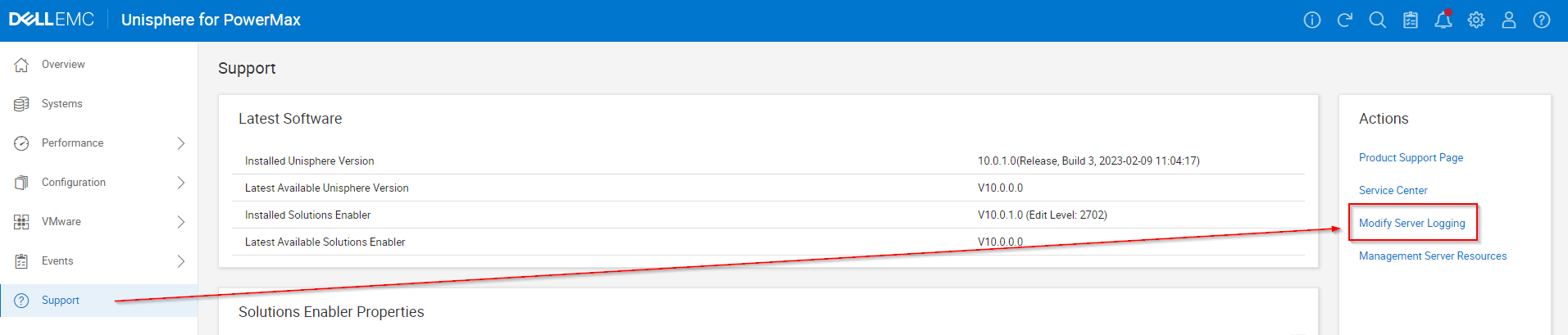
- Select Support and in the Actions panel, select Modify Server Logging:
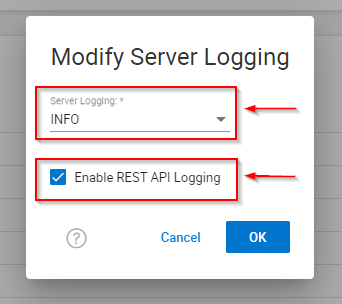
- Set Server logging WARN to INFO and check the "Enable REST API Logging" checkbox and click OK.
- Reproduce any issues or testing.
- Remember to uncheck the "Enable REST API Logging" checkbox and click OK.
- Gather EMC Reports/Grab.
Manual steps if the GUI is not accessible:
You can enable RestAPI and INFO logging manually.
IMPORTANT: smas needs to be restarted after making changes to the domain.xml.init file.
File PATH: ../SMAS/jboss/domain/configuration/domain.xml.init
IMPORTANT: After RestAPI logs have been collected:
- Ensure
<level name="INFO"/>is set to<level name="WARN"/> - Ensure
<level name="ON"/>is set to<level name="OFF"/>
For INFO logging in smas.log – change WARN to INFO:
<size-rotating-file-handler name="FILE"><level name="WARN"/><formatter><named-formatter name="PATTERN"/></formatter><file relative-to="jboss.server.log.dir" path="smas.log"/><rotate-size value="50M"/><max-backup-index value="10"/><append value="true"/></size-rotating-file-handler>
And to enable RESTAPI logging – change OFF to ON:
<size-rotating-file-handler name="RESTAPIUSAGE"><level name="OFF"/><formatter><named-formatter name="PATTERN"/></formatter><file relative-to="jboss.server.log.dir" path="restapi.log"/><rotate-size value="50M"/><max-backup-index value="10"/><append value="true"/></size-rotating-file-handler>
Affected Products
Unisphere for PowerMaxArticle Properties
Article Number: 000019037
Article Type: How To
Last Modified: 15 ربيع الأول 1448
Version: 6
Find answers to your questions from other Dell users
Support Services
Check if your device is covered by Support Services.