NVP-vProxy: VM backup fails for certain VMs with a runtime error "index out of range"
Summary: NetWorker VMware Protection (NVP) backups fail for certain Virtual Machines (VM) fail. The error reported is "index out of range," indicating an internal processing or metadata handling issue that affects only specific VMs. ...
Symptoms
The NetWorker VMware Protection (NVP) integration is configured with the vProxy Appliance.
The backups fail for certain Virtual Machines (VM) with a runtime error index out of range message.
The backup session log shows:
YYYY/MM/DD HH:MM:SS PANIC:  [145] Internal error occured, see log file: runtime error: index out of range.
YYYY/MM/DD HH:MM:SS PANIC:  [145] goroutine 13 [running]:
...
YYYY/MM/DD HH:MM:SS PANIC:  [145] vim.(*VimVirtualMachine).readCustomField(0xc8202f2800, 0x570500, 0x12, 0x0, 0x0, 0x0, 0x0, 0x0, 0x0, 0x0, ...)
...
YYYY/MM/DD HH:MM:SS ERROR:  [145] Backup has FAILED.
The VM backup session logs are available on the NetWorker server in the following location:
- Linux:
/nsr/logs/polic/POLICY_NAME/WORKFLOW_NAME - Windows (Default):
C:\Program Files\EMC NetWorker\nsr\logs\POLICY_NAME\WORKFLOW_NAME
The NetWorker server policy logs follow the jobsdb retention (default 72 hours). After this time has passed the VM backup session logs are purged; however, can be found on the vProxy appliance: /opt/emc/vproxy/runtime/logs/recycle/vbackupd/DATE
Cause
This issue is occurring at the VMware level. There are several potential causes:
- Invalid or unsupported custom attribute values
- Non‑UTF‑8 characters
- Control characters
- Malformed escape sequences
- Excessively large strings (from automation tools or scripts)
- Orphaned or inconsistent custom attribute definitions. This occurs when a VM references a custom attribute key but the corresponding custom attribute definition was deleted or is inaccessible in vCenter. This condition may appear when deleting custom attributes at the vCenter level without first removing them from all VMs. This may appear in long‑lived environments upgraded across multiple vCenter versions.
- Insufficient vCenter permissions to manage custom attributes.
- Residual attributes left from interrupted vProxy operations.
Resolution
For each of the causes outlined:
- Review the VM's Custom Attributes from VMware vSphere. Identify if any of the Custom Attribute conflicts raised in the Cause section. Consult with the VMware administrator if the custom attributes can be removed (even if for temporary backup testing). If backups succeed without the custom attributes, consider their impact on the backup functionality and determine if they are required or can be left off.
NOTE: Any vProxy related custom attribute can be safely deleted. These are place holder attributes and are automatically created during the next NetWorker VMware Protection (NVP) operation. See point four for more information.
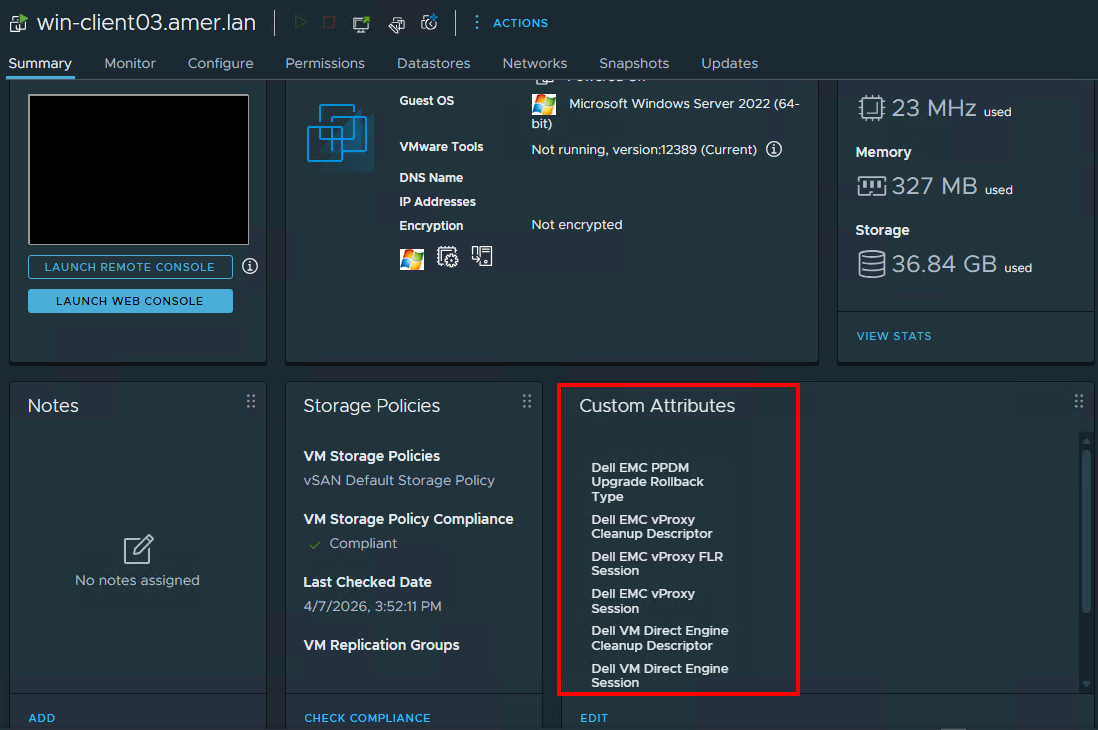
- The VMware Administrator must investigate for orphaned or inconsistent custom attribute definitions in the vSphere environment.
- The VMware user account used for NetWorker VMware Protection operations must have Global -> Manage custom attributes permissions in vSphere. The NetWorker VMware Integration - Minimum required vCenter user account privileges section details all the necessary permissions required for backup and restore operations. NetWorker documentation is available through: Support for NetWorker | Manuals & Documents (You must sign in with your Dell support account).
- If residual vProxy custom attributes were not updated correctly, they can be manually deleted as per point 1. Alternatively, the
ProxyHC cleanupfunction can be used to cleanup stale information, see: NVP-vProxy: How to use health check tool ProxyHC on vProxy appliance
Additional Information
The vCenter server support bundle may provide additional context on this failure. Review the vCenter server logs (/var/log/vmware/vpxd/vpxd.log) may provide additional messaging regarding CustomFieldsManager or vim.fault observed during the backup.