Avamar: List of Avamar Client Backup Error and Exit Codes
Summary: This article lists the Avamar error and exit codes. It can be used to help troubleshooting backup and restore issues.
This article applies to
This article does not apply to
This article is not tied to any specific product.
Not all product versions are identified in this article.
Symptoms
When an Avamar client backup fails, there is an associated Error and Exit Code logged.
Example output from a client log:
2014-09-02 12:58:39 avtar Error <0000>: Specified source path "C:\backup_folder" does not exist; ignored
2014-09-02 12:58:39 avtar Error <8012>: Error in path list: All paths are invalid.
2014-09-02 12:58:39 avtar Error <8939>: Problem initializing for the backup, exitcode=536870924
2014-09-02 12:58:39 avtar Info <6149>: Error summary: 3 errors: 8012, 8939, 0
2014-09-02 12:58:39 avtar Info <8468>: Sending wrapup message to parent
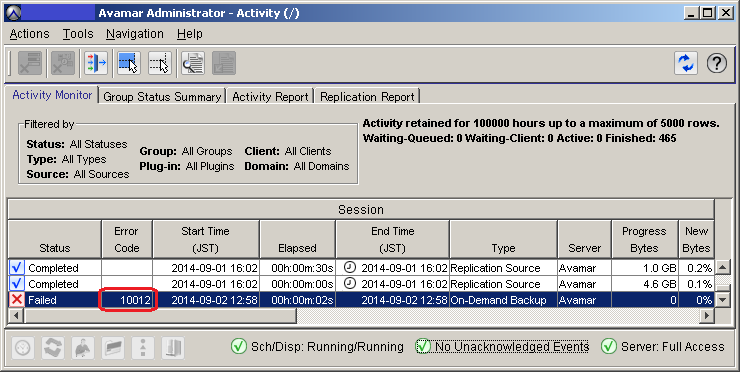
2014-09-02 12:58:39 avtar Info <5314>: Command failed (3 errors, exit code 10012: Error in source or target list)
The error code can also be viewed in the Activity Monitor window:
Cause
An error message is returned by an Avamar operation.
Resolution
The tables below contain the list of error codes, associated exit codes, and a summary of the error messages:
| Error Code | Exit Code | Summary |
| 10001 | 536870913 | Command failed: Login failed - Logins disabled or invalid user-id or password. |
| 10002 | 536870914 | Command failed: Invalid command line flags. |
| 10003 | 536870915 | Command failed: Lock error: Process already running or error creating local lock file. |
| 10004 | 536870916 | Command failed: Local file permissions error. |
| 10005 | 536870917 | Command failed: Error processing exclude list. |
| 10006 | 536870918 | Command failed: Cannot read local mount table. |
| 10007 | 536870919 | Command failed: Miscellaneous error. |
| 10008 | 536870920 | Command failed: Cannot establish connection with server (possible network or DNS failure). |
| 10009 | 536870921 | Command failed: Error processing include list. |
| 10010 | 536870922 | Command completed but with open file errors. |
| 10011 | 536870923 | Command failed: Restore failed. |
| 10012 | 536870924 | Command failed: Error in source or target list. |
| 10013 | 536870925 | Command failed: Externally cancelled. |
| 10014 | 536870926 | Command failed: Internal Failure. |
| 10015 | 536870927 | Command failed: Invalid Session Ticket issued by Management Console. |
| 10016 | 536870928 | Command failed: Session cancelled by Server. |
| 10017 | 536870929 | Command failed: Error initializing or using encrypted socket connection. |
| 10018 | 536870930 | Command failed: Login failed - No machine specified for snapup. |
| 10019 | 536870931 | Command failed: Externally cancelled by Administrator. |
| 10020 | 536870932 | Command completed with errors, client log should be examined. |
| 10021 | 536870933 | Command failed: Externally aborted by INT or TERM signals. |
| 10022 | 536870934 | Command failed: Externally cancelled by INT signal. |
| 10023 | 536870935 | Command failed: Externally cancelled by TERM signal. |
| 10024 | 536870936 | Command failed: Error occurred while processing DUMP stream. |
| 10025 | 536870937 | Command failed: Unhandled exception. |
| 10026 | 536870938 | Command failed: Fatal signal. |
| 10027 | 536870939 | Command failed: No matching backups selected. |
| 10028 | 536870940 | Operation failed because target server is full. |
| Error Code | Exit Code | Summary |
| 10001 | 151 | Command failed: Login failed - Logins disabled or invalid user-id or password. |
| 10002 | 152 | Command failed: Invalid command line flags. |
| 10003 | 153 | Command failed: Lock error: Process already running or error creating local lock file. |
| 10004 | 154 | Command failed: Local file permissions error. |
| 10005 | 155 | Command failed: Error processing exclude list. |
| 10006 | 156 | Command failed: Cannot read local mount table. |
| 10007 | 157 | Command failed: Miscellaneous error. |
| 10008 | 158 | Command failed: Cannot establish connection with server (possible network or DNS failure). |
| 10009 | 159 | Command failed: Error processing include list. |
| 10010 | 160 | Command completed but with open file errors. |
| 10011 | 161 | Command failed: Restore failed. |
| 10012 | 162 | Command failed: Error in source or target list. |
| 10013 | 163 | Command failed: Externally cancelled. |
| 10014 | 164 | Command failed: Internal Failure. |
| 10015 | 165 | Command failed: Invalid Session Ticket issued by Management Console. |
| 10016 | 166 | Command failed: Session cancelled by Server. |
| 10017 | 167 | Command failed: Error initializing or using encrypted socket connection. |
| 10018 | 168 | Command failed: Login failed - No machine specified for snapup. |
| 10019 | 169 | Command failed: Externally cancelled by Administrator. |
| 10020 | 170 | Command completed with errors, client log should be examined. |
| 10021 | 171 | Command failed: Externally aborted by INT or TERM signals. |
| 10022 | 172 | Command failed: Externally cancelled by INT signal. |
| 10023 | 173 | Command failed: Externally cancelled by TERM signal. |
| 10024 | 174 | Command failed: Error occurred while processing DUMP stream. |
| 10025 | 175 | Command failed: Unhandled exception. |
| 10026 | 176 | Command failed: Fatal signal. |
| 10027 | 177 | Command failed: No matching backups selected. |
| 10028 | 178 | Operation failed because target server is full. |
Additional Information
Note: If the environment variable AVAMAR_EXITCODE is used in an Avamar post script, the exit code returns as AVAMAR_EXITCODE.
For Example:
Exit Code 10012 (Error in source or target list) occurs, then AVAMAR_EXITCODE returned looks like the following:
-
-
536870924 for a Windows client.
-
162 for a UNIX or Linux client.
-
Affected Products
Avamar, Avamar ServerProducts
Avamar ClientArticle Properties
Article Number: 000039608
Article Type: Solution
Last Modified: 05 شوال 1447
Version: 5
Find answers to your questions from other Dell users
Support Services
Check if your device is covered by Support Services.