NMC:在 NMC 復原中無法正確顯示阿拉伯文字元
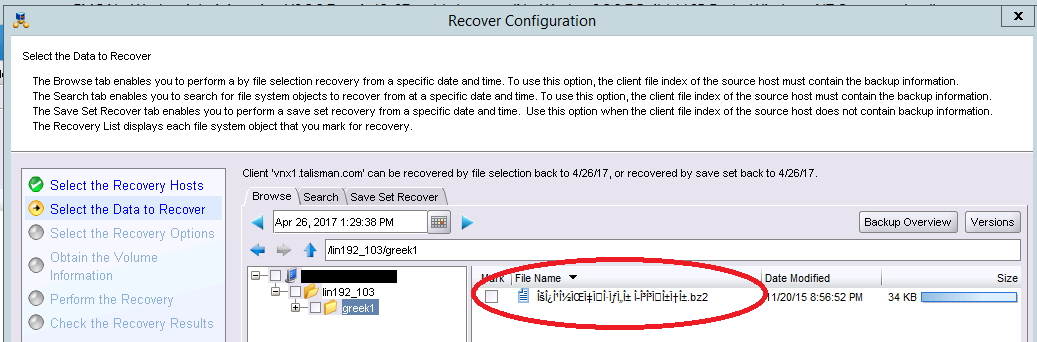
Summary: 阿拉伯字元可在 Windows 使用者程式中正確顯示,但無法在 NMC 復原中正確呈現。
This article applies to
This article does not apply to
This article is not tied to any specific product.
Not all product versions are identified in this article.
Symptoms
- 在復原組態精靈中顯示檔案名稱時,NMC 中未正確顯示阿拉伯字元。
- 阿拉伯字元在 Windows 使用者程式中正確顯示。
- 阿拉伯文語言套件會安裝在 NetWorker 伺服器、NetWorker Management Console (NMC) 伺服器和 NMC 用戶端上。
Cause
這是 NetWorker 的已知限制。
Resolution
如果 NMC 伺服器不是美國地區,請執行下列步驟:
- 停止 NMC 伺服器上的 GST 服務。
- 備份複本
gconsole.jnlp。在 Windows NMC 伺服器上,位於C:\Program Files\EMC NetWorker\Management\GST\web)。在 Linux NMC 伺服器上,位於/opt/lgtonmc/web。 - 編輯
gconsole.jnlp檔案中所定義。在結尾的 application-desc> 區段內<新增下列兩行。
<argument>-e</argument><argument>utf-8</argument>
- 在 NMC 伺服器主機上啟動 GST 服務
- 在要啟動 NMC GUI 的用戶端機器上,清除 java Web 快取和暫存檔案。
- 啟動 NMC GUI。
Affected Products
NetWorker, NetWorker Management ConsoleArticle Properties
Article Number: 000048756
Article Type: Solution
Last Modified: 10 رمضان 1447
Version: 6
Find answers to your questions from other Dell users
Support Services
Check if your device is covered by Support Services.