Avamar: A "Run-at-end" custom script causes backup to fail
Summary: This article explains how a run-at-end custom scripts trigger another long-running script, causing avtar timeouts, and backup failures.
Symptoms
Custom scripts were modified in a way that created a chain reaction.
A run-at-end script triggers another enclosed script that runs long‑running instructions.
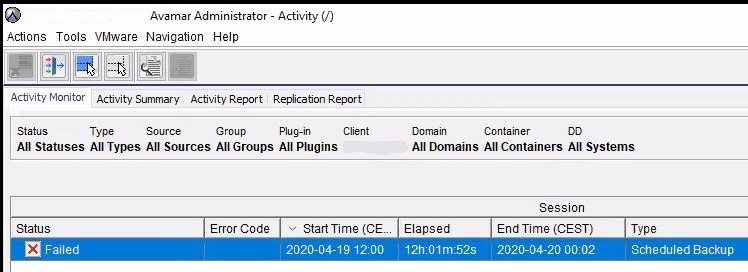
Although the backup completes successfully, avtar waits for script responses, times out by design, cancels the work order, and marks the backup failed in Activity Window.
The following message does not show in the backup log file:
avtar Info <5917>: Back from run-at-end, exit code 0
A snippet of the log showing the custom scripting running as run-at-end:
2020-04-12 13:25:23 avtar Info <5156>: Backup #24 timestamp 2020-04-12 13:29:57, 396 files, 110 directories, 926.3 GB (211 files, 4.569 GB, 0.49% new)
2020-04-12 13:25:23 avtar Info <7539>: Label "Schedule_Lab-1586685600009", scheduled to expire after 07/12/20 (2020-07-12 10:00:00 UTC), daily,weekly,monthly,yearly backup
2020-04-12 13:25:23 avtar Info <6083>: Backed-up 926.3 GB in 89.58 minutes: 620 GB/hour (265 files/hour)
.  .  .
2020-04-12 13:25:23 avtar Info <7883>: Finished at 2020-04-12 13:25:23 CEST, Elapsed time: 0001h:29m:34s
2020-04-12 13:25:23 avtar Info <5916>: Executing run-at-end '/usr/local/avamar/etc/scripts/custom_lab_script.sh'
.  .  .
2020-04-12 23:56:08 avtar Info <8758>: Canceled - exiting...
2020-04-12 23:56:08 avtar Info <9772>: Starting graceful (staged) termination, MCS cancel (wrap-up stage)
The UI:
Cause
An Avamar run-at-end custom script (custom_lab_script.sh) triggers a secondary script (lab_layer_script.sh).
This secondary script runs a long‑running instruction, causing Avamar (avtar) to wait indefinitely for a response.
After the configured timeout reached (approximately 10 hours and 30 minutes in this case), the work order gracefully cancels and the backup marks as Failed.
Sample scripts illustrate the root cause:
The first example is custom_lab_script.sh, which is the script invoked by Avamar through the run‑at‑end mechanism.
root@linux-client:/usr/local/avamar/etc/scripts/#: cat custom_lab_script.sh
#!/bin/bash
su - admin -c /home/admin/lab/lab_layer_script.sh
exit 0
The lab_layer_script.sh (the custom_lab_script.sh is triggered and results in a long lasting "instruction"):
admin@linux-client:~/lab/>: cat lab_layer_script.sh
#!/bin/bash
nohup /bin/bash /home/admin/lab/sleep_script.sh &
A 12‑hour timer simulates a long‑running instruction to reproduce lab timeouts; in production, any lab_layer_script.sh action that runs excessively long or never ends can cause failure.
admin@linux-client:~/lab/>: cat sleep_script.sh
#!/bin/bash
sleep 43200
Resolution
Avoid triggering long‑running actions from run‑at‑end scripts.
If required, invoke them from a separate layer script and detach execution using &>/dev/null, as shown below:
The Run-at-end custom script before (where the problem happens):
root@linux-client:/usr/local/avamar/etc/scripts/#: cat custom_lab_script.sh
#!/bin/bash
su - admin -c /home/admin/lab/lab_layer_script.sh
exit 0
The Run-at-end custom script after (where the problem is resolved):
root@linux-client:/usr/local/avamar/etc/scripts/#: cat custom_lab_script.sh
#!/bin/bash
su - admin -c /home/admin/lab/lab_layer_script.sh &>/dev/null
exit 0
The backup log snippet shows the expected behavior with the message "avtar Info <5917>: Back from run-at-end, exit code 0":
2020-05-10 13:23:09 avtar Info <5156>: Backup #28 timestamp 2020-05-10 13:28:36, 395 files, 110 directories, 926.3 GB (211 files, 5.971 GB, 0.64% new)
2020-05-10 13:23:09 avtar Info <7539>: Label "Schedule_Lab-1589104800010", scheduled to expire after 06/09/20 (2020-06-09 10:00:00 UTC), daily,weekly backup
2020-05-10 13:23:09 avtar Info <6083>: Backed-up 926.3 GB in 88.46 minutes: 628 GB/hour (268 files/hour)
.  .  .
2020-05-10 13:23:09 avtar Info <7883>: Finished at 2020-05-10 13:23:09 CEST, Elapsed time: 0001h:28m:27s
2020-05-10 13:23:10 avtar Info <5916>: Executing run-at-end '/usr/local/avamar/etc/scripts/custom_lab_script.sh'
.  .  .
2020-05-10 13:24:05 avtar Info <5917>: Back from run-at-end, exit code 0
.  .  .
2020-05-10 13:24:05 avtar Info <5314>: Command completed (exit code 0: success)
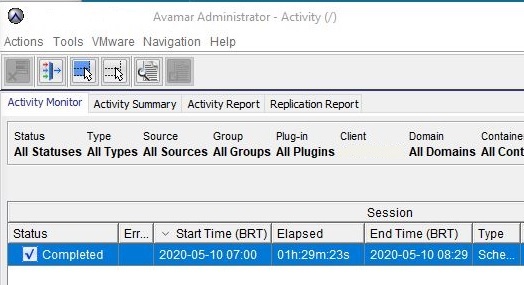
The UI: