Avamar: Unable to restore files from VM backup using FLR
Summary: Virtual machine (VM) File Level Restore (FLR) backups fail because the Avamar proxy cannot resolve the backup target (Data Domain) Domain Name System (DNS) name.
This article applies to
This article does not apply to
This article is not tied to any specific product.
Not all product versions are identified in this article.
Symptoms
Browsing VM backups using FLR fails with this error message:
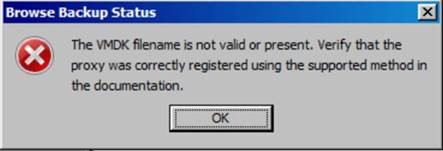
- The affected VM does not exceed any FLR limits.
- FLR fails during the browsing phase.
On the FLR proxy, the MountMgr.log file is located in:
/usr/local/avamarclient/bin/logsThese errors indicate that the proxy cannot retrieve the backup list from the target Data Domain server:
[MM - DEBUG] sAssetPath=/mnt/dunion/<vCenter_name>/VirtualMachines/<VM_name_UUID>/by-number/0000149
[MM - ERROR] HLPR_ListOfDirectories failed for/mnt/dunion/<vCenter_name>/VirtualMachines/<VM_name_UUID>/by-number/0000149/VMFiles
[MM - ERROR] Unable to find backed up VMDK images for:/mnt/dunion/<vCenter_name>/VirtualMachines/<VM_name_UUID>/by-number/0000149
Despite these errors, the backup exists and is visible when verified from the Avamar Utility Node:
mccli backup show --name=/<vCenter_name>/VirtualMachines/<VM_name_UUID>
Sample output:
0,23000,CLI command completed successfully.
Created              Label  Size     Retention Hostname
yyyy-mm-dd hh:mm PM  149    ##.# GB   D         <AVAMAR_FQDN>
The Avamar server IP is correctly defined in the
axionfs.cmd file located in:
/usr/local/avamar/var
Example:
--server=xxx.xxx.xxx.xxx
--id=restoreonly
--password=###########
--primarybackupdir=by-number
--encrypt=tls
Cause
The Avamar proxy cannot resolve the Data Domain Fully Qualified Domain Name (FQDN).
The following errors appear in the latest axionfs_*.log file located in:
/usr/local/avamar/varaxionfs Info: Connecting to Data Domain Server "DD_FQDN"
netsys::getaddrinfo failed for DD_FQDN: Name or service not known
Failed to resolve Data Domain Server name "DD_FQDN" to an IP address
Data Domain login FAILED
Unable to retrieve DDR info for 'VMConfiguration'Because the proxy cannot resolve the Data Domain hostname, FLR cannot access the required backup metadata.
Resolution
Ensure that the Avamar proxy can resolve the Data Domain FQDN.
Step 1: Verify DNS Resolution
- Run the following commands on the Avamar proxy:
nslookup <DataDomain_FQDN>
nslookup <DataDomain_IP>
- If DNS resolution fails, proceed to Step 2.
Step 2: Update Name Resolution on the Proxy
- Use one of the following methods:
- Option A: Update DNS configuration
- Edit the resolver configuration file and ensure the correct DNS servers and search domain are configured:
/etc/resolv.conf
-
- Option B: Update the hosts file
- Manually add the Data Domain FQDN and IP address to:
/etc/hosts - Example:
xxx.xxx.xxx.xxx DD_FQDN - After correcting name resolution, retry the FLR operation.
Affected Products
AvamarProducts
Avamar, Avamar Client for VMwareArticle Properties
Article Number: 000067854
Article Type: Solution
Last Modified: 01 ذو القعدة 1447
Version: 5
Find answers to your questions from other Dell users
Support Services
Check if your device is covered by Support Services.