DPA 代理程式無法啟動
Summary: 本文說明由於 dpaagent_config.xml 組態檔案中的項目無效或不完整,導致 DPA 代理程式服務無法啟動的問題。
This article applies to
This article does not apply to
This article is not tied to any specific product.
Not all product versions are identified in this article.
Symptoms
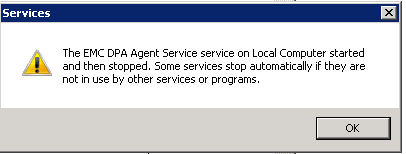
啟動 DPA 代理程式服務時,無法啟動。
如果從 Windows 服務開始,您可能會收到如下所示的錯誤框:
Cause
目前尚不清楚此問題的原因。
在一個案例中,發現dpagent_config.xml檔不正確,這導致代理無法啟動。
Resolution
需要進一步的故障診斷才能解決此問題。
在啟動時訪問「dpaagent_config.xml」檔以配置代理程式。如果此檔中的 xml 標記不完整、拼寫錯誤或缺失,則可能導致代理無法啟動。在這種情況下,代理不會記錄任何錯誤。
以下是「dpaagent_config.xml」檔案的內容,所有這些標籤都應該在那裡,它們可能還有其他標籤。所有這些都必須完整且拼寫正確,其中包含有效數據:
<AGENTCONFIG>                                                                            Open tag.
    <VERSION>600</VERSION>                                                       Major Agent Version
    <AGENTVERSION>6.4.0.102611</AGENTVERSION>               Full Agent Version
    <SERVERNAME>127.0.0.1</SERVERNAME>                            IP or FQDN or DPA APP server this agent is assigned to.
    <SERVERPORT>9002</SERVERPORT>                                  Port on DPA APP server to connect to, this should always be 9002 unless APP server port was changed.
    <SERVERSSL>true</SERVERSSL>                                            Should always be set to true, to use SSL connection.
    <LOGFILE>/opt/emc/dpa/agent/logs/dpaagent.log</LOGFILE>   Path to the DPA agent log
    <LOGLEVEL>Info</LOGLEVEL>                                                  Current log level of the agent, not that the APP will override this setting, so change in the DPA GUI
    <LOGFILEMAXSIZE>99614720</LOGFILEMAXSIZE>                Max size of the dpa agent log file.
    <JREDIR>/opt/emc/dpa/services/_jre</JREDIR>                          Java directory.
</AGENTCONFIG>                                                                             Close tag, if there is anything after this tag the agent will not start.
此檔案中的所有值皆應正確,只能編輯伺服器名稱和記錄層級值,如果其他值需要編輯,請聯絡 Dell Technologies 支援以取得協助。
如果任何標籤拼寫錯誤,或者部分標籤丟失,則必須更正。例如,在一個案例中,伺服器名稱標籤缺少部分,如下所示:
<SERVERNAME>127.0.0.1RVERNAME>
標記「</SER」的缺失部分已添加回來,這解決了問題並允許代理啟動。
請聯絡 Dell Technologies 技術支援部門,以取得更多詳細資料或資訊。
Article Properties
Article Number: 000167227
Article Type: Solution
Last Modified: 27 ذو القعدة 1447
Version: 5
Find answers to your questions from other Dell users
Support Services
Check if your device is covered by Support Services.