DPSearch: Some Disk Files Not Indexed During Virtual Machine Indexing on Avamar
Summary: DPSearch collection does not process Windows VM backup client dynamic disks and, as a result, the data in unavailable for discovery.
This article applies to
This article does not apply to
This article is not tied to any specific product.
Not all product versions are identified in this article.
Symptoms
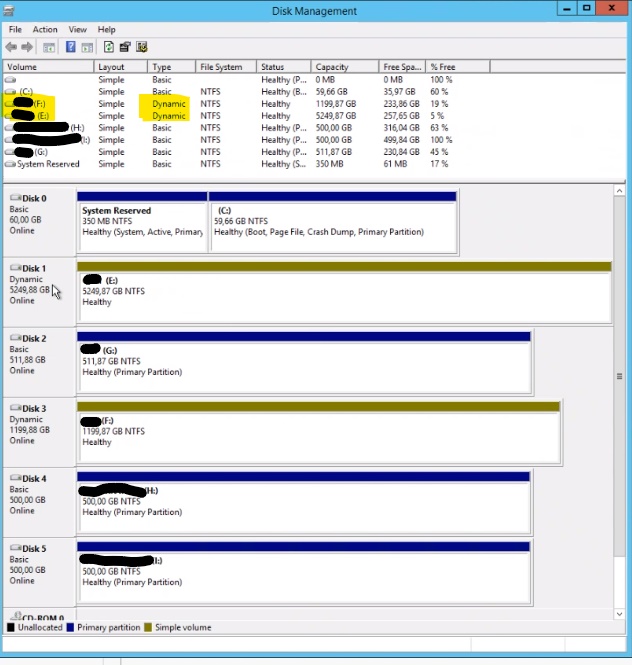
Unable to find some files from certain disks from the file server where the files are hosted when running a collection with Virtual Machine Indexing enabled. These disks are set up in dynamic type instead of basic type as per screenshot:
Cause
Dynamic type disk is not a supported type from DPSearch Virtual Machine indexing. Disks that are set up with basic type must be used as per Installation and Administration guide:
"Prerequisites
Ensure that the following requirements are met:
- All the virtual machine disks (.vmdk) are SCSI or SATA controller.
- All the volumes on the disk are a simple layout, basic type, and NTFS format.
- Install the virtual machine tool before backup.
- The proxy version is the same as the Avamar server version.
Note: The DPSearch software supports Avamar version 7.5.1 or later."
Resolution
In order to process the files hosted on this disk, there is two possible actions:
- Run File system backup against that Virtual Machine
- Migrate the data from the Dynamic type disk to a Basic type disk
Affected Products
Data Protection Search, Data Protection SearchArticle Properties
Article Number: 000185233
Article Type: Solution
Last Modified: 30 رمضان 1447
Version: 3
Find answers to your questions from other Dell users
Support Services
Check if your device is covered by Support Services.