PowerFlex: How to Calculate Storage Pool Free Capacity
Summary: This article explains the calculation for storage pool free capacity in PowerFlex.
Instructions
Storage Pool's (SP) Capacity consists of the following variables:
Used Capacity multiplied by 2, to accommodate the need to keep two copies of the data at all times.
Free Capacity multiplied by 2, to accommodate the need to keep two copies of the data at all times.
Spare Capacity - calculated according to the SP resources - for additional information see PowerFlex: How to Calculate Spare Capacity
Equation:
(SP Used Capacity*2) + (SP Free Capacity*2) + SP Spare Capacity = SP Capacity |
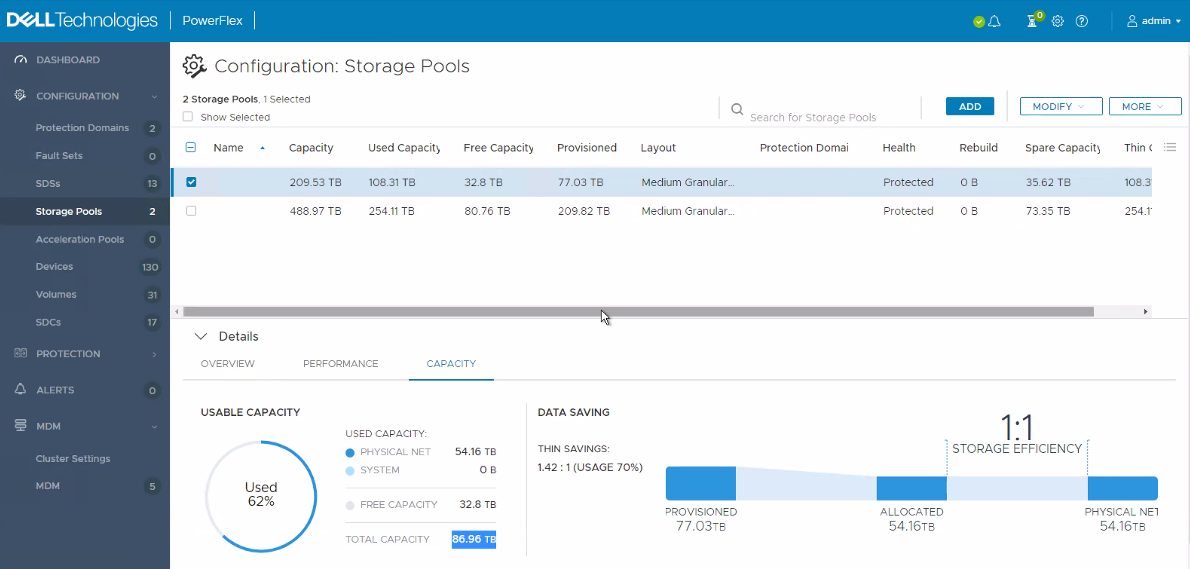
Presentation Server example:
Keep in mind that the UI rounds up all the amounts shown on the screen.
Equation:
Capacity - Spare Capacity - (Used Capacity * 2) - (Free Capacity / 2) = Free Capacity
Variables:
- Capacity - 209.53 TB
- Used Capacity - 108.31 TB (Used Capacity * 2)
- Spare Capacity - 35.62 TB
Calculation:
Capacity - Spare Capacity - (Used Capacity * 2) - (Free Capacity / 2) = Free Capacity
209.53 TB - 35.62 TB - (54.16 TB * 2 = 108.32 TB) - (65.6 TB / 2 = 32.8 TB) = 32.8 TB