Isilon PowerScale 9.3 or higher Cannot modify role in Webui
Summary: In OneFS 9.3 or higher, when trying to modify roles in webui, you might receive the following error on submit (last step) "Something went wrong. Unable to parse json into persona."
Symptoms
Modifying roles in the webui results in the following error when trying to "submit" the change: "Something went wrong. Unable to parse json into persona"
You can still change them using CLI without any issues.
When viewing the role over CLI, you see that some members are listed with UID only.
Example below:
onefs93-1# isi auth roles view AuditAdmin
       Name: AuditAdmin
Description: View all system configuration settings.
    Members: admin
             test1
             test2
             UID:2003
             WINSERVER\test_user
 Privileges
             ID: ISI_PRIV_LOGIN_CONSOLE
     Permission: r
<--------------snipped------------------>
In papi logs, you see similar errors or a STACK:
onefs93-1# isi_for_array -s 'grep 2023-03-24 /var/log/isi_papi_d.log | grep -i "Failed to find user for" | grep UID'
onefs93-1: 2023-03-24T12:38:55.132849-07:00 <3.6> onefs93-1(id1) isi_papi_d[5511]: STACK Failed to find user for 'UID:2003': No such user     from --- (---:0):      isi_exception::isi_exception(int, char const*, __va_list_tag*) (OFFSET:134)     api_exception::api_exception(api_error_code, char const*, ...) (OFFSET:146)     auth_user_handler::http_get(request const&, response&) (OFFSET:1098)     uri_handler::execute_http_method(request&, response&, bool, bool) (OFFSET:2480)     uri_manager::execute_request(request&, response&, bool, bool, bool, bool, bool) (OFFSET:1550)     std::__1::basic_filebuf<char, std::__1::char_traits<char> >::basic_filebuf(void) (OFFSET:7588)     std::__1::basic_filebuf<char, std::__1::char_traits<char> >::basic_filebuf(void) (OFFSET:9908)     typeinfo name for std::__1::basic_filebuf<char, std::__1::char_traits<char> > (OFFSET:40557)     typeinfo name for std::__1::basic_filebuf<char, std::__1::char_traits<char> > (OFFSET:37691)     ADDRESS (UNKNOWN:2363392)
If you check the user by UID, they do not exist:
onefs93-1# isi auth users view --uid=2003
Failed to find user for 'UID:2003': No such user
Error seen in webui: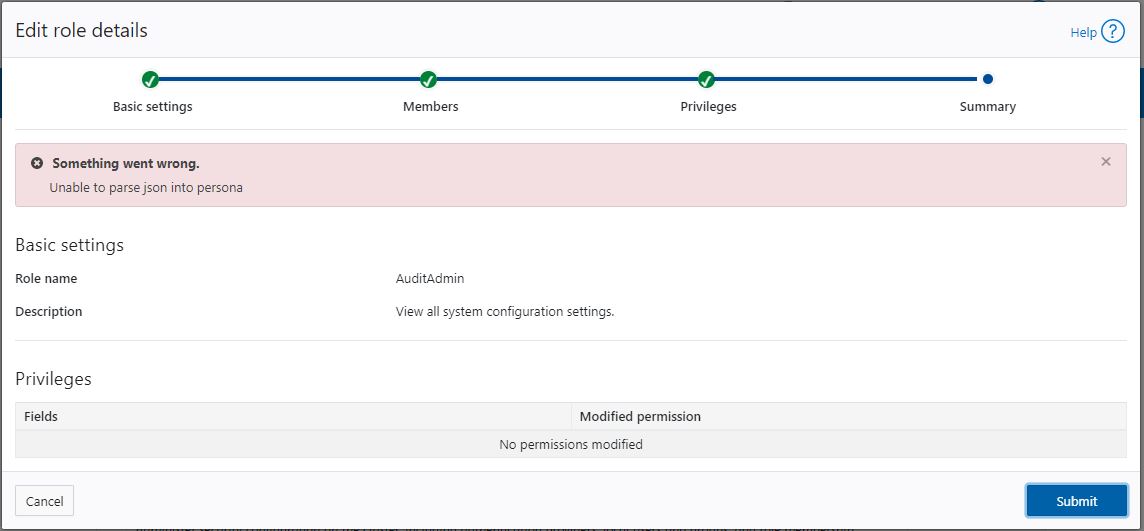
Cause
Deleting the user or users does not completely remove the 'UID' from the members list and fails to resolve all members.
Resolution
If members of the role you are trying to modify have users with UID only listed, verify the members with UID only do not exist.
isi auth users view --uid=<UID#>
Remove non-existing UIDs from the role that you are trying to modify:
isi auth role modify <Role_name> --remove-uid=<UID>
Example:
isi auth role modify AuditAdmin --remove-uid=2003
After removing all non-existing UIDs from the role, modify the role over Webui.
If there are multiple members listed with UID, and those users do not exist, all non-existing UIDs must be removed.