PowerProtect Data Manager: Fails to Create Storage Unit with Error Code CFG0001
Summary: Fails to create storage unit with error code CFG0001
This article applies to
This article does not apply to
This article is not tied to any specific product.
Not all product versions are identified in this article.
Symptoms
When creating a new policy, it fails to create the storage unit.
From UI:
From UI:
CFG0001: xxx: Unable to configure the protection policy because of the following error: Failed to connect to PowerProtect DD System. errorNum: 5007 errorMessage: operation is not implementedFrom the job log:
ddboost.log: 2023-08-11T23:15:17.931Z ERROR [] [pool-26-thread-1] [00000000-0000-4000-b000-000000000000][][][TRACE_ID:81a3388041e49793;JOB_ID:9ea4884359c07119][plc.id:2eab4e3d,asset.id:,pcs.id:] ddboost.log(52) - severity:1 msg:[D688:7FF690077BA0] ddp_connect_with_config() failed, Hostname: xxx, Err: 5007-nfs ddp getinfo failed (nfs: Operation not supported)Confirmed that there is no network issue, no certificate issue, already using sysadmin to add Data Domain (discovery is working fine).
Cause
Data Domain NFS service is disabled.
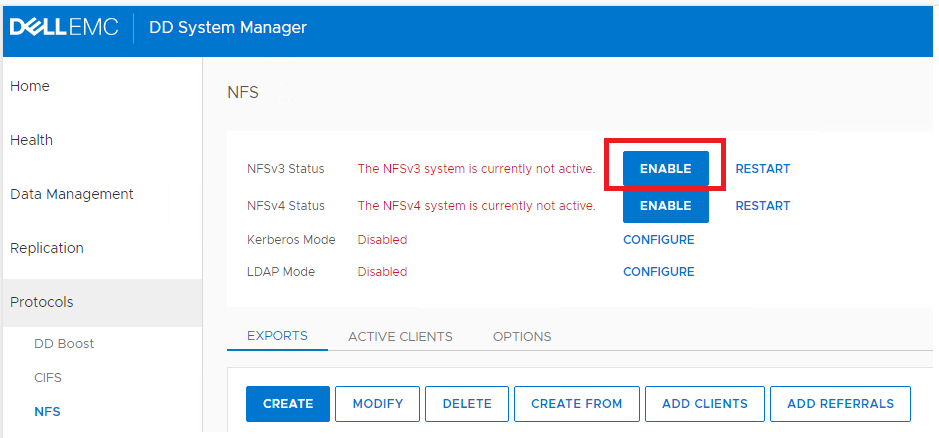
Resolution
On the Data Domain UI, click "ENABLE" to enable NFSv3.
Affected Products
PowerProtect Data Manager, PowerProtect SoftwareArticle Properties
Article Number: 000216695
Article Type: Solution
Last Modified: 01 ذو الحجة 1447
Version: 6
Find answers to your questions from other Dell users
Support Services
Check if your device is covered by Support Services.