PowerProtect: SQL TLR Mount fail with Saveset is not GLR Capable
Summary: PPDM SQL :MS SQL TLR ( Table level Restore ) Fails to mount the database backup with Saveset is not GLR Capable This happens when backups are configured to run using T-SQL Script .
This article applies to
This article does not apply to
This article is not tied to any specific product.
Not all product versions are identified in this article.
Symptoms
Starting Table Level Restore will first mount the database backup form the Data Domain then launch Itempoint
Mounting the files fail with error :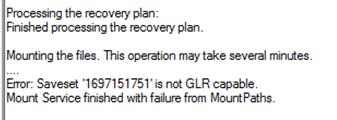
Mounting the files fail with error :
Error: Saveset '1697484639' is not GLR capable.
Mount Service finished with failure from MountPaths.
Cause
During backup the GLR offset was not set on the saveset because access denied to the MSAPPAGENT folder for the user running the T-SQL Script.
Reviewing backup logs to verify if GLR offset was set during backup , you will see the following entries in backup logs
Reviewing backup logs to verify if GLR offset was set during backup , you will see the following entries in backup logs
 ddbmsqlsv PowerProtect Data Manager notice Failed to create GLR offset map file C:\Program Files\DPSAPPS\MSAPPAGENT\tmp\1697123111_97f6f441_om.bin.
ddbmsqlsv PowerProtect Data Manager severe Failed to create offset map file C:\Program Files\DPSAPPS\MSAPPAGENT\tmp\1697123111_97f6f441_om.bin.
Despite backup completed successfully , but the user was unable to access the directory to create the offset map file .
Resolution
Resolution:
The user running backup using T-SQL Scripts must have read/write access permissions to the MSAPPAGENT folder
This is Also documented in the Guide starting 19.13 release
The user running backup using T-SQL Scripts must have read/write access permissions to the MSAPPAGENT folder
This is Also documented in the Guide starting 19.13 release
Required privileges for T-SQL backups
To enable the Application Direct backups using Transact-SQL (T-SQL) scripts with the Microsoft application agent, specific access permissions are required.
The SQL Agent Service login user must have read and write access permissions in the Microsoft application agent installation directory, which is C:\Program Files\DPSAPPS\MSAPPAGENT by default.
Affected Products
PowerProtect App DirectArticle Properties
Article Number: 000219290
Article Type: Solution
Last Modified: 03 شعبان 1447
Version: 3
Find answers to your questions from other Dell users
Support Services
Check if your device is covered by Support Services.