VxRail: Node Add Fails With Status "Upload bundle to host"
Summary: User is adding a node to an existing cluster, and the node being added is running a lower VxRail code version than the existing cluster nodes. In the Dell VxRail Plugin, node-add fails with the status "Upload bundle to host." ...
This article applies to
This article does not apply to
This article is not tied to any specific product.
Not all product versions are identified in this article.
Symptoms
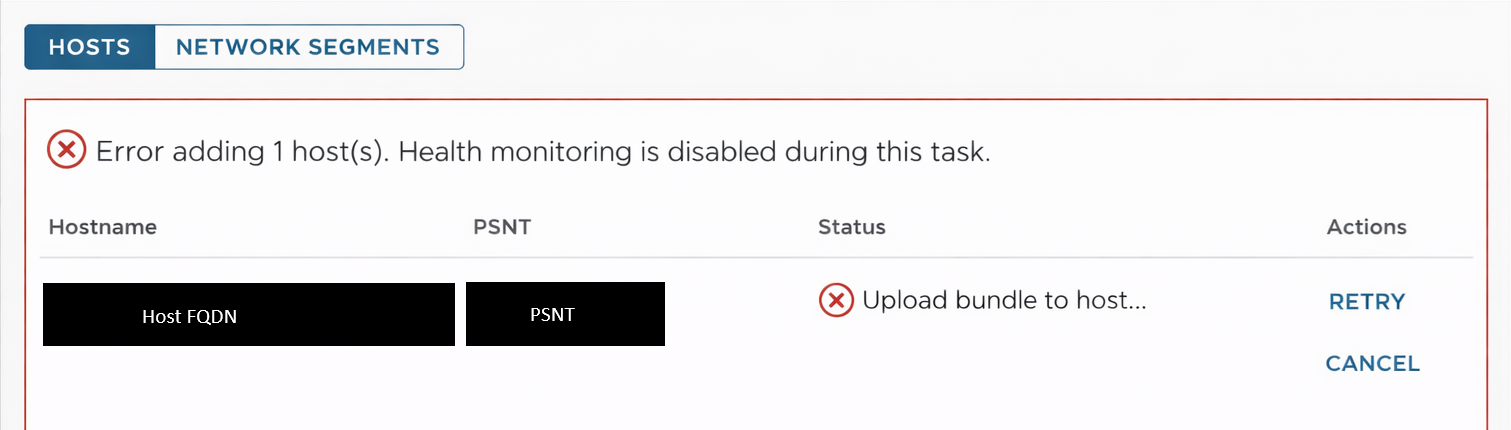
User is adding a node to an existing cluster, and the node being added is running a lower VxRail code version than the existing cluster nodes. In the Dell VxRail Plugin, node-add fails with the status "Upload bundle to host"
Error adding host. Health monitoring is disabled during this task.
Cause
The recovery bundle is not found on the VxRail Manager path /data/store2/recovery.
Resolution
To resolve this issue, follow the steps below:
- Copy the recovery bundle .zip to the VxRail Manager path /data/store2/recovery. If the recovery bundle is missing or corrupted, follow the steps to regenerate it:
- Take a snapshot of VxRail Manager before applying the below steps:
- Download a VxRail composite upgrade bundle, the version of the upgrade bundle should be the same as cluster version.
- Perform a local upgrade to let the upgrade bundle uploaded into VxRail Manager.
- It is not necessary to start an upgrade.
- After the upgrade bundle is uploaded successfully, run the below command to generate a new recoveryBundle-<version>.zip.
- Take a snapshot of VxRail Manager before applying the below steps:
vxrm: # /etc/vmware-marvin/scripts/lcm/scripts/update-recovery-bundle.sh /data/store2/recovery/recoveryBundle-<version>.zip /data/store2/lcm/unpacked /data/store2/recovery/recoveryBundle-<version>.zip
Example:
/etc/vmware-marvin/scripts/lcm/scripts/update-recovery-bundle.sh /data/store2/recovery/recoveryBundle-7.0.401.zip /data/store2/lcm/unpacked /data/store2/recovery/recoveryBundle-7.0.401.zip
- Run command:
chmod 644 recoveryBundle-<target_version>.zip
- Run command:
chown tcserver:pivotal recoveryBundle-<target_version>.zip
- Retry node-add.
Affected Products
VxRail, VxRail Appliance Series, VxRail G Series Nodes, VxRail D Series Nodes, VxRail D560, VxRail D560F, VxRail E Series Nodes, VxRail E560, VxRail E560F, VxRail E560N, VxRail E660, VxRail E660F, VxRail E660N, VxRail E665, VxRail E665F, VxRail E665N
, VxRail G560, VxRail G560F, VxRail P Series Nodes, VxRail P570, VxRail P570F, VxRail P580N, VxRail P670F, VxRail P670N, VxRail P675F, VxRail P675N, VxRail S Series Nodes, VxRail S470, VxRail S570, VxRail S670, VxRail Software, VxRail V Series Nodes, VxRail V570, VxRail V570F, VXRAIL V670F, VxRail VD-4510C, VxRail VD-4520C, VxRail VD Series Nodes, VxRail VE-660, VxRail VE-6615, VxRail VE-670, VxRail VP-760, VxRail VP-7625, VxRail VP-770, VxRail VS-760
...
Article Properties
Article Number: 000219738
Article Type: Solution
Last Modified: 06 رمضان 1447
Version: 4
Find answers to your questions from other Dell users
Support Services
Check if your device is covered by Support Services.