PowerFlex: How to Sanitize NVDIMM and SDPM - Video
Summary: PowerFlex/PowerEdge: How to Sanitize NVDIMM - Video
This article applies to
This article does not apply to
This article is not tied to any specific product.
Not all product versions are identified in this article.
Instructions
Important Warning Sanitize operations on NVDIMM, DCPMM, or SDPM permanently erase persistent memory data. Review KB 000377158 - "Caution when using sanitize operation on NVDIMM, DCPMM, or SDPM" before performing these steps.
NOTE: Before sanitizing NVDIMM\SDPM, All Flex and DAX devices must be removed from the SDS node.
- Steps from iDRAC for 16G and above generations only
- Go to Configuration > BIOS Settings > Memory Settings > scroll down to Persistent Memory
- From iDRAC web interface, change Current Value to Enabled from the drop-down list
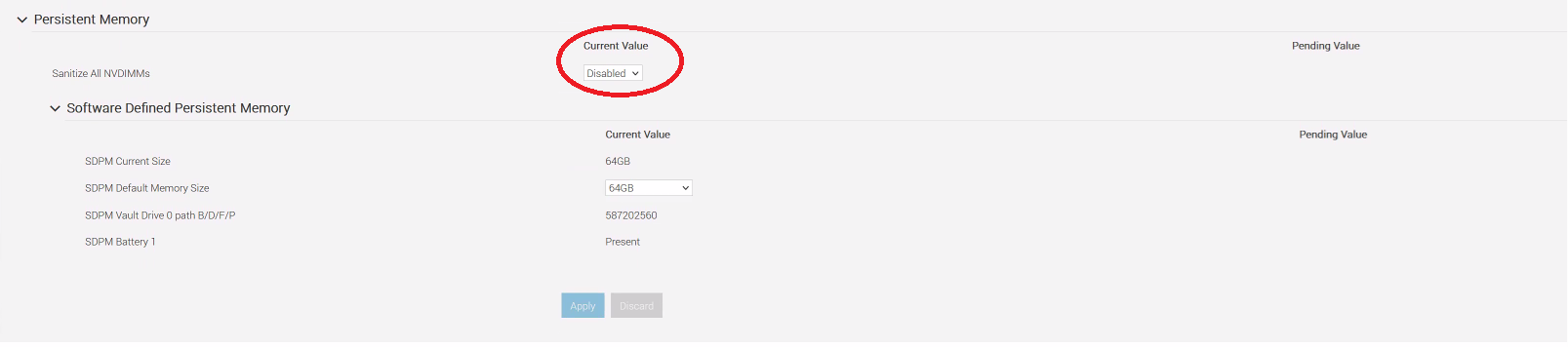
Before sanitizing NVDIMMs, All Flex and DAX devices must be removed from the SDS node.
- Steps from the System Setup page for 14G and 15G (it also applies to higher generations)
- 14G PowerEdge: Allows sanitizing individual NVDIMMs.
- 15G PowerEdge: Only supports sanitizing all NVDIMMs at once.
- While the Server is booting press F2 to enter System Setup
- Go to System BIOS > Memory Settings. The current system BIOS memory settings are displayed.
- Click Persistent Memory and select Enabled beside Sanitize All NVDIMMs
- 14G PowerEdge you can sanitize an individual NVDIMM
- 15G PowerEdge you can only sanitize all NVDIMMs
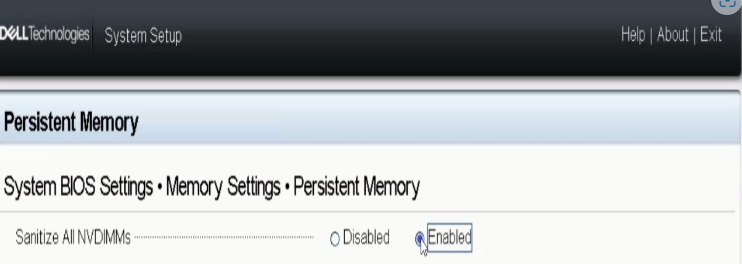
Before sanitizing NVDIMMs, All Flex and DAX devices must be removed from the SDS node.
Affected Products
PowerFlex rack, ScaleIOArticle Properties
Article Number: 000221219
Article Type: How To
Last Modified: 15 شعبان 1447
Version: 8
Find answers to your questions from other Dell users
Support Services
Check if your device is covered by Support Services.