DPA: Chargeback Details report does not return Data Retained field
Summary: The Chargeback Details report returns all zeros in the data retained column.
This article applies to
This article does not apply to
This article is not tied to any specific product.
Not all product versions are identified in this article.
Symptoms
The Chargeback Details report returns all zeros in the
data retained column despite successful data collection of all assigned requests.Cause
The product is functioning as designed.
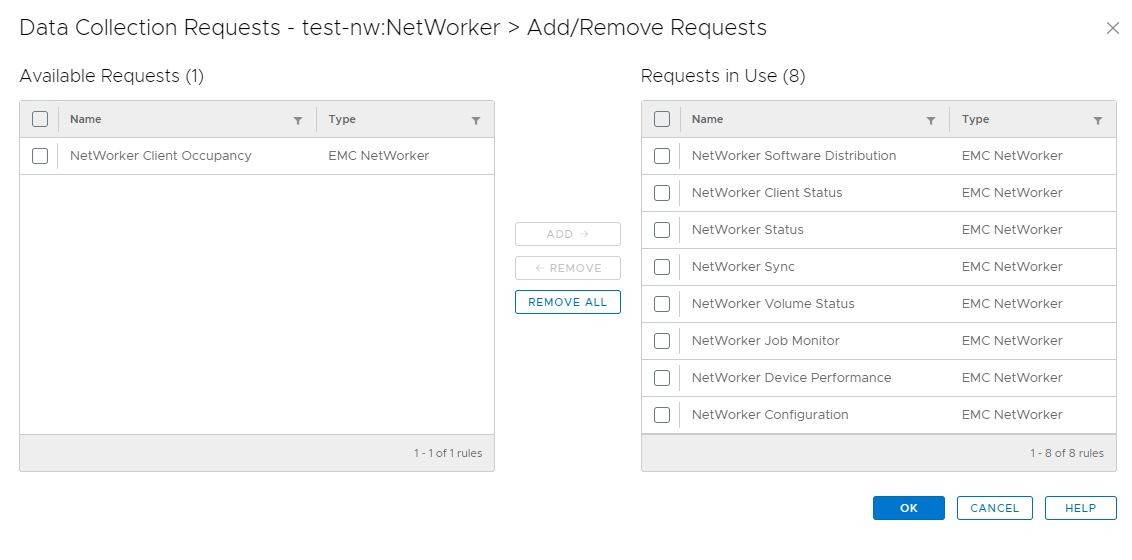
Examining the assigned data collection requests for the NetWorker object, it was found that not all requests were assigned. The Client Occupancy request was not assigned.
The data retained column is populated from the Client Occupancy datasource, which requires the Client Occupancy request be assigned.
Below is an example of this.
Resolution
To resolve this issue, follow these steps.
- In the DPA UI go to Inventory then Object Library. Under Applications select the NetWorker object.
- Click the Properties button and then the Data Collection tab.
- In this window, click the Add/Remove Request button.
- Select Client Occupancy request in the left pane.
- Click the Add button to add it to the right pane.
- Click Ok to finish the assignment of the request.
Once assigned, the DPA Agent runs the request and collects occupancy data.
Once there has been occupancy data collected, the data retained field populates in the report.
Contact Dell Technical Support for further details or information.
Article Properties
Article Number: 000225355
Article Type: Solution
Last Modified: 10 شعبان 1447
Version: 1
Find answers to your questions from other Dell users
Support Services
Check if your device is covered by Support Services.