Dell NativeEdge: Radius certificate name not displayed in side panel
Summary: In Dell NativeEdge version 4.1.0.0, the Radius server certificate name was not displayed in the side panel as expected. Users can now view complete Radius certificate details from the Certificate page under the Security section. ...
This article applies to
This article does not apply to
This article is not tied to any specific product.
Not all product versions are identified in this article.
Symptoms
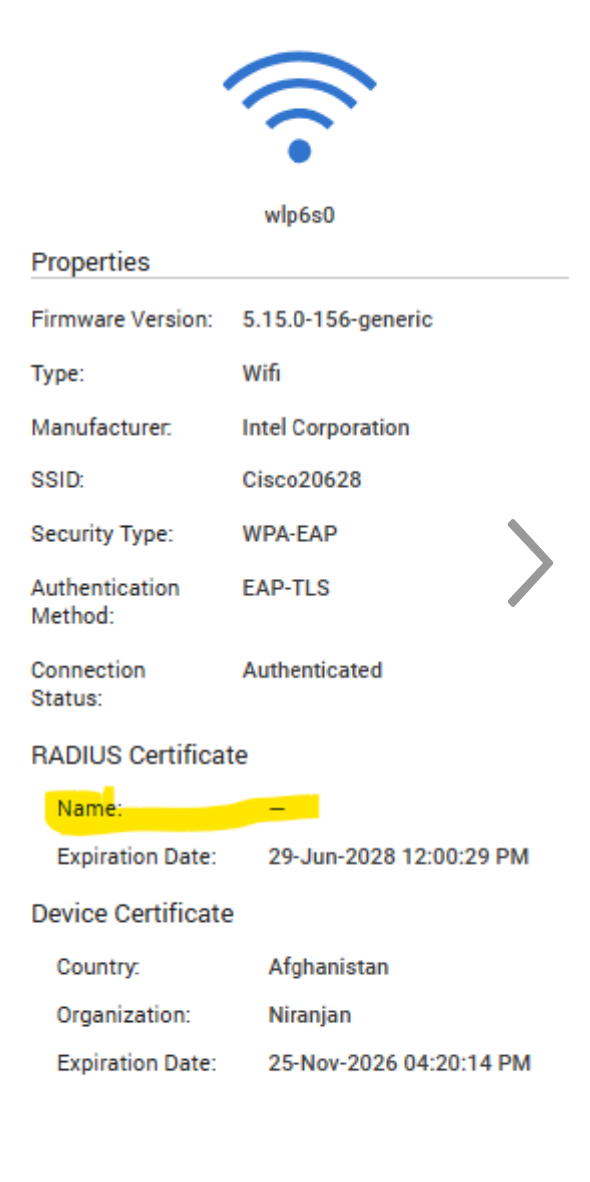
- In Dell NativeEdge version 4.1.0.0, the Radius server certificate name is missing from the side panel in the user interface.
- Other certificate details such as expiry date and organization were visible.
- No functional impact on authentication or connectivity
Cause
The user interface does not include the Radius certificate name in the side panel due to missing updates in the inventory and API payload.
Resolution
-
Resolution in Dell NativeEdge v4.1.0.0 Release:
- The Radius certificate details are now accessible from the Security → Certificate page.
- No additional configuration is required.
-
A permanent solution will be in the future NativeEdge releases.
Affected Products
Dell Distributed Private CloudArticle Properties
Article Number: 000398896
Article Type: Solution
Last Modified: 22 شعبان 1447
Version: 1
Find answers to your questions from other Dell users
Support Services
Check if your device is covered by Support Services.