Dell Automation Platform: NativeEdgeエンドポイントのIPアドレスが誤って報告される
Summary: この記事では、NativeEdgeエンドポイントがIPアドレスを誤って報告する状況について説明します。この状況は、エンドポイントのプロビジョニング後、または再起動後に発生する可能性があります。
This article applies to
This article does not apply to
This article is not tied to any specific product.
Not all product versions are identified in this article.
Symptoms
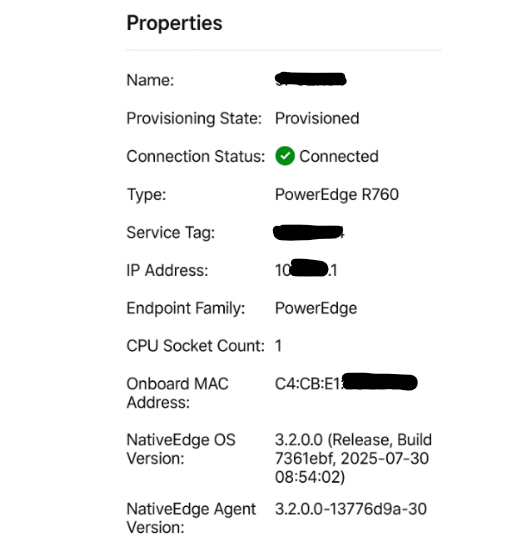
通常のオペレーションでは、NativeEdgeエンドポイントがネットワーク環境内で使用されていないIPアドレスで表示される場合があります。
Cause
Automation Platform UIは、エンドポイントの起動プロセス中に、最初のLAN-on-Motherboard (LOM)ポートを使用して実行時にIPアドレスを入力します。有効な IP アドレスが使用できない場合、システムは次に使用可能なインターフェイスを使用して、Automation Platform UI の IP アドレス属性に入力します。まれに、内部IPアドレス(内部VM NATネットワークによって使用される)が表示されることが確認されました
この動作の一般的な原因としては、DHCPサーバーに到達できない、最初のLOMポートのネットワーク ケーブルが切断されている、初期プロビジョニング後にエンドポイントが別のネットワーク セグメントに接続されている、などが挙げられます。
Resolution
この挙動は機能には影響せず、外観上の問題と見なされます。
対処方法
Dell Automation Platformの今後のリリースでは、UIで見つかったこの外観上のエラーを修正する予定です。
Affected Products
Dell Automation Platform, NativeEdge Solutions, Dell Automation Platform Components, NativeEdgeArticle Properties
Article Number: 000433708
Article Type: Solution
Last Modified: 24 رمضان 1447
Version: 2
Find answers to your questions from other Dell users
Support Services
Check if your device is covered by Support Services.