Dell 자동화 플랫폼: NativeEdge 엔드포인트 IP 주소가 잘못 보고됨
Summary: 이 문서에서는 NativeEdge 엔드포인트가 IP 주소를 잘못 보고하는 상태에 대해 설명합니다. 이 상황은 엔드포인트의 프로비저닝 후 또는 재부팅 후에 나타날 수 있습니다.
This article applies to
This article does not apply to
This article is not tied to any specific product.
Not all product versions are identified in this article.
Symptoms
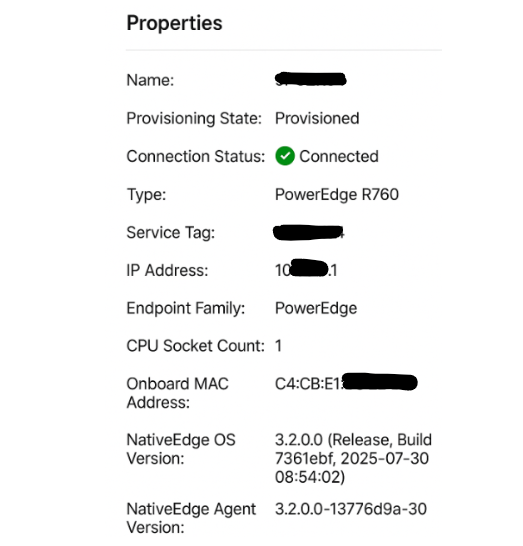
정상 작동 중에 NativeEdge 엔드포인트가 네트워킹 환경 내에서 사용되지 않는 IP 주소와 함께 나타날 수 있습니다.
Cause
자동화 플랫폼 UI는 엔드포인트의 부팅 프로세스 중 런타임에 첫 번째 LOM(LAN on Motherboard) 포트를 사용하여 IP 주소를 채웁니다. 유효한 IP 주소를 사용할 수 없는 경우 시스템은 사용 가능한 다음 인터페이스를 사용하여 자동화 플랫폼 UI의 IP 주소 속성을 채웁니다. 드문 경우지만 내부 IP 주소(내부 VM NAT 네트워크에서 사용됨)가 표시될 수 있습니다.
이 동작의 일반적인 원인으로는 DHCP 서버에 연결할 수 없거나, 첫 번째 LOM 포트에서 네트워크 케이블이 끊어졌거나, 초기 프로비저닝 후 엔드포인트가 다른 네트워크 세그먼트에 연결되는 경우가 있습니다.
Resolution
이 동작은 기능에 영향을 주지 않으며 외관상의 문제로 간주됩니다.
해결책
Dell Automation Platform의 향후 릴리스에서는 UI에서 발견된 외관 오류를 수정할 예정입니다.
Affected Products
Dell Automation Platform, NativeEdge Solutions, Dell Automation Platform Components, NativeEdgeArticle Properties
Article Number: 000433708
Article Type: Solution
Last Modified: 24 رمضان 1447
Version: 2
Find answers to your questions from other Dell users
Support Services
Check if your device is covered by Support Services.