Avamar: Unable to Perform Restore or Modify Existing Backups
Summary: Unable to perform restore or modify existing backups-Error message: usr/local/avamar/bin/avtar.bin: error while loading shared libraries: /usr/local/avamar/lib/libmagfs.so.1: file too short ...
This article applies to
This article does not apply to
This article is not tied to any specific product.
Not all product versions are identified in this article.
Symptoms
Avamar is unable to perform restore or update the retention tags or period of the existing backups. May encounter the following error message:
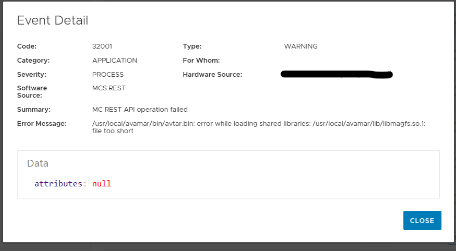
When running the avtar commands in the Avamar CLI, may encounter the same error when running avtar --version.
admin@avamar:~/>: avtar --version
/usr/local/avamar/bin/avtar.bin: error while loading shared libraries: /usr/local/avamar/lib/libmagfs.so.1: file too short
admin@avamar:~/>:
Cause
avtar.bin binary is trying to load a shared library (libmagfs.so.1), but the file is either corrupted or file contents are missing.
Use the following commands to verify the checksum value and determine whether the libmagfs.so.1.0.0 file is empty or corrupted.
md5sum /usr/local/avamar/lib/libmagfs.so.1.0.0

ls -lrth /usr/local/avamar/lib/libmagfs.so.1.0.0
Expected outputs
admin@avamar:~/>: md5sum /usr/local/avamar/lib/libmagfs.so.1.0.0
8d21608d28e65c89547dfbcb9483c869  libmagfs.so.1.0.0

admin@avamar:~/>: ls -lrth /usr/local/avamar/lib/libmagfs.so.1.0.0
-r--r--r-- 1 root root 36M Dec  8  2023 /usr/local/avamar/lib/libmagfs.so.1.0.0
If there is a mismatch in checksum values or the file is missing, the file should be replaced.
Resolution
If the symptoms match the described issue, contact Dell Support and reference this article for further assistance.
Affected Products
Avamar Server, Avamar Virtual EditionArticle Properties
Article Number: 000323264
Article Type: Solution
Last Modified: 15 يناير 2026
Version: 2
Find answers to your questions from other Dell users
Support Services
Check if your device is covered by Support Services.