在 Azure 上執行的 Data Domain Virtual Edition 具有不適用於作業系統或 NVRAM 的系統磁片
Oversigt: 部署在 Microsoft Azure Cloud 的 Data Domain Virtual Edition (DDVE) 需要作業磁片、NVRAM 磁碟,以及儲存備份所需的中繼資料磁片數量。但是,部署後一開始沒有手動新增儲存裝置,便會出現「系統」磁片,而此磁片並不適用于 DDVE、作業系統或 NVRAM。
Denne artikel gælder for
Denne artikel gælder ikke for
Denne artikel er ikke knyttet til et bestemt produkt.
Det er ikke alle produktversioner, der er identificeret i denne artikel.
Symptomer
在 Microsoft Azure 上執行的 Data Domain Virtual Edition (DDVE) 需要下列儲存裝置才能運作 (注意詳細資料可能會在稍後的 DDOS 版本中變更):
- 一個 250 GiB 標準 HDD 或 Premium SSD 根磁片,適用于 DDVE 和 DDOS 作業系統
- 一個 10 GiB 標準 HDD 或頂級 SSD NVRAM 磁碟
- 為本機備份中繼資料提供所需的 1 TiB 或 2 TiB 標準 HDD 或 Premium SSD
Disk   Slot        Manufacturer/Model         Firmware   Serial No.   Capacity    Type
       (pci/idx)
----   ---------   ------------------------   --------   ----------   ---------   ----
dev1   2:0         Msft    Virtual_Disk       n/a        (unknown)    250.0 GiB   SAS

在上述實例中,DDVE 不會使用 600.0 GiB 磁片。它不適用於本機元資料備份的作業系統、NVRAM 或儲存裝置。
Årsag
在建立新的虛擬機器時,Azure 會新增此磁片。針對大部分的虛擬機器類型,Azure 提供的產品,包括從市場部署 DDVE 時使用的 VM 類型。
例如,對於 DDOS 7.11,如果建立高達 96 TiB 儲存容量的 DDVE,則會使用「Standard_D16ds_v5」類型的 Azure VM 進行部署。有關儲存需求的詳細資料,請參閱《Dell PowerProtect DDVE in the Azure Cloud 7.11 Installation and Administration Guide》(Azure Cloud 7.11 安裝和管理指南)。下方所示以供參考的是概述 VM 資源的指南表格:
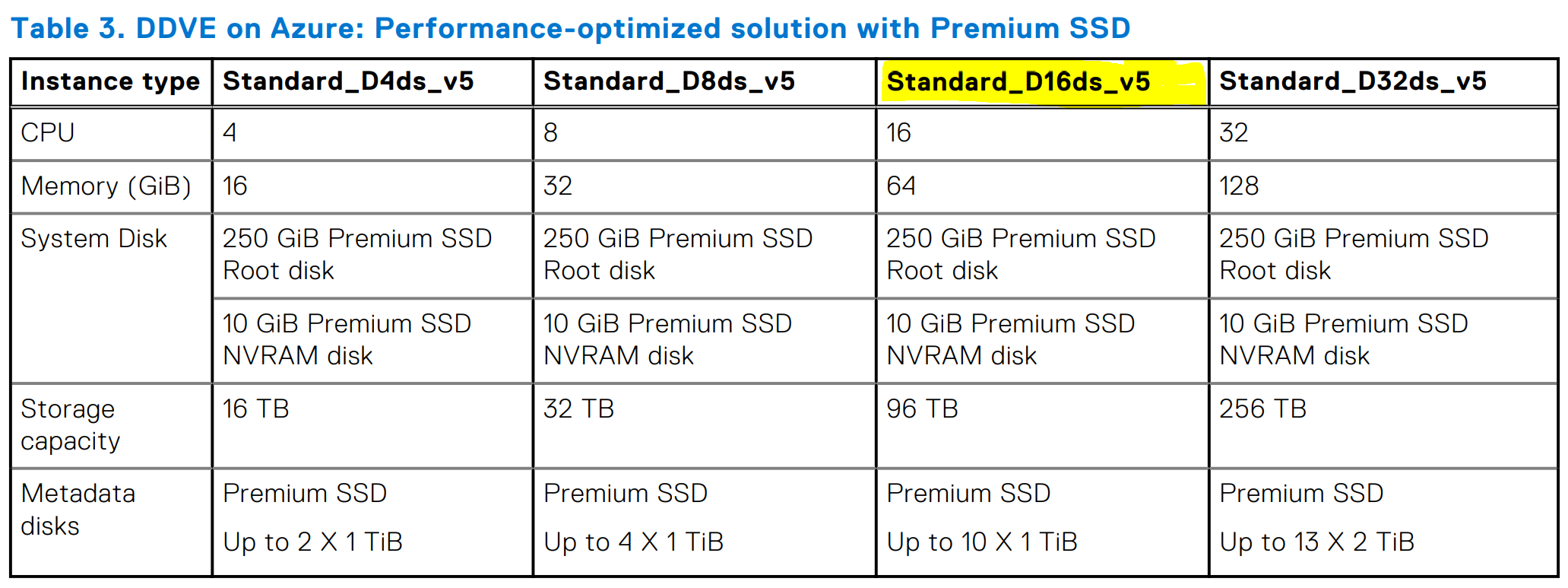
圖 1:下表顯示管理指南中所需的 VM 資源
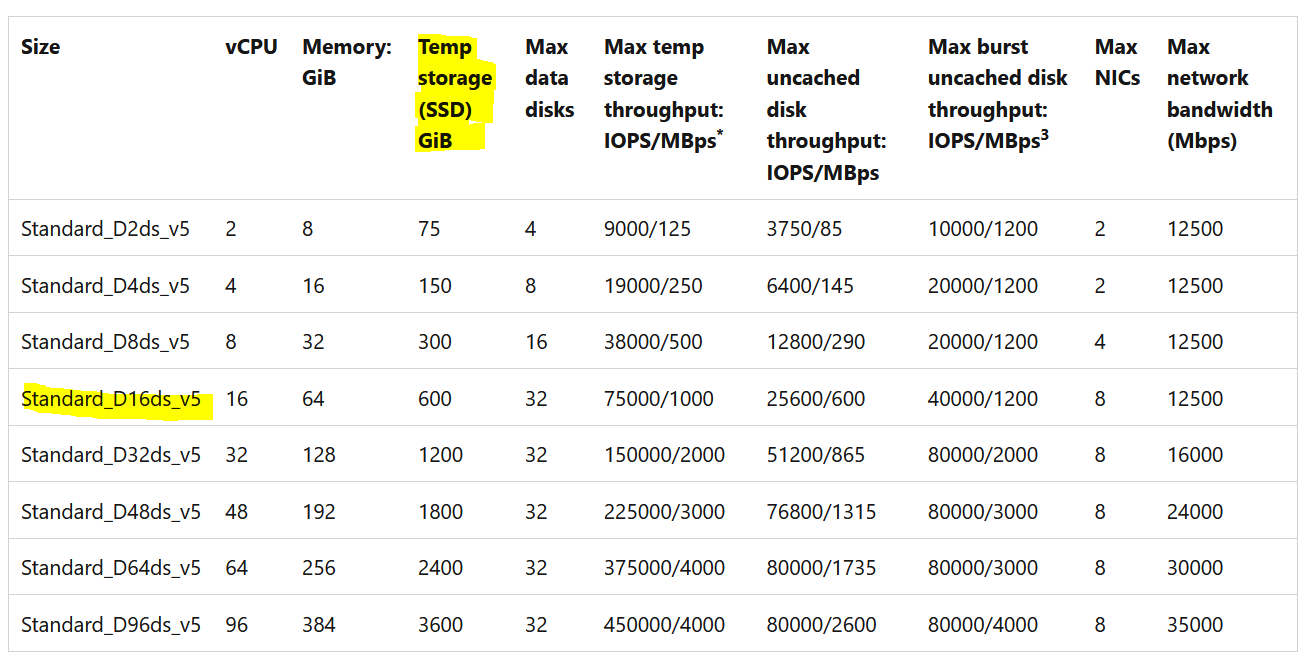
圖 2:Azure VM 詳細資料
如上表所示,針對用於安裝 DDVE 的 VM 類型,Azure 在 DDVE 虛擬機器中新增了 600 GiB 的「Temp Storage (SSD)」,即使 DDVE 沒有任何用途也一樣。
例如,對於 DDOS 7.11,如果建立高達 96 TiB 儲存容量的 DDVE,則會使用「Standard_D16ds_v5」類型的 Azure VM 進行部署。有關儲存需求的詳細資料,請參閱《Dell PowerProtect DDVE in the Azure Cloud 7.11 Installation and Administration Guide》(Azure Cloud 7.11 安裝和管理指南)。下方所示以供參考的是概述 VM 資源的指南表格:
圖 1:下表顯示管理指南中所需的 VM 資源

圖 2:Azure VM 詳細資料
如上表所示,針對用於安裝 DDVE 的 VM 類型,Azure 在 DDVE 虛擬機器中新增了 600 GiB 的「Temp Storage (SSD)」,即使 DDVE 沒有任何用途也一樣。
說明此暫存磁片的 Microsoft Azure 說明文件已連結,並如下所述:
From the Microsoft Azure documentation:

   Temporary disk

   Most VMs contain a temporary disk, which is not a managed disk.

   The temporary disk provides short-term storage for applications and processes, and is intended to only store data such as page files, swap files, or SQL Server tempdb.

   Data on the temporary disk may be lost during a maintenance event or when you redeploy a VM.

   During a successful standard reboot of the VM, data on the temporary disk will persist.

   For more information about VMs without temporary disks, see Azure VM sizes with no local temporary disk.
Løsning
Data Domain DDVE 端不需要採取任何動作。可以忽略其他磁片。DDOS 完全不會使用此功能。
該磁片是 DDVE 所使用的 Azure VM 類型中不可或缺的一部分,不應修改、變更或刪除。
Microsoft Azure 雲端供應商會自行執行此操作,因此,如果有建議的話,我們建議您聯絡 Microsoft Azure 支援以取得更多詳細資料。
該磁片是 DDVE 所使用的 Azure VM 類型中不可或缺的一部分,不應修改、變更或刪除。
Microsoft Azure 雲端供應商會自行執行此操作,因此,如果有建議的話,我們建議您聯絡 Microsoft Azure 支援以取得更多詳細資料。
Berørte produkter
Data Domain, DD OS 7.11, DD OS 7.7, Data Domain Virtual EditionArtikelegenskaber
Artikelnummer: 000215391
Artikeltype: Solution
Senest ændret: 17 jul. 2023
Version: 3
Find svar på dine spørgsmål fra andre Dell-brugere
Supportservices
Kontrollér, om din enhed er dækket af supportservices.