Data Domain: How to power-off or restart a DDVE system
Zusammenfassung: This article details the recommended procedure to power-off or reboot/restart a Data Domain Virtual Edition (DDVE) system.
Dieser Artikel gilt für
Dieser Artikel gilt nicht für
Dieser Artikel ist nicht an ein bestimmtes Produkt gebunden.
In diesem Artikel werden nicht alle Produktversionen aufgeführt.
Weisungen
How to power off or reboot a Data Domain Virtual Edition (DDVE) system from vSphere:
- Use only 'Shut Down Guest OS' or 'Restart Guest' (as needed).
- Avoid using 'Power Off or Reset' options as these act like pulling the power cable on a bare metal machine and may result in Data Loss or Integrity issues.
- DDVE does not support the 'Suspend' operation - Using 'Suspend' may cause unexpected results.
Procedure from vSphere Web/Client
- Right Click the required DDVE Virtual Machine (VM)
- Select Power > 'Shut Down Guest OS' ---> to power off the DDVE device
OR
- Select Power > 'Restart Guest OS' ---> to reboot/restart the DDVE device
The operations highlighted in the red box must be avoided.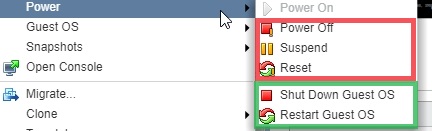
Betroffene Produkte
Data DomainProdukte
Data Domain, Data Domain Virtual EditionArtikeleigenschaften
Artikelnummer: 000010643
Artikeltyp: How To
Zuletzt geändert: 26 Sep. 2025
Version: 4
Antworten auf Ihre Fragen erhalten Sie von anderen Dell NutzerInnen
Support Services
Prüfen Sie, ob Ihr Gerät durch Support Services abgedeckt ist.