I backup delle immagini delle VM Avamar non riescono con "No Proxy" perché il proxy è spento in vCenter
Zusammenfassung: I backup delle immagini delle VM Avamar non riescono con "No Proxy" perché il proxy è spento in vCenter.
Dieser Artikel gilt für
Dieser Artikel gilt nicht für
Dieser Artikel ist nicht an ein bestimmtes Produkt gebunden.
In diesem Artikel werden nicht alle Produktversionen aufgeführt.
Symptome
Activity Monitor nell'interfaccia utente di Avamar mostra "No Proxy".
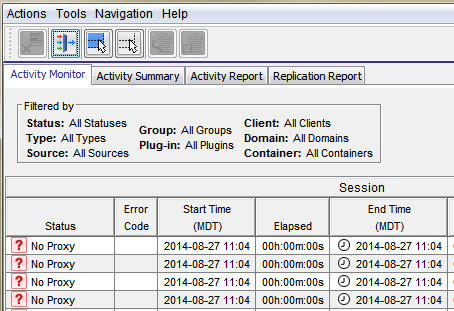
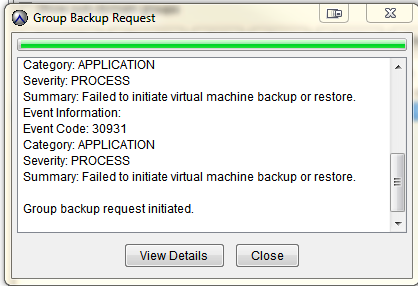
Il backup delle immagini VMware on-demand ha esito negativo con le seguenti operazioni:
Categoria: Severity APPLICAZIONE
: Riepilogo DEL PROCESSO
: Impossibile avviare il backup o il ripristino della macchina virtuale.
Informazioni sull'evento:
Codice evento: Categoria 30931
: Severity APPLICAZIONE
: Riepilogo DEL PROCESSO
: Impossibile avviare il backup o il ripristino della macchina virtuale.
Se viene avviata una richiesta di backup di gruppo.
Ursache
Il proxy è spento in vCenter.
Lösung
- Aprire vCenter e verificare se il proxy è spento.
- Se il proxy è spento, accenderlo.
Weitere Informationen
Negli articoli seguenti vengono illustrati i problemi che presentano lo stesso errore generico "No Proxy".
- I backup delle immagini delle VM Avamar non riescono con "No Proxy" perché nessun proxy server è configurato per proteggere il datastore contenente i VMDK del client
- I backup delle immagini delle VM Avamar hanno esito negativo con errore "No Proxy" a causa di un'interruzione della connessione vCenter
- I backup delle immagini delle VM Avamar hanno esito negativo con errore "No Proxy" a causa del fatto che la VM non dispone di dischi rigidi
- I backup delle immagini delle VM Avamar hanno esito negativo con errore "No Proxy" a causa del proxy spento in vCenter
- I backup delle immagini delle VM Avamar non riescono con errore "No Proxy" a causa di proxy non risoluzione in DNS
Betroffene Produkte
AvamarProdukte
AvamarArtikeleigenschaften
Artikelnummer: 000033569
Artikeltyp: Solution
Zuletzt geändert: 05 Feb. 2025
Version: 4
Antworten auf Ihre Fragen erhalten Sie von anderen Dell NutzerInnen
Support Services
Prüfen Sie, ob Ihr Gerät durch Support Services abgedeckt ist.