Windows Server: Cómo instalar Update Services con PowerShell
Zusammenfassung: Este artículo está diseñado para abordar la instalación de la función Windows Server Update Services (WSUS) mediante Windows PowerShell. En esta guía, se detalla la adición de la función WSUS con PowerShell, que cubre la instalación y la administración de cmdlets como Get-WsusUpdate para la configuración de sincronización y control de actualizaciones. ...
Dieser Artikel gilt für
Dieser Artikel gilt nicht für
Dieser Artikel ist nicht an ein bestimmtes Produkt gebunden.
In diesem Artikel werden nicht alle Produktversionen aufgeführt.
Weisungen
- Escriba
Start PowerShellen la ventana Símbolo del sistema para iniciar Windows PowerShell. - Para instalar la función WSUS, ejecute el siguiente comando
Install-WindowsFeature UpdateServices
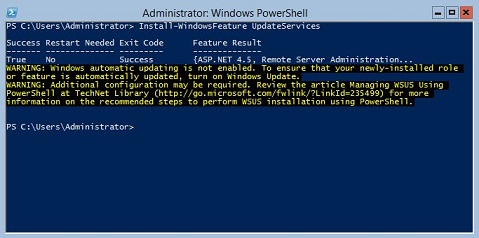
Información adicional:
Los siguientes servicios de función de WSUS se pueden instalar mediante Windows PowerShell.
- Base de datos interna de Windows (WID)
- Servicios de WSUS
- Base de datos
Los servicios de función WSUS Services y WID Database se instalan después de ejecutar el cmdlet Install-WindowsFeature UpdateSevices.
Los siguientes cmdlets de Windows PowerShell están disponibles para administrar la función WSUS en un servidor que ejecuta Windows Server Core.
Para agregar un equipo cliente especificado a un grupo de destino especificado.
Add-WsusComputer
Aprobar una actualización que se aplicará a los clientes.
Approve-WsusUpdate
Rechazar la actualización para la implementación.
Deny-WsusUpdate
Para obtener la lista de todas las clasificaciones de WSUS disponibles en el sistema.
Get-WsusClassification
Para obtener el objeto de computadora WSUS que representa la computadora cliente.
Get-WsusComputer
Para obtener la lista de todos los productos disponibles en WSUS por categoría.
Get-WsusProduct
Para obtener el valor del objeto servidor de actualización de WSUS.
Get-WsusServer
Para obtener el objeto de actualización de WSUS con detalles sobre la actualización.
Get-WsusUpdate
Para realizar el proceso de limpieza en un servidor WSUS especificado.
Invoke-WsusServerCleanup
Para establecer si las clasificaciones de actualizaciones que sincroniza WSUS están habilitadas o deshabilitadas.
Set-WsusClassification
Para establecer si el producto que representa la categoría de actualizaciones que se sincronizarán está habilitado o deshabilitado.
Set-WsusProduct
Para establecer si el servidor WSUS se sincroniza desde Microsoft Update o un servidor ascendente y las propiedades del servidor ascendente.
Set-WsusServerSynchronizationBetroffene Produkte
Microsoft Windows 2012 Server, Microsoft Windows 2012 Server R2Produkte
C Series, HS Series, Modular Infrastructure, Rack Servers, Tower Servers, XE Servers, XR Servers, OEM Server Solutions, Microsoft Windows Server 2016, Microsoft Windows Server 2019, Microsoft Windows Server 2022, Microsoft Windows Server 2025Artikeleigenschaften
Artikelnummer: 000121387
Artikeltyp: How To
Zuletzt geändert: 05 Sept. 2025
Version: 8
Antworten auf Ihre Fragen erhalten Sie von anderen Dell NutzerInnen
Support Services
Prüfen Sie, ob Ihr Gerät durch Support Services abgedeckt ist.