How to Export Windows Event Logs
Zusammenfassung: Learn how to export Event Viewer logs in Windows 11, 10, 8, and 7. This guide explains how to save logs, check system logs, and view application logs using Event Viewer. Ideal for troubleshooting and system diagnostics. ...
Dieser Artikel gilt für
Dieser Artikel gilt nicht für
Dieser Artikel ist nicht an ein bestimmtes Produkt gebunden.
In diesem Artikel werden nicht alle Produktversionen aufgeführt.
Weisungen
Windows Event Logs
- Windows Event Viewer:
- In Windows 7: Click Start and type:
eventvwr.msc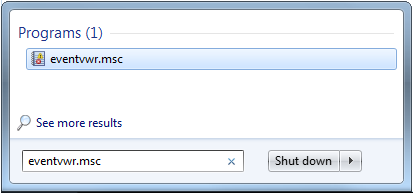
- In Windows 11, 10, 8.1, or 8:
- Press the Window Key
- Type: Event Viewer
- Select View Event Logs
- In Windows 7: Click Start and type:
- Select the type of logs that you must export:
- Windows 11, 10, 8.1, 8, or 7:
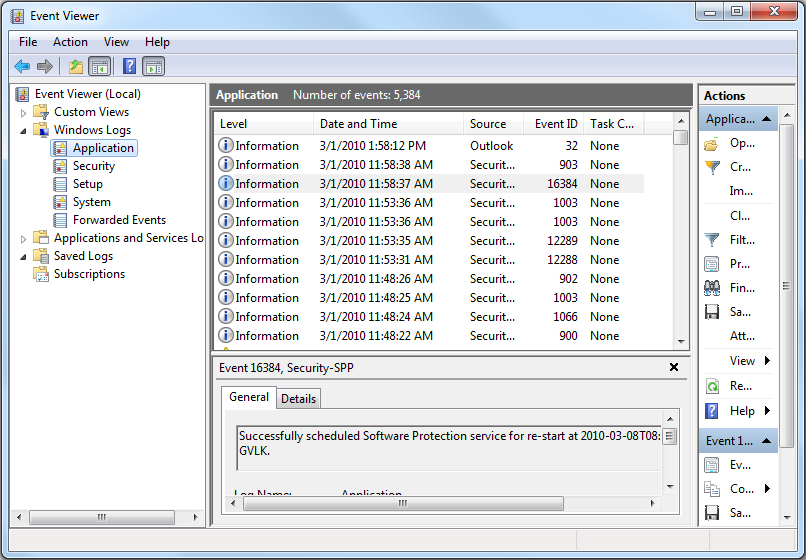
- Windows 11, 10, 8.1, 8, or 7:
- Save the log:
- Windows 11, 10, 8.1, 8, or 7: Action - > Save All Events As….
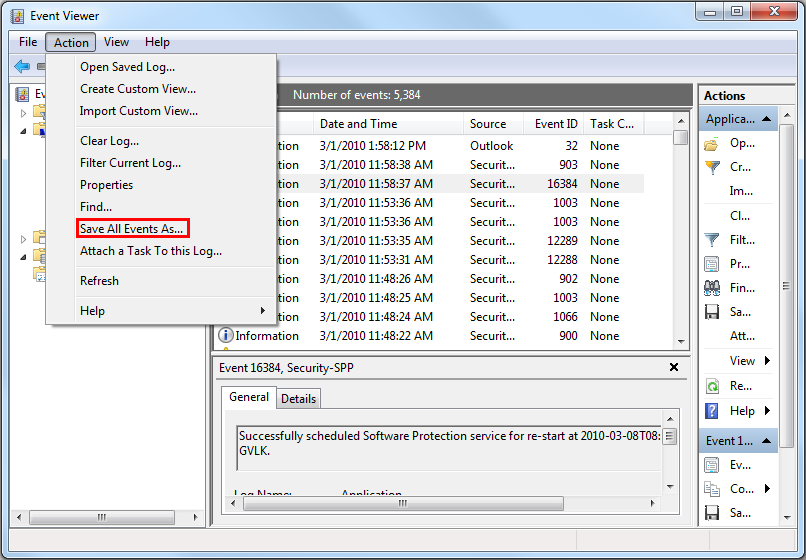
- Windows 11, 10, 8.1, 8, or 7: Action - > Save All Events As….
More information can be found in the following link: How to Save Event Logs

For information about BIOS event logs for Dell laptops, see KB article BIOS Event Logs and Diagnostic Logging on Dell Laptops
Betroffene Produkte
Alienware, Dell All-in-One, Dell Pro All-in-One, Dell Pro Max Micro, Dell Pro Max Slim, Dell Pro Max Tower, Dell Pro Micro, Dell Pro Slim, Dell Pro Tower, Dell Slim, Dell Tower, Inspiron, Legacy Desktop Models, OptiPlex, Vostro, XPS, G Series
, G Series, Alienware, Dell Plus, Dell Pro, Dell Pro Max, Dell Pro Plus, Dell Pro Premium, Inspiron, Latitude, Dell Pro Rugged, Vostro, XPS, Legacy Laptop Models, Fixed Workstations, Mobile Workstations, Dell Pro Max Micro XE FCM2250, Dell Pro Max Slim XE FCS1250, Dell Pro Max Tower T2 XE FCT2250, Dell Pro Max 16 XE MC16250, Dell Pro Micro Plus XE QBM1250, Dell Pro Slim Plus XE5 QBS1250, Dell Pro Tower Plus XE5 QBT1250
...
Artikeleigenschaften
Artikelnummer: 000124382
Artikeltyp: How To
Zuletzt geändert: 21 Juli 2025
Version: 7
Antworten auf Ihre Fragen erhalten Sie von anderen Dell NutzerInnen
Support Services
Prüfen Sie, ob Ihr Gerät durch Support Services abgedeckt ist.