Come identificare la versione del programma di installazione master di Dell Data Security
Zusammenfassung: Informazioni su come identificare la versione del programma di installazione principale di Dell Data Security (in precedenza Dell Data Protection) seguendo queste istruzioni dettagliate. ...
Dieser Artikel gilt für
Dieser Artikel gilt nicht für
Dieser Artikel ist nicht an ein bestimmtes Produkt gebunden.
In diesem Artikel werden nicht alle Produktversionen aufgeführt.
Weisungen
Nota:
- A maggio 2022, Dell Endpoint Security Suite Enterprise ha raggiunto la fine della manutenzione. Questo prodotto e i relativi articoli non vengono più aggiornati da Dell.
- A gennaio 2019, Dell Endpoint Security Suite Pro ha raggiunto la fine della manutenzione. Questo prodotto e i relativi articoli non vengono più aggiornati da Dell.
- Per ulteriori informazioni, consultare Policy sul ciclo di vita del prodotto (fine del supporto/fine del ciclo di vita) per Dell Data Security. Per eventuali domande sugli articoli alternativi, rivolgersi al proprio team di vendita o contattare endpointsecurity@dell.com.
- Fare riferimento alla pagina Sicurezza degli endpoint per ulteriori informazioni sui prodotti correnti.
La versione del programma di installazione master di Dell Data Security (in precedenza Dell Data Protection) può essere utilizzata per:
- Identificare i problemi noti.
- Comprendere le modifiche del flusso di lavoro.
- Verificare i requisiti di sistema.
Prodotti interessati:
- Dell Encryption Enterprise
- Dell Data Protection | Enterprise Edition
- Dell Encryption Personal
- Dell Data Protection | Personal Edition
- Dell Endpoint Security Suite Enterprise
- Dell Endpoint Security Suite Pro
Sistemi operativi interessati:
- Windows
- Per identificare la versione è necessario scaricare il [PROGRAMMA DI INSTALLAZIONE MASTER].
- Il nome di prodotto del [PROGRAMMA DI INSTALLAZIONE MASTER] varia in base all'applicazione:
DDSSetup.exeDDSSetup.exe per Dell Encryption EnterpriseDDSSetup.exeDDSSetup.exe per Dell Encryption PersonalDDSSuite.exeDell Endpoint Security Suite EnterpriseDDSSuite.exeper Dell Endpoint Security SuiteDDPSetup.exeDDPSetup.exe per Dell Data Protection | Enterprise EditionDDPSetup.exeDDPSetup.exe per Dell Data Protection | Personal EditionDDPSuite.exeDDPSuite.exe per Dell Data Protection | Endpoint Security SuiteDDPSuite.exeDDPSuite.exe per Dell Data Protection | Endpoint Security Suite Enterprise
Per informazioni sul download di DDSSetup o DDPSetup, consultare Come scaricare Dell Encryption Enterprise o Dell Encryption Personal.
- Cliccare con il pulsante destro del mouse sul [PROGRAMMA DI INSTALLAZIONE MASTER] e scegliere Proprietà.
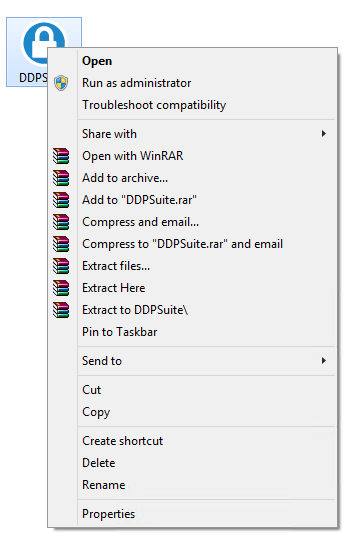
- Fare clic sulla scheda Dettagli.

- Documentare la versione del prodotto.
 la versione del prodotto del client potrebbe differire dalla schermata sopra.
Weitere Informationen
Videos
Betroffene Produkte
Dell Encryption, Dell Endpoint Security Suite Pro, Dell Endpoint Security Suite EnterpriseArtikeleigenschaften
Artikelnummer: 000124917
Artikeltyp: How To
Zuletzt geändert: 06 Aug. 2026
Version: 12
Antworten auf Ihre Fragen erhalten Sie von anderen Dell NutzerInnen
Support Services
Prüfen Sie, ob Ihr Gerät durch Support Services abgedeckt ist.