Dell Data Security 제거 중 종속성 오류 발생
Zusammenfassung: Dell Data Security(이전 Dell Data Protection)를 제거하는 동안 종속성 오류가 표시될 수 있습니다.
Dieser Artikel gilt für
Dieser Artikel gilt nicht für
Dieser Artikel ist nicht an ein bestimmtes Produkt gebunden.
In diesem Artikel werden nicht alle Produktversionen aufgeführt.
Symptome
영향을 받는 제품:
- Dell Encryption Enterprise
- Dell Data Protection | Enterprise Edition
- Dell Encryption Personal
- Dell Data Protection | Personal Edition
- Dell Encryption External Media
- Dell Data Protection | External Media Edition
- Dell Data Guardian
- Dell Self-Encrypting Drive Manager
- Dell Data Protection | SED(Self-Encrypting Drive) Manager
- Dell BitLocker Manager
- Dell Data Protection | BitLocker Manager
- Dell Full Disk Encryption
- Dell Data Protection | Secure Lifecycle
- Dell Data Protection | Cloud Edition
- Dell Endpoint Security Suite Enterprise
- Dell Endpoint Security Suite Pro
- Dell Threat Defense
- Dell Data Protection | Server Encryption
- Dell Data Protection | Security Tools
영향을 받는 버전:
- v8.0.0 이상
Ursache
해당 사항 없음
Lösung
Dell Encryption Enterprise를 제거할 때 다음 오류가 발생할 수 있습니다.
[APPLICATION1]는 [APPLICATION2]에 따라 다릅니다. [APPLICATION1]를 제거한 다음 제거를 다시 시도하십시오.
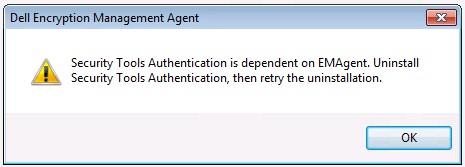
그림 1: (영어로만 제공) Dell Encryption Management Agent
참고:
- [APPLICATION1] 및 [APPLICATION2]는 다른 Dell Encryption Enterprise 애플리케이션에 종속된 Dell Encryption Enterprise 애플리케이션을 나타냅니다.
- 엔드포인트에서 오류가 약간 다를 수 있습니다.
이러한 오류는 종속성을 제거하기 전에 응용 프로그램을 제거하려고 시도한 결과입니다. 모든 Dell Data Security 구성 요소는 Dell Data Security 제거 프로그램을 사용하여 제거할 수 있습니다. 자세한 내용은 Dell Data Security 제거 프로그램을 실행하는 방법을 참조하십시오.
지원 부서에 문의하려면 Dell Data Security 국제 지원 전화번호를 참조하십시오.
온라인으로 기술 지원 요청을 생성하려면 TechDirect로 이동하십시오.
추가 정보 및 리소스를 보려면 Dell 보안 커뮤니티 포럼에 참여하십시오.
Betroffene Produkte
Dell EncryptionArtikeleigenschaften
Artikelnummer: 000129590
Artikeltyp: Solution
Zuletzt geändert: 19 Apr. 2026
Version: 14
Antworten auf Ihre Fragen erhalten Sie von anderen Dell NutzerInnen
Support Services
Prüfen Sie, ob Ihr Gerät durch Support Services abgedeckt ist.