Come eseguire la scansione di un codice QR o codice a barre del codice di matricola
Zusammenfassung: Seguire la procedura riportata di seguito per utilizzare il dispositivo mobile per eseguire la scansione del codice QR o del codice a barre del codice di matricola sul dispositivo Dell. Il codice di matricola è il modo migliore per accedere a informazioni specifiche sul dispositivo Dell in uso. ...
Dieser Artikel gilt für
Dieser Artikel gilt nicht für
Dieser Artikel ist nicht an ein bestimmtes Produkt gebunden.
In diesem Artikel werden nicht alle Produktversionen aufgeführt.
Weisungen
È possibile che il prodotto Dell non funzioni correttamente al punto da non poter accedere al sito del supporto.
Utilizzando il dispositivo mobile, è possibile eseguire la scansione del codice QR o del codice a barre del codice di matricola per individuare la pagina di supporto del prodotto per il dispositivo in uso. La pagina di supporto del prodotto fornisce contenuti di supporto in autonomia, ad esempio esercitazioni, driver e informazioni sulla garanzia.
Passaggio 1. Individuare il codice QR o il codice a barre del codice di matricola del prodotto per il quale è necessaria assistenza.
Il codice QR o codice a barre del codice di matricola si trova in genere sul retro o sulla parte inferiore del prodotto Dell. Il codice di matricola è un codice di 7 caratteri che Dell utilizza per identificare il prodotto specifico e consente di accedere alle opzioni di supporto personalizzate in base alle specifiche tecniche e alla garanzia del prodotto.
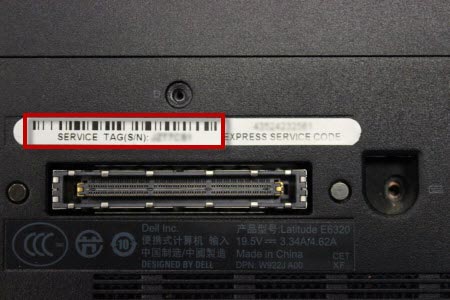
Figura 1. Esempio di codice a barre del codice di matricola sulla parte inferiore di un notebook Dell.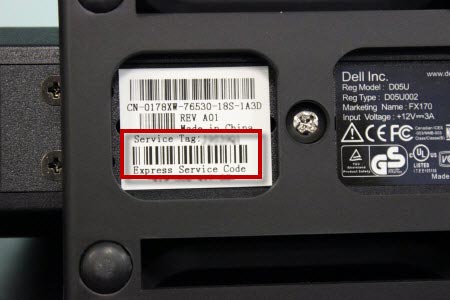
Figura 2: Esempio di codice a barre del codice di matricola sulla parte inferiore di una docking station Dell.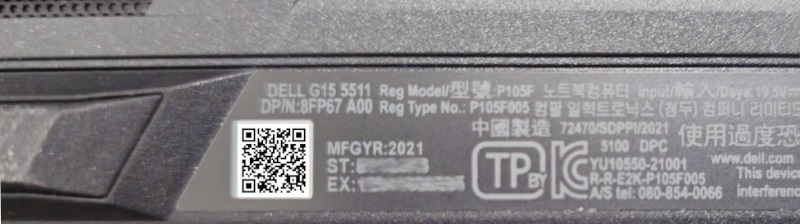
Figura 3: Esempio di codice QR del codice di matricola sulla parte inferiore di un notebook Dell.
NOTA: Dopo aver individuato il codice di matricola, la scansione del codice QR illustrato nella Figura 3 consente di accedere al sito del Supporto Dell.
NOTA: Per ulteriori informazioni, consultare la pagina Libreria di supporto Trovare il codice di matricola o il numero di serie.
Passaggio 2. Eseguire la scansione del codice QR o del codice a barre del codice di matricola con la fotocamera del dispositivo.
- Assicurarsi di disporre di un'applicazione scanner di codici QR o codici a barre sul dispositivo mobile. Se sul dispositivo mobile non è installata un'applicazione scanner per codici QR o codici a barre, installane una da una fonte affidabile come l'App Store di Apple o il Google Play Store.
- Aprire l'applicazione scanner codici QR o codici a barre sul dispositivo mobile ed eseguire la scansione del codice QR o del codice a barre.
- Una volta ottenuto il codice di matricola, copiarlo in modo che possa essere utilizzato sul sito del supporto Dell.
- Accedere alla pagina del Supporto Dell o eseguire la scansione del codice QR nella Figura 3 e selezionare Apri link.
- Una volta visualizzata la pagina del sito del supporto Dell, incollare il codice di matricola nella casella in Identifica il prodotto o cerca supporto e selezionare il tipo di supporto desiderato.
Suggerimenti per eseguire una corretta scansione del codice QR o del codice a barre del codice di matricola
- Assicurarsi che il codice QR o il codice a barre sia leggibile sul prodotto. La scansione potrebbe non essere in grado di leggere codici a barre sbiaditi, danneggiati o sporchi.
- Assicurarsi che il dispositivo Dell si trovi in un'area ben illuminata.
- Durante la scansione, accertarsi che il codice QR o il codice a barre sia a fuoco.
Weitere Informationen
 Fuori garanzia? Nessun problema: Accedere al sito web Dell.com/support, inserire il codice di matricola Dell e visualizzare le offerte disponibili.
NOTA: le offerte sono disponibili solo per i clienti di personal computer in Stati Uniti, Canada, Regno Unito, Francia, Germania, Cina e Giappone. Server e storage non applicabili.
Betroffene Produkte
Chromebox, Alienware, Dell Pro Max Micro, Dell Pro Max Slim, Dell Pro Max Tower, Dell Pro Micro, Dell Pro Slim, Dell Pro Tower, Dell Slim, Dell Tower, Inspiron, Legacy Desktop Models, OptiPlex, Vostro, XPS, G Series, Gateways & Embedded PCs
, Alienware and Dell Gaming Monitors, C Series, E Series, P Series, S Series, SE Series, UltraSharp Premier (UP) Series, UltraSharp (U) Series, Dell Monitors, Dell Plus Monitors, Dell Pro Monitors, Dell Pro Plus Monitors, Dell Printers, MultiFunction Printers, Projectors & Accessories, TVs & Home Theater, Chromebook, G Series, Alienware, Dell Plus, Dell Pro, Dell Pro Max, Dell Pro Plus, Dell Pro Premium, Inspiron, Latitude, Dell Pro Rugged, Vostro, XPS, Legacy Laptop Models, C Series, HS Series, Modular Infrastructure, Rack Servers, Tower Servers, XE Servers, XR Servers, OEM Server Solutions, Fixed Workstations, Mobile Workstations, D/Dock Expansion-Station, D/Port Advanced Port Replicator, Dell Compact Charging Cart - 36 Devices, Dell Dock WD15, Dell Dual Charge Dock HD22Q, Dell Dual Video USB3.0 Docking Station D1000, Dell EAPR2, Dell ESPR2, Dell Essential Charging Cart - 24 Devices - CT3021, Dell Mobile Computing Cart (Managed), Dell Mobile Computing Cart (Unmanaged), Dell Network Ready Charging Cart – 30 Devices, Dell Pro Max Micro XE FCM2250, Dell Pro Max Slim XE FCS1250, Dell Pro Max Tower T2 XE FCT2250, Dell Pro Max 16 XE MC16250, Dell Pro Micro Plus XE QBM1250, Dell Pro Slim Plus XE5 QBS1250, Dell Pro Tower Plus XE5 QBT1250, Dell Rugged Desk Dock, Dell SuperSpeed USB 3.0 Docking Station, Dell Thunderbolt Dock TB15, Dell Thunderbolt Dock TB16, Dell Precision Dual USB-C Thunderbolt Dock - TB18DC, Dell Universal Dock D6000, Dell Universal Dock - D6000S, Dell Universal Dock UD22, Dell Unmanaged Charging Cart – 30 Devices, Dell USB3.0 dock D3100, Dell Dock WD19, Dell Performance Dock - WD19DC, Dell Performance Dock – WD19DCS, Dell Dock – WD19S, Dell Thunderbolt Dock - WD19TB, Dell Thunderbolt Dock – WD19TBS, Dell Wireless Dock, Dell Wireless Docking Station WLD15, E-Port, E-Port Plus, Inspiron duo Audio Station, C/Dock Expansion Station, C/Dock II Expansion Station, C/Port APR, C/Port II APR, PowerEdge 1300, PowerEdge 1400SC, PowerEdge SC1420, PowerEdge SC1425, PowerEdge SC1430, PowerEdge SC1435, PowerEdge 1500SC, PowerEdge 1550, PowerEdge 1600SC, PowerEdge 1650, PowerEdge 1655MC, PowerEdge 1750, PowerEdge 1800, PowerEdge 1850, PowerEdge 1855, PowerEdge 1900, PowerEdge 1950, PowerEdge 1955, PowerEdge 2100, PowerEdge 2200, PowerEdge 2300, PowerEdge 2400, PowerEdge Rack Enclosure 2410, PowerEdge Rack Enclosure 2420, PowerEdge 2450, PowerEdge 2500, PowerEdge 2500SC, PowerEdge 2550, PowerEdge 2800, PowerEdge 2850, PowerEdge 2900, PowerEdge 2950, PowerEdge 2970, PowerEdge 300, PowerEdge 300SC, PowerEdge 3250, PowerEdge 350, PowerEdge 400SC, PowerEdge Rack Enclosure 4020S, PowerEdge 4100, PowerEdge Rack Enclosure 4210, PowerEdge Rack Enclosure 4220, PowerEdge 4300, PowerEdge 4350, PowerEdge 4400, PowerEdge Rack Enclosure 4620S, PowerEdge Rack Enclosure 4820, PowerEdge SP 4__, PowerEdge XE 4__, PowerEdge 500SC, PowerEdge XL 5133-4, PowerEdge 600SC, PowerEdge 6300, PowerEdge 6350, PowerEdge 6400, PowerEdge 6450, PowerEdge 650, PowerEdge 6800, PowerEdge 6850, PowerEdge 6950, PowerEdge 700, PowerEdge 7150, PowerEdge 7250, PowerEdge 750, PowerEdge 800, PowerEdge 830, PowerEdge 840, PowerEdge 8450, PowerEdge 850, PowerEdge 860, PowerEdge C1100, PowerEdge C2100, PowerEdge C410X, PowerEdge C5000, PowerEdge C5125, PowerEdge C5220, PowerEdge C5230, PowerEdge C6100, PowerEdge C6105, PowerEdge C6145, PowerEdge C6220, PowerEdge C6220 II, PowerEdge C8000, PowerEdge EL, PowerEdge External Media System 1434, PowerEdge External Media System 1634, PowerEdge External Media System 753, Poweredge FC430, Poweredge FC630, PowerEdge FC640, Poweredge FC830, PowerEdge FD332, PowerEdge FM120x4 (for PE FX2/FX2s), PowerEdge FX2/FX2s, PowerEdge M IO Aggregator, PowerEdge M1000E, PowerEdge M420, PowerEdge M520, PowerEdge M520 (for PE VRTX), PowerEdge M600, PowerEdge M605, PowerEdge M610, PowerEdge M610x, PowerEdge M620, PowerEdge M620 (for PE VRTX), PowerEdge M630, PowerEdge M630 (for PE VRTX), PowerEdge M640, PowerEdge M640 (for PE VRTX), PowerEdge M710, PowerEdge M710HD, PowerEdge M7701, PowerEdge M7725, PowerEdge M805, PowerEdge M820, PowerEdge M820 (for PE VRTX), PowerEdge M830, PowerEdge M905, PowerEdge M910, PowerEdge M915, PowerEdge MX5016s, PowerEdge MX7000, PowerEdge MX740C, PowerEdge MX750c, PowerEdge MX760c, PowerEdge MX840C, PowerEdge R200, PowerEdge R210, PowerEdge R210 II, PowerEdge R220, PowerEdge R300, PowerEdge R310, PowerEdge R320, PowerEdge R410, PowerEdge R415, PowerEdge R420, PowerEdge R420XR, PowerEdge R510, PowerEdge R515, PowerEdge R520, PowerEdge R610, PowerEdge R620, PowerEdge R6715, PowerEdge R6725, PowerEdge R710, PowerEdge R715, PowerEdge R720, PowerEdge R720XD, PowerEdge R805, PowerEdge R810, PowerEdge R815, PowerEdge R820, PowerEdge R900, PowerEdge R905, PowerEdge R910, PowerEdge R920, PowerEdge SDS 100 (Storage System), PowerEdge SP 5__, PowerEdge SP 5__-2, PowerEdge SP 51__-2 (ATI Mach64), PowerEdge SP 575-2, PowerEdge T100, PowerEdge T105, PowerEdge T110, PowerEdge T110 II, PowerEdge T20, PowerEdge T300, PowerEdge T310, PowerEdge T320, PowerEdge T410, PowerEdge T420, PowerEdge T605, PowerEdge T610, PowerEdge T620, PowerEdge T710, POWEREDGE VRTX, PowerEdge Web Server, PowerEdge XE 5__, PowerEdge XE 5__-2, PowerEdge XE 51__-2 (ATI Mach64), PowerEdge 2600, PowerEdge 2650, PowerEdge 6600, PowerEdge 6650, PowerEdge 4600, PowerEdge SC 420, PowerEdge SC 430, PowerEdge SC 440, Dell Thunderbolt Dock – WD22TB4
...
Artikeleigenschaften
Artikelnummer: 000130977
Artikeltyp: How To
Zuletzt geändert: 28 März 2025
Version: 9
Antworten auf Ihre Fragen erhalten Sie von anderen Dell NutzerInnen
Support Services
Prüfen Sie, ob Ihr Gerät durch Support Services abgedeckt ist.