Computer Name Shows as Desktop-XXXXXX on Dell Systems that Ship with Windows 10
Zusammenfassung: This article provides the steps for changing the Computer Name on a Dell computer if it shows Desktop-XXXXXX.
Dieser Artikel gilt für
Dieser Artikel gilt nicht für
Dieser Artikel ist nicht an ein bestimmtes Produkt gebunden.
In diesem Artikel werden nicht alle Produktversionen aufgeführt.
Symptome
Computer Name Shows Desktop-XXXXXX
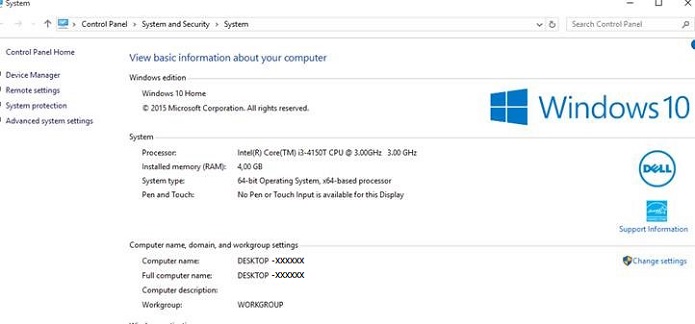
You may notice that your Windows 10 computer has a computer name "Desktop-XXXXXX" on both desktop and laptops. (XXXXXX = any combination of seven letters or numbers)
Ursache
No cause information is available.
Lösung
How to Change the Computer Name
You have several options that allow you to change the computer name of a Windows 10 computer.
From the Start Menu
- Click Settings on the Start menu, the Settings Window opens.
- Click the System icon in the upper left.
- Click About at the bottom of the left side menu.
- Then Click the Rename PC button
- In the Rename your PC Window, type in the new name in the box then Click Next and Click the Restart Now button.
Desktop Mode Menu
- Type sysdm.cpl in the search box then press the Enter key, this opens the System Properties window.
- Click the Change.
- In the Computer Name/Domain Changes window type in the new computer name in the Computer Name box then Click OK then click Yes to restart the system.
Videos
Computer Name Shows as Desktop-XXXXXX on Dell Systems that Ship with Windows 10
Watch this video to learn how to change your computer name in Windows.
Betroffene Produkte
Alienware, Dell All-in-One, Dell Pro All-in-One, Dell Pro Max Micro, Dell Pro Max Slim, Dell Pro Max Tower, Dell Pro Micro, Dell Pro Slim, Dell Pro Tower, Dell Slim, Dell Tower, Inspiron, OptiPlex, Vostro, XPS, G Series, G Series, Alienware
, Dell Plus, Dell Pro, Dell Pro Max, Dell Pro Plus, Dell Pro Premium, Inspiron, Latitude, Dell Pro Rugged, Vostro, XPS, Fixed Workstations, Mobile Workstations, Dell Pro Max Micro XE FCM2250, Dell Pro Max Slim XE FCS1250, Dell Pro Max Tower T2 XE FCT2250, Dell Pro Max 16 XE MC16250, Dell Pro Micro Plus XE QBM1250, Dell Pro Slim Plus XE5 QBS1250, Dell Pro Tower Plus XE5 QBT1250
...
Artikeleigenschaften
Artikelnummer: 000137111
Artikeltyp: Solution
Zuletzt geändert: 14 Sept. 2026
Version: 9
Antworten auf Ihre Fragen erhalten Sie von anderen Dell NutzerInnen
Support Services
Prüfen Sie, ob Ihr Gerät durch Support Services abgedeckt ist.