Latitude 7250 or E7250 Laptop Status LED Guide
Zusammenfassung: The following guide which shows the various LEDs on your laptop. I have also shown what each of the LEDs represent. What each of the stages that the LED can go through and what that means for you. ...
Dieser Artikel gilt für
Dieser Artikel gilt nicht für
Dieser Artikel ist nicht an ein bestimmtes Produkt gebunden.
In diesem Artikel werden nicht alle Produktversionen aufgeführt.
Symptome
The External LEDs
The small indicator lights on the system are known as LEDs. They serve as status lights for your laptop.
In this section, we deal with the three LEDs along the top edge on the exterior of the laptop.
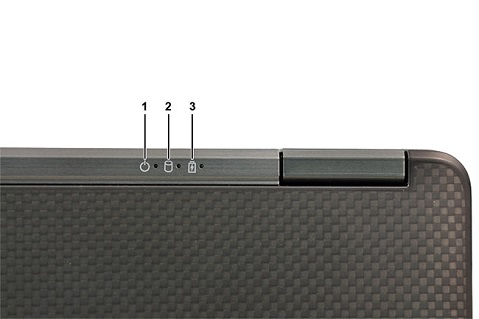
(Figure.1 External LEDs)
| 1 | Power LED - Indicates the Power Status | 2 | Hard drive Activity LED - Turns white when the laptop reads or writes to the hard drive. |
| 3 | Battery LED - Indicates the Battery Status |
Note: To Avoid Data Loss, you should never turn the laptop off while the hard drive activity indicators are flashing.
The Power LED indicates the power status as follows:
| Power State | LED Behavior |
|---|---|
| On | Solid White |
| Standby | Breathe White (Flashes slowly). |
| Off, Hibernate | Off |
The Battery LED indicates the Battery status as follows:
| Battery State | LED Behavior |
|---|---|
| Non-Dell AC adapter plugged to Notebook | Alternately blinking Amber and White light |
| Temporary Battery Failure with AC Adapter present | Alternately blinking Amber with a steady White light |
| Fatal Battery Failure with AC Adapter present | Constantly blinking Amber light |
| Battery in Full-Charge Mode with AC Adapter present | Light off |
| Battery in Charge Mode with AC Adapter present | Constant White light |
Ursache
The Palm-rest LEDs
The Device status LEDs are located across the upper right-hand side of the keyboard. They are used to display the status of the Storage, Battery, and Wireless Activity. They can also be used as a diagnostics tool.

(Figure.2 Palm-rest LEDs)
| 1 | Storage LED | 2 | Power LED |
| 3 | Wireless LED |
Check the Links section below for more information about how to use these LEDs to further troubleshoot any issues you are having with your laptop.
Lösung
Links
I have included several links below. These articles either use the LEDs to troubleshoot a fault with your computer or explain what the combination of LEDs and their State means.
Betroffene Produkte
Latitude E7250/7250Artikeleigenschaften
Artikelnummer: 000142023
Artikeltyp: Solution
Zuletzt geändert: 08 Dez. 2025
Version: 7
Antworten auf Ihre Fragen erhalten Sie von anderen Dell NutzerInnen
Support Services
Prüfen Sie, ob Ihr Gerät durch Support Services abgedeckt ist.