ECS: GeoDrive experiences performance issues
Zusammenfassung: Troubleshooting GeoDrive slow performance and timeout errors
Dieser Artikel gilt für
Dieser Artikel gilt nicht für
Dieser Artikel ist nicht an ein bestimmtes Produkt gebunden.
In diesem Artikel werden nicht alle Produktversionen aufgeführt.
Symptome
- Slow performance identified when archiving to the ECS using Geo Drive on Windows Storage Server.
- Also noticed 404 errors for requests on ECS.
Ursache
A possible cause is a very large change-log found for each cloud-drives. The change log contains things like permission, attribute changes, file/folder deletes, folder creates, file renames. It is a first-in/first-out queue that must preserve the ordering of operations. If the count of the change log is huge, that causes performance issues.
Lösung
Resolution:
For all Geodrive Versions:
Find the size of the change log and if huge, disable it from saving file security/description in cloud server: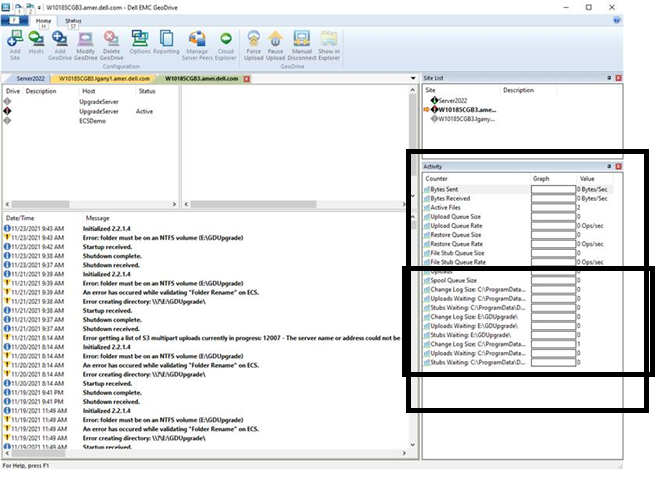
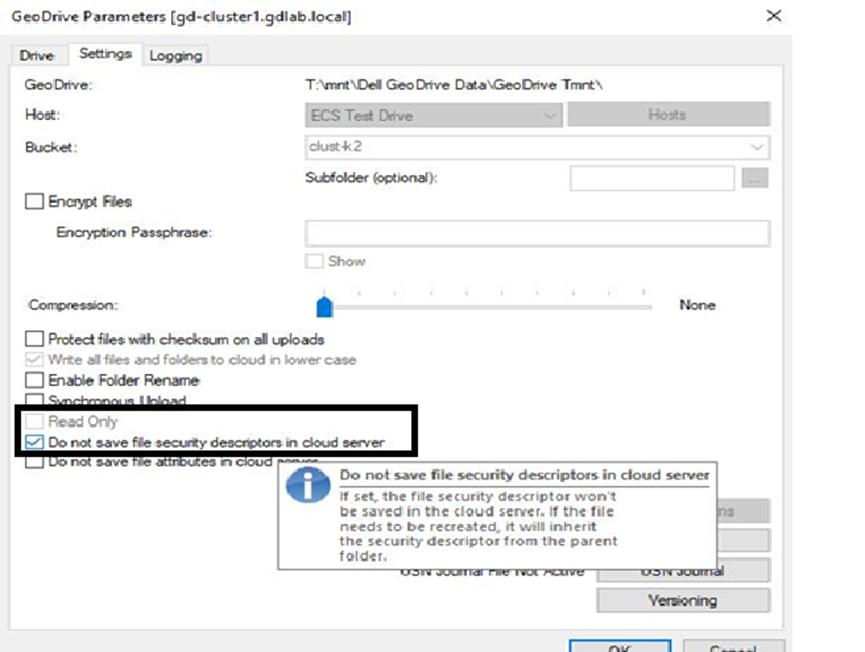
For all Geodrive Versions:
Find the size of the change log and if huge, disable it from saving file security/description in cloud server:
- From the screenshot over on the right in the Activity Window, it shows the size of the change log for each of the cloud drives.
- Right-click on the cloud drives, go to Settings, and checkmark "DO not save file security/description in cloud server". Click “OK”
Betroffene Produkte
GeoDrive for Windows, Elastic Cloud StorageArtikeleigenschaften
Artikelnummer: 000194162
Artikeltyp: Solution
Zuletzt geändert: 12 Mai 2026
Version: 3
Antworten auf Ihre Fragen erhalten Sie von anderen Dell NutzerInnen
Support Services
Prüfen Sie, ob Ihr Gerät durch Support Services abgedeckt ist.