PowerEdge: iDRAC9 performance monitoring using SNMP
Zusammenfassung: The following document provides an example of how to monitor performance on an iDRAC9 using Simple Network Management Protocol (SNMP).
Dieser Artikel gilt für
Dieser Artikel gilt nicht für
Dieser Artikel ist nicht an ein bestimmtes Produkt gebunden.
In diesem Artikel werden nicht alle Produktversionen aufgeführt.
Weisungen
DRAC 9 Performance Monitoring using SNMP
This is a limited way to get alerts using SNMP for Central Processing Unit (CPU) performance threshold. This is required to enable, as it is disabled by default. This is also only available on systems with INTEL processors:
The Object Identifier (OID) is 1.3.6.1.4.1.674.10892.5.3.2.1.0.2650. However, the implementation requires two steps before it can be used.
Reference the following Whitepaper Enhanced Out Of Band Performance Monitoring:
https://downloads.dell.com/solutions/general-solution-resources/White%20Papers/Enhanced_OOB_Performance_Monitoring_WhitePaper.pdf
Section 4: Sensor Threshold Values
- The upper noncritical thresholds of the utilization sensors can be viewed and configured using WS-Man and RACADM interfaces.
- The upper noncritical threshold values of these sensors can be configured using the below Fully Qualified Device Descriptor (FQDDs).
Pre-requisites:
- Enable Intelligent Platform Management Interface (IPMI) on the iDRAC (iDRAC settings, Connectivity, IPMI)
- Enable IPMI on the user (iDRAC Settings/Users/User Configuration)
- Linux Based system with IPMI Tools OR Windows system with OMSA or IMPI tools installed (https://www.dell.com/support/home/drivers/driversdetails?driverid=9ngfj)
The following command can be run remotely, or locally (remote example):
- Reference page 27 of the Enhanced Out-of-Band (OOB) performance monitoring Whitepaper.
-
Enable the sensor:
#ipmitool -I lanplus -H <drac ip> -U user -P password raw 0x04 0x28 0xFD 0xC0 0x80 0x00 0x80 0x00-
Example:
ipmitool -I lanplus -H <drac ip> -U user -P password raw 0x04 0x28 0xFD 0xC0 0x80 0x00 0x80 0x00
-
-
Set the threshold value using RACADM. This can also be run locally or remotely:
# racadm - sensorsettings set iDRAC.Embedded.1#SystemBoardCPUUsage -level Max 90- Example:
racadm -r <drac ip> -u user -p password sensorsettings set iDRAC.Embedded.1#SystemBoardCPUUsage -level Max 90
- Example:
This enables the sensor, sets the threshold, and sets a value for the warning.
A workload can be simulated using third-party programs.
This is the output of the trap using Wireshark:
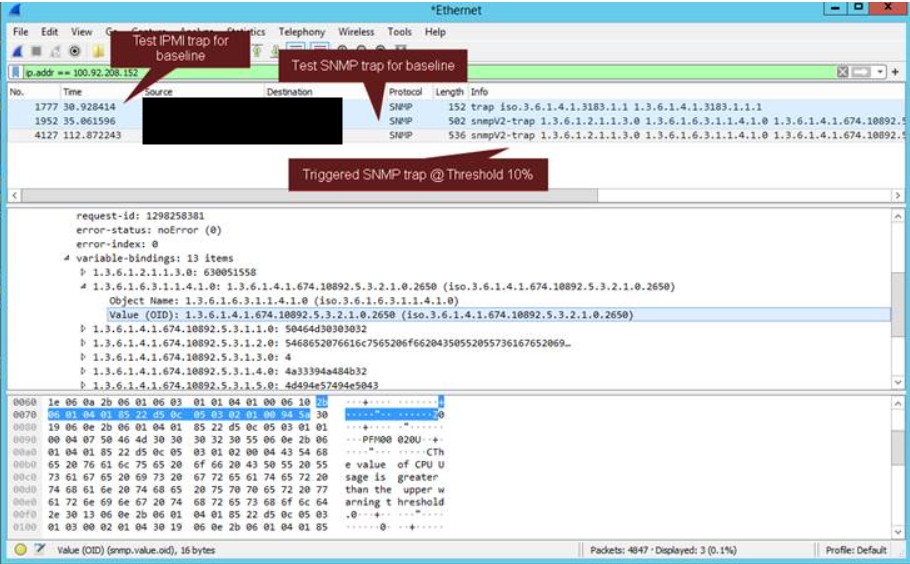
There are no Arguments for the SNMP OID because it is triggered on the threshold value that is specified on the RACADM command.
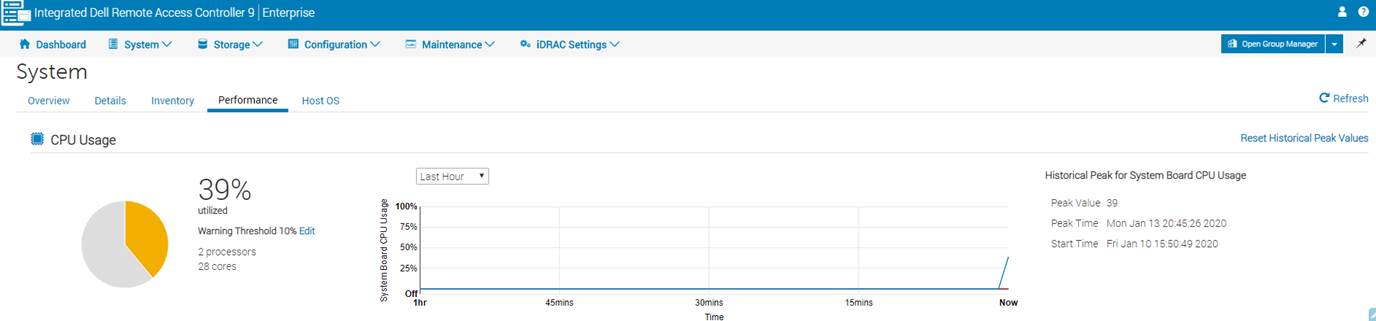
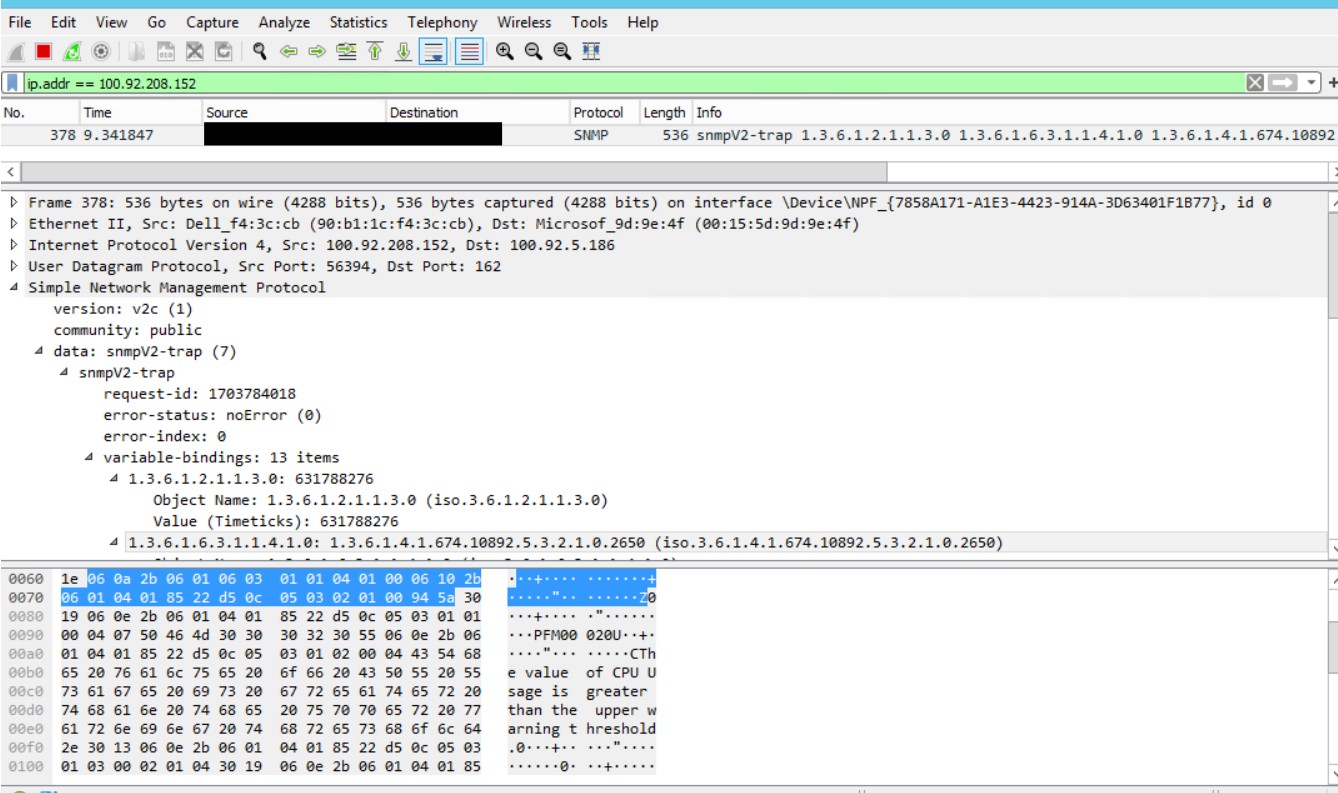
Example view from DRAC correlated to Wireshark output:
Betroffene Produkte
iDRAC9, iDRAC9 - 3.1x Series, iDRAC9 - 3.2x Series, iDRAC9 - 3.3x Series, iDRAC9 - 4.xx Series, OEMR R250, OEMR R440, OEMR R450, OEMR R550, OEMR R640, OEMR XL R640, OEMR R6415, OEMR R650, OEMR R650xs, OEMR R6515, OEMR R6525, OEMR R660, OEMR XL R660
, OEMR R660xs, OEMR R6615, OEMR R6625, OEMR R740, OEMR XL R740, OEMR R740xd, OEMR XL R740xd, OEMR R740xd2, OEMR R7415, OEMR R7425, OEMR R750, OEMR R750xa, OEMR R750xs, OEMR R7515, OEMR R7525, OEMR R760, OEMR R760xa, OEMR R760XD2, OEMR XL R760, OEMR R760xs, OEMR R7615, OEMR R7625, OEMR R840, OEMR R860, OEMR R940, OEMR R940xa, OEMR R960, OEMR XL R660xs, OEMR XL R6615, OEMR XL R6625, OEMR XL R760xs, OEMR XL R7615, OEMR XL R7625, OEMR XR4520c, OEMR XR5610, OEMR XR7620, OEMR XR8610t, OEMR XR8620t, PowerEdge R250, PowerEdge R440, PowerEdge R450, PowerEdge R540, PowerEdge R550, PowerEdge R640, PowerEdge R6415, PowerEdge R650, PowerEdge R650xs, PowerEdge R6515, PowerEdge R6525, PowerEdge R660, PowerEdge R660xs, PowerEdge R6615, PowerEdge R6625, PowerEdge R740, PowerEdge R740XD, PowerEdge R740XD2, PowerEdge R7415, PowerEdge R7425, PowerEdge R750, PowerEdge R750XA, PowerEdge R750xs, PowerEdge R7515, PowerEdge R7525, PowerEdge R760, PowerEdge R760XA, PowerEdge R760xd2, PowerEdge R760xs, PowerEdge R7615, PowerEdge R7625, PowerEdge R840, PowerEdge R860, PowerEdge R940, PowerEdge R940xa, PowerEdge R960, PowerEdge XR4510c, PowerEdge XR4520c, PowerEdge XR5610, PowerEdge XR8610t, PowerEdge XR8620t
...
Artikeleigenschaften
Artikelnummer: 000201657
Artikeltyp: How To
Zuletzt geändert: 07 Mai 2026
Version: 5
Antworten auf Ihre Fragen erhalten Sie von anderen Dell NutzerInnen
Support Services
Prüfen Sie, ob Ihr Gerät durch Support Services abgedeckt ist.