Dell Unity: Impossibile accedere all'interfaccia di gestione di Unity utilizzando https://FQDN o https://ip.address (correggibile dall'utente)
Zusammenfassung: Impossibile accedere all'interfaccia di gestione di Unity utilizzando https://FQDN o https://ip.address L'accesso a Unity avviene utilizzando https://FQDN/?casHome=LOCAL e https://ip.address/?casHome=LOCAL ...
Dieser Artikel gilt für
Dieser Artikel gilt nicht für
Dieser Artikel ist nicht an ein bestimmtes Produkt gebunden.
In diesem Artikel werden nicht alle Produktversionen aufgeführt.
Symptome
Impossibile accedere all'interfaccia di gestione di Unity tramite https://FQDN o https://ip.address
L'accesso a Unity avviene utilizzando https://FQDN/?casHome=LOCAL e https://ip.address/?casHome=LOCAL
L'accesso a Unity avviene utilizzando https://FQDN/?casHome=LOCAL e https://ip.address/?casHome=LOCAL
Ursache
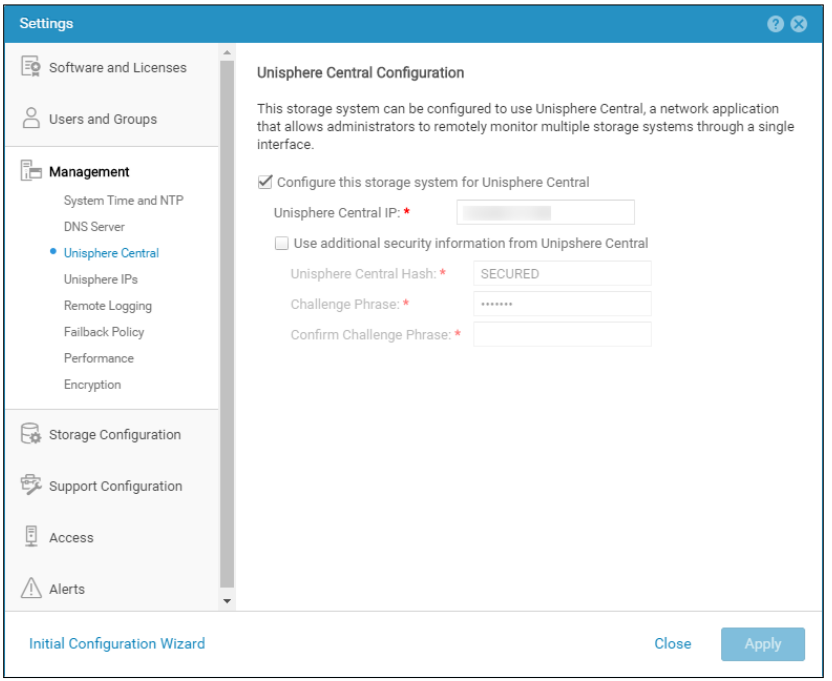
Unisphere Central è abilitato su Unity anche se Unisphere Central non è in uso.
Lösung
Selezionare "Configure this storage system for Unisphere Central" solo se Unisphere Central è in uso. In caso contrario, rimuovere il controllo abilitando Unisphere Central.
Betroffene Produkte
Dell EMC UnityArtikeleigenschaften
Artikelnummer: 000205133
Artikeltyp: Solution
Zuletzt geändert: 12 Dez. 2025
Version: 5
Antworten auf Ihre Fragen erhalten Sie von anderen Dell NutzerInnen
Support Services
Prüfen Sie, ob Ihr Gerät durch Support Services abgedeckt ist.