VxRail: Node Add Wizard "Network Settings" Tab is Blank
Zusammenfassung: Node add wizard tab is blank due to ipv6 not being enabled on vmk0.
Dieser Artikel gilt für
Dieser Artikel gilt nicht für
Dieser Artikel ist nicht an ein bestimmtes Produkt gebunden.
In diesem Artikel werden nicht alle Produktversionen aufgeführt.
Symptome
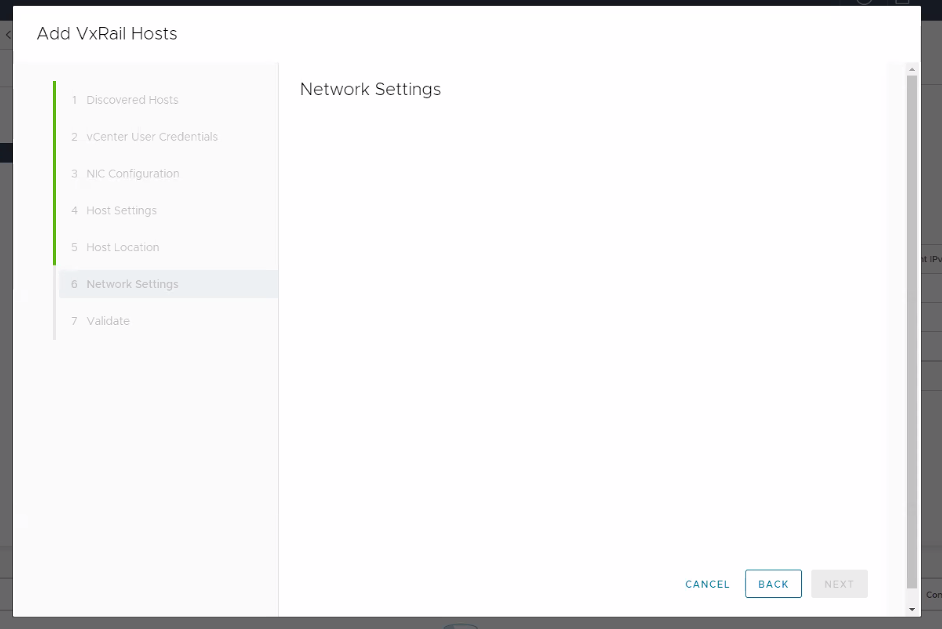
Similar issues report in short.term.log:
"2022-11-02 21:11:52,427" microservice.ms-day2 "2022-11-02T21:11:51.679285223Z stdout F 2022-11-02 21:11:51,679 [INFO] <ThreadPoolExecutor-0_25:140582357804800> segment_network_service.py format_network_info() (62): Create network info for traffic: management"
"2022-11-02 21:11:52,427" microservice.ms-day2 "2022-11-02T21:11:51.679355458Z stdout F 2022-11-02 21:11:51,679 [INFO] <ThreadPoolExecutor-0_25:140582357804800> global_config_handler.py _get_from_config_service() (26): get ip_version from configuration service..."
"2022-11-02 21:11:52,427" microservice.ms-day2 "2022-11-02T21:11:51.687939041Z stdout F 2022-11-02 21:11:51,687 [ERROR] <ThreadPoolExecutor-0_25:140582357804800> exp_general_controller.py get() (123): Internal Error During fetching cluster network info."
"2022-11-02 21:11:52,427" microservice.ms-day2 "2022-11-02T21:11:51.687954848Z stdout F Traceback (most recent call last):"
"2022-11-02 21:11:52,427" microservice.ms-day2 "2022-11-02T21:11:51.687959497Z stdout F   File ""/home/app/runtime_operations_app/main/controllers/exp_general_controller.py"", line 119, in get"
"2022-11-02 21:11:52,427" microservice.ms-day2 "2022-11-02T21:11:51.687964135Z stdout F     network_info = ClusterNetwork().get_network()"
"2022-11-02 21:11:52,427" microservice.ms-day2 "2022-11-02T21:11:51.68796846Z stdout F   File ""/home/app/runtime_operations_app/main/services/segment_network_service.py"", line 85, in get_network"
"2022-11-02 21:11:52,427" microservice.ms-day2 "2022-11-02T21:11:51.687972257Z stdout F     network_info[traffic_type] = self.format_network_info(traffic_type)"
"2022-11-02 21:11:52,427" microservice.ms-day2 "2022-11-02T21:11:51.687976359Z stdout F   File ""/home/app/runtime_operations_app/main/services/segment_network_service.py"", line 63, in format_network_info"
"2022-11-02 21:11:52,427" microservice.ms-day2 "2022-11-02T21:11:51.68798425Z stdout F     ip_list, ipv6_list = self._get_ip_list(traffic_type)"
"2022-11-02 21:11:52,427" microservice.ms-day2 "2022-11-02T21:11:51.687987733Z stdout F   File ""/home/app/runtime_operations_app/main/services/segment_network_service.py"", line 40, in _get_ip_list"
"2022-11-02 21:11:52,427" microservice.ms-day2 "2022-11-02T21:11:51.687991083Z stdout F     all_traffic_info = self._get_all_traffic_info()"
"2022-11-02 21:11:52,427" microservice.ms-day2 "2022-11-02T21:11:51.687994504Z stdout F   File ""/home/app/runtime_operations_app/main/services/segment_network_service.py"", line 36, in _get_all_traffic_info"
"2022-11-02 21:11:52,427" microservice.ms-day2 "2022-11-02T21:11:51.687997846Z stdout F     self.all_traffic_info = NetworkAdaptiveInfoHandler().retrieve_all_hosts_traffic_info()"
"2022-11-02 21:11:52,427" microservice.ms-day2 "2022-11-02T21:11:51.688021672Z stdout F   File ""/home/app/runtime_operations_app/main/services/network_adaptive_info_handler.py"", line 548, in retrieve_all_hosts_traffic_info"
"2022-11-02 21:11:52,427" microservice.ms-day2 "2022-11-02T21:11:51.688026171Z stdout F     all_traffic_info[hostname] = self.formatter.format_host_traffic_info(hostname, raw_traffic_info)"
"2022-11-02 21:11:52,427" microservice.ms-day2 "2022-11-02T21:11:51.688041779Z stdout F   File ""/home/app/runtime_operations_app/main/services/network_adaptive_info_handler.py"", line 335, in format_host_traffic_info"
"2022-11-02 21:11:52,427" microservice.ms-day2 "2022-11-02T21:11:51.688045478Z stdout F     formatted_traffic_info: TrafficInfo = self.format_host_specified_traffic_info(host, cluster_portgroups_info, traffic_type)"
"2022-11-02 21:11:52,427" microservice.ms-day2 "2022-11-02T21:11:51.688048698Z stdout F   File ""/home/app/runtime_operations_app/main/services/network_adaptive_info_handler.py"", line 286, in format_host_specified_traffic_info"
"2022-11-02 21:11:52,427" microservice.ms-day2 "2022-11-02T21:11:51.688052231Z stdout F     network_info = self._get_host_specified_traffic_network_info(host, traffic_type)"
"2022-11-02 21:11:52,427" microservice.ms-day2 "2022-11-02T21:11:51.688055943Z stdout F   File ""/home/app/runtime_operations_app/main/services/network_adaptive_info_handler.py"", line 282, in _get_host_specified_traffic_network_info"
"2022-11-02 21:11:52,427" microservice.ms-day2 "2022-11-02T21:11:51.688060631Z stdout F     network_info = self._get_specified_network_info(vnics, lambda vnic : vnic['device'] == vmk)"
"2022-11-02 21:11:52,427" microservice.ms-day2 "2022-11-02T21:11:51.68806382Z stdout F   File ""/home/app/runtime_operations_app/main/services/network_adaptive_info_handler.py"", line 136, in _get_specified_network_info"
"2022-11-02 21:11:52,427" microservice.ms-day2 "2022-11-02T21:11:51.688067352Z stdout F     interface_ipv6, prefix_len, v6_gateway = self._get_vnic_ipv6_addr_prefix_len_and_gw(vnic)"
"2022-11-02 21:11:52,427" microservice.ms-day2 "2022-11-02T21:11:51.688070245Z stdout F   File ""/home/app/runtime_operations_app/main/services/network_adaptive_info_handler.py"", line 107, in _get_vnic_ipv6_addr_prefix_len_and_gw"
"2022-11-02 21:11:52,427" microservice.ms-day2 "2022-11-02T21:11:51.688073697Z stdout F     ipv6_addresses = ipv6_config.get('ipV6Address', [])"
"2022-11-02 21:11:52,427" microservice.ms-day2 "2022-11-02T21:11:51.688076866Z stdout F AttributeError: 'NoneType' object has no attribute 'get'"
"2022-11-02 21:11:52,427" microservice.ms-day2 "2022-11-02T21:11:51.688504301Z stdout F 2022-11-02 21:11:51,688 [WARNING] <ThreadPoolExecutor-0_25:140582357804800> api_error_handler.py unexpected_error_handler() (14): Got unexpected error : Invalid status argument"
Ursache
During a node expansion, VxRail Manager (VRM) gets all IP information from the existing nodes. In this case, ipv6 is disabled on one or more nodes side, which causes VRM to fail to get the info.
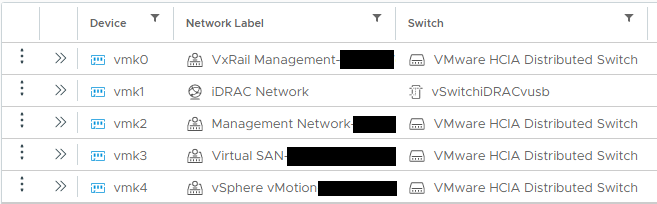
Existing VxRail Cluster nodes should have the below vmks, and vmk0 enabled with ipv6:
Lösung
To resolve this issue:
- Log in to vSphere.
- Move to ESXi -> Configuration -> VMkernel adapters -> vmk0 of "VxRail Management-XXX" network.
- Edit setting of vmk0 -> Go to ipv6 settings page -> select "Obtain IPV6 address automatically through Router Advertisement."

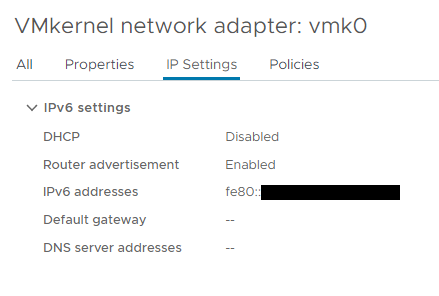
- Go to "IP Settings" page of vmk0 and check with the expected output:
- Retry the Add host action.
If "IPv6 settings" tab is not available, follow the VMware procedure to enable IPv6 (host reboot required): Activate or Deactivate IPv6 Support on a Host
Weitere Informationen
If vmk0 is for iDRAC network and missing vmk1 issue, see Article: VxRail: Physical View Not Working or the Node Missing from Hosts Page
Betroffene Produkte
VxRail, VxRail 460 and 470 Nodes, VxRail Appliance Series, VxRail G Series Nodes, VxRail D Series Nodes, VxRail D560, VxRail D560F, VxRail E Series Nodes, VxRail E460, VxRail E560, VxRail E560F, VxRail E560N, VxRail E660, VxRail E660F, VxRail E660N
, VxRail E665, VxRail E665F, VxRail E665N, VxRail G560, VxRail G560F, VxRail P Series Nodes, VxRail P470, VxRail P570, VxRail P570F, VxRail P580N, VxRail P670F, VxRail P670N, VxRail P675F, VxRail P675N, VxRail S Series Nodes, VxRail S470, VxRail S570, VxRail S670, VxRail Software, VxRail V Series Nodes, VxRail V470, VxRail V570, VxRail V570F, VXRAIL V670F, VxRail VD-4510C, VxRail VD-4520C, VxRail VD Series Nodes, VxRail VE-660, VxRail VE-6615, VxRail VE-670, VxRail VP-760, VxRail VP-7625, VxRail VP-770, VxRail VS-760
...
Artikeleigenschaften
Artikelnummer: 000205351
Artikeltyp: Solution
Zuletzt geändert: 24 Apr. 2026
Version: 5
Antworten auf Ihre Fragen erhalten Sie von anderen Dell NutzerInnen
Support Services
Prüfen Sie, ob Ihr Gerät durch Support Services abgedeckt ist.