OS10 네트워크 명령 문제 해결
Zusammenfassung: OS10 네트워크 명령 문제 해결
Dieser Artikel gilt für
Dieser Artikel gilt nicht für
Dieser Artikel ist nicht an ein bestimmtes Produkt gebunden.
In diesem Artikel werden nicht alle Produktversionen aufgeführt.
Weisungen
기본 로그인 자격 증명.
로그인: admin
비밀번호: admin
모든 명령을 보려면 Show command 다음에 Enter 키를 누릅니다.
s1# show version
s1# show boot
s1# show spanning-tree active
s1# show interface status | no-more

필터 옵션: find, except, grep.
s1# show ip route
show tech-support를 수집하려면
PuTTY 세션을 텍스트 파일에 기록합니다.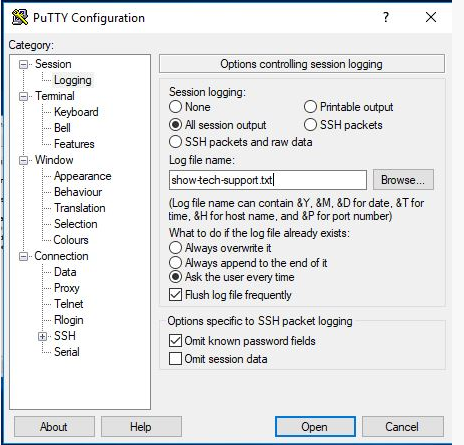
이 명령은 화면에 모든 정보를 나열합니다.
s1# show tech-support
SOSreport 번들을 생성하는 방법
스위치의 플래시에 저장된 커널 레벨 지원 번들:
s1# generate support-bundle
이 명령은 최근에 생성된 번들을 보여줍니다.
s1# dir supportbundle
s1# copy supportbundle://sosreport-OS10-dateandtime.tar.xz
(그런 다음 탭하여 복사할 수 있는 위치에 대한 옵션 확인)
또한(Dell 서버에서 Support Assist를 사용하도록 구성된 경우) Support-Assist 전송을 실행할 수 있습니다.
이렇게 하면 스위치의 모든 로그가 SupportAssist 서버로 전송됩니다.
s1# support-assist activity full-transfer start-now
Support Assist의 구성을 확인하려면 다음을 수행합니다.
s1# configure
s1(config) # support-assist
s1(conf-support-assist)# show

s1(conf-support-assist)# exit
s1(config)
문제를 해결할 때 화면에 오류 메시지가 출력되지 않게 하려면:
s1(config)# logging console enable
s1(config)# logging console disable
s1(config)# end
콘솔에 보고되는 오류의 심각도를 변경하려면 다음을 수행합니다.
s1(config)# logging console severity log-crit
s1(config)#logging console enable
로깅을 기본값으로 재설정하려면 다음을 수행합니다.
s1(config)# no logging console severity
Betroffene Produkte
StorageArtikeleigenschaften
Artikelnummer: 000207120
Artikeltyp: How To
Zuletzt geändert: 30 Sept. 2025
Version: 4
Antworten auf Ihre Fragen erhalten Sie von anderen Dell NutzerInnen
Support Services
Prüfen Sie, ob Ihr Gerät durch Support Services abgedeckt ist.