Precision Tower Memory Fan ePSA Error Codes 2000-0511 or 2000-0712
Zusammenfassung: Learn about memory fan ePSA error codes 2000-0511 or 2000-0712 on a Dell Precision 5860 Tower, Precision 7865 Tower, or Precision 7960 Tower.
Dieser Artikel gilt für
Dieser Artikel gilt nicht für
Dieser Artikel ist nicht an ein bestimmtes Produkt gebunden.
In diesem Artikel werden nicht alle Produktversionen aufgeführt.
Symptome
Dell Precision computers might receive ePSA error codes 2000-0511 or 2000-0712 after removing the air shroud. This may also occur if the air shroud is not properly seated.
Affected Platforms:
- Precision 5860 Tower
- Precision 7865 Tower
- Precision 7875 Tower
- Precision 7960 Tower
Ursache
The air shroud may have been removed. This also occurs if the air shroud has been reseated and is not making a good connection. This also occurs if something is in the way of the air shroud.
Lösung
ePSA Error 2000-0511
Check the memory fan to confirm that it is installed correctly. The memory fan is in the air shroud.
ePSA Error 2000-0712
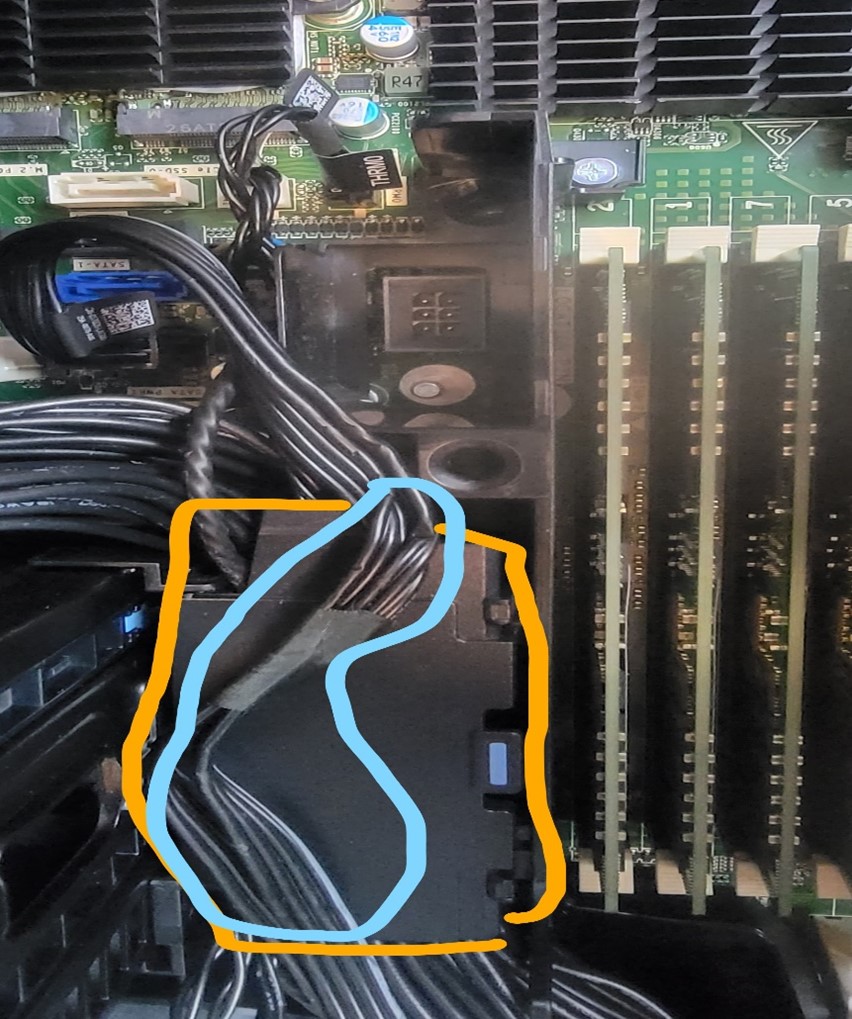
Confirm that all cables have been put into the air duct before installing the air shroud. The following image shows a bad example with the cables outside of the air duct.
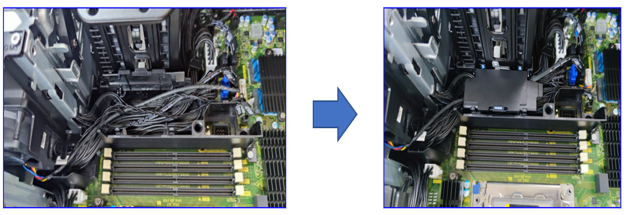
Connect the cables to the motherboard and put all cables into the air duct channel as shown. Then close the cover of the air duct. The following image shows a good example with the cables inside the air duct.
Precision 7875 Tower
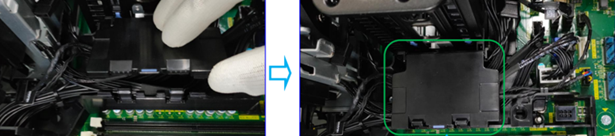
Confirm that the cables are routed under the bottom air shroud. The following image shows appropriate cable routing for the Precision 7875 Tower bottom air shroud in the area outlined with a green box.
Precision 7960 Tower
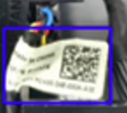
If a Precision 7960 Tower is receiving ePSA Error 2000-0712, check inside the air shroud. Look for Part Piece ID (PPID) labels that are attached to cables. PPID labels are labels that may contain a QR code and have a twenty-digit alphanumeric sequence written on them. The following image shows an example PPID label.
Confirm that there is no bad cable routing. Do not let the PPID label lay across the red line on the right side of the following image. Do not let cables rest around where the red line is in the following image.
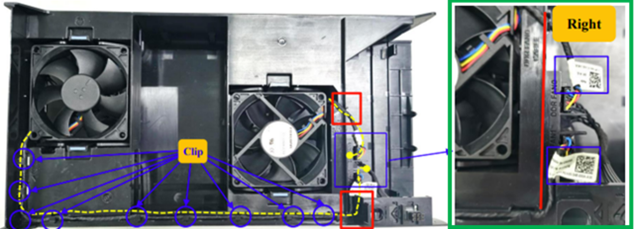
Note: Where the cable "hooks" (or curves) and changes routing direction, the cable must not rest on the red line.
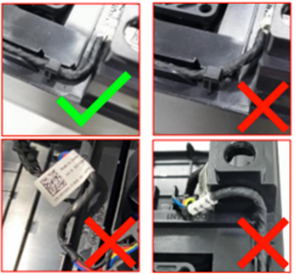
The following image shows good cable routing and bad cable routing examples.
Betroffene Produkte
Precision 5860 Tower, Precision 7865 Tower, Precision 7875 Tower, Precision 7960 TowerArtikeleigenschaften
Artikelnummer: 000213660
Artikeltyp: Solution
Zuletzt geändert: 18 Mai 2026
Version: 9
Antworten auf Ihre Fragen erhalten Sie von anderen Dell NutzerInnen
Support Services
Prüfen Sie, ob Ihr Gerät durch Support Services abgedeckt ist.