Openshift: Some hardware information is missing on the Red Hat Web Console Node Details view page
Zusammenfassung: Add worker nodes via Dell APEX Cloud Platform node addition function, the newly added nodes hardware information is missing on the Red Hat Web Console Node Details view page.
Dieser Artikel gilt für
Dieser Artikel gilt nicht für
Dieser Artikel ist nicht an ein bestimmtes Produkt gebunden.
In diesem Artikel werden nicht alle Produktversionen aufgeführt.
Symptome
Login to Red Hat OpenShift web console, navigate to Compute menu clicks the Nodes item, select one of the listed worker nodes.
On the Node detail view page, the information for CPU, Disks and NICs are missing and shows 0 CPUs, 0 Disks and 0 NICs.
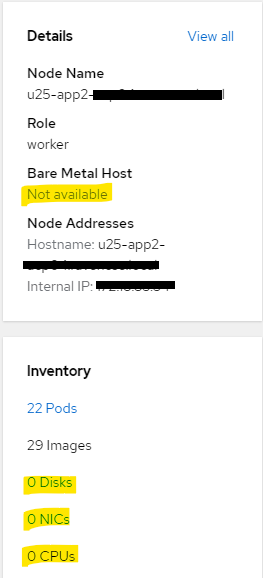
On the Node detail view page, the information for CPU, Disks and NICs are missing and shows 0 CPUs, 0 Disks and 0 NICs.
Ursache
In order to enforce the security in customer's environment, accessing to iDRAC network from management network is not allowed in current release of Dell APEX Cloud Platform for Redhat Openshift.
So after adding a worker node via Dell APEX Cloud Platform node addition function, the newly added node management network will not have permission to access the node iDRAC network and causes hardware information missing on the node view page.
This issue only impacts worker node that is added via Dell APEX Cloud Platform node addition function.
Control plane node is not impacted.
This issue will be fixed in future release of Dell APEX Cloud Platform for Redhat Openshift.
So after adding a worker node via Dell APEX Cloud Platform node addition function, the newly added node management network will not have permission to access the node iDRAC network and causes hardware information missing on the node view page.
This issue only impacts worker node that is added via Dell APEX Cloud Platform node addition function.
Control plane node is not impacted.
This issue will be fixed in future release of Dell APEX Cloud Platform for Redhat Openshift.
Lösung
For the missing hardware information, user can navigate to Inventory view of the Dell APEX Cloud Platform web console plugin, the CPU numbers can be found from node details view, the NIC details can be found from the back view of the node. Currently the disks are not displayed on Inventory view for Compute Cluster Nodes.
Betroffene Produkte
APEX Cloud Platform for Red Hat OpenShiftArtikeleigenschaften
Artikelnummer: 000217296
Artikeltyp: Solution
Zuletzt geändert: 19 Feb. 2026
Version: 4
Antworten auf Ihre Fragen erhalten Sie von anderen Dell NutzerInnen
Support Services
Prüfen Sie, ob Ihr Gerät durch Support Services abgedeckt ist.