Data Domain: DD Boost Configuration Guide for CommVault
Zusammenfassung: This article provides basic information about configuration of DD Boost with CommVault Application. This article also describes the prerequisites required for configuring DD Boost with CommVault and supported configuration/workflows with CommVault 11.30.x and 11.32.x software versions. ...
Dieser Artikel gilt für
Dieser Artikel gilt nicht für
Dieser Artikel ist nicht an ein bestimmtes Produkt gebunden.
In diesem Artikel werden nicht alle Produktversionen aufgeführt.
Weisungen
Software configuration
Table: prerequisites for Data Domain (DD) and Commvault required versions.
| DDOS Version | DDBoostSDK | CommServe/Media Agent Version |
| DDOS 7.8 or later | DD Boost SDK 7.11 - integrated in Commvault 11.30.x and 11.32.x Media Agent Package | 11.30.x (DD Boost Access) |
| DDOS 7.8 or later | DD Boost SDK 7.11 - integrated in Commvault 11.30.x and 11.32.x Media Agent Package | 11.32.x (DD Boost Client Direct) |
Note: DD Boost Client is supported with fresh deployments, no migration is supported either from DD Boost Access (CV 11.30.x) or from prior CV versions.
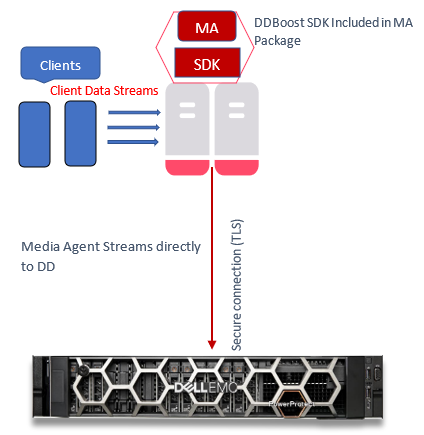
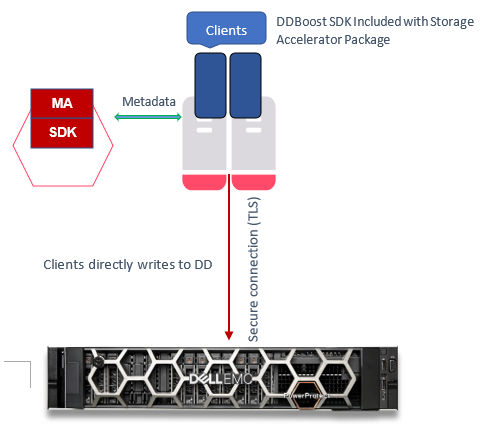
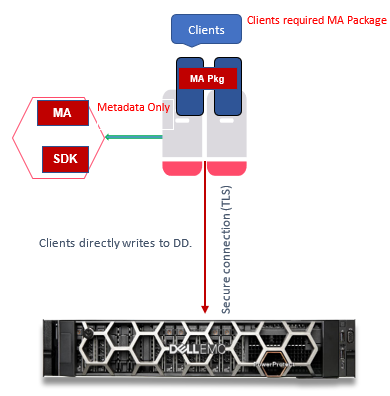
Supported Configuration/workflows with Commvault 11.30.x
Workflow I: Data Path Media Agent to Data Domain
Workflow II: Data Path Client to Data Domain
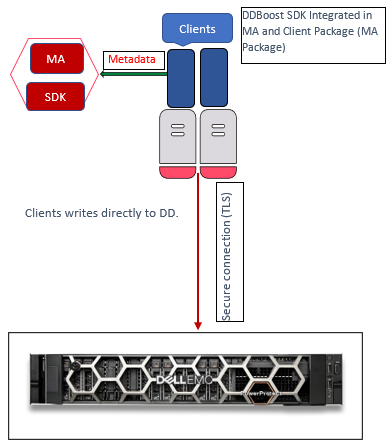
Supported workflows for 11.32.x
Workflow I: Data Path is Client to Data Domain (DD Client-Side Deduplication)
Note: For Full Backup and Incremental Backups Only, Restore Only.
Workflow II: Data Path is Client to Data Domain (DD Client-Side Deduplication)
Note: For Synthetic Full (DD VS - Virtual Synthetics) Backup Only
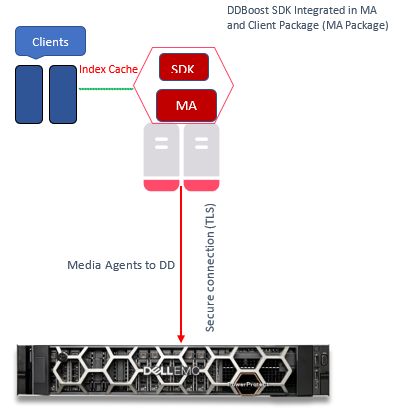
Workflow III: Clients to Media Agent to Data Domain
Data Path is Media Agent to Data Domain.
Note: Preferred for DD non-Client-Side Deduplication
Configuration Steps
This section explains the steps required to configure a DD appliance.
Note: DD Boost SDK is installed by default when CommVault Media Agent and CommServe are installed on hosts.
Verify that the DD has a valid license, and the filesystem and DD Boost are enabled.
- Check license:
sysadmin@DataDomain# elicense show Licensing scheme: EMC Electronic License Management System (ELMS) node-locked mode Capacity licenses: ## Feature Shelf Model Capacity Type State Expiration Date Note -- ------------------ ----------- ----------- --------------- ------ --------------- ---- 1 CAPACITY-ACTIVE ES40 1135.04 TiB permanent (int) active n/a 2 CLOUDTIER-CAPACITY n/a 9.09 TiB permanent (int) active n/a -- ------------------ ----------- ----------- --------------- ------ --------------- ---- Licensed Active Tier capacity: 1135.04 TiB* * Depending on the hardware platform, usable filesystem capacities may vary. Feature licenses: ## Feature Count Type State Expiration Date Note -- ------------------------- ----- --------------- ------ --------------- ---- 1 REPLICATION 1 permanent (int) active n/a 2 VTL 1 permanent (int) active n/a 3 DDBOOST 1 permanent (int) active n/a 4 RETENTION-LOCK-GOVERNANCE 1 permanent (int) active n/a 5 ENCRYPTION 1 permanent (int) active n/a - Check filesystem status:
sysadmin@DataDomain# filesys status The filesystem is enabled and running. - Check DD Boost status:
sysadmin@DataDomain# ddboost status DD Boost status: enabled - Check DD Boost options for DSP:
sysadmin@DataDomain# ddboost option show Option Value ------------------------------ -------- distributed-segment-processing enabled virtual-synthetics enabled fc disabled global-authentication-mode none global-encryption-strength none ------------------------------ -------- - Create DD Boost Storage Unit:
sysadmin@DataDomain# ddboost storage-unit create DDSTU_P2WIN_COMP_3 user sysadmin Created storage-unit "DDSTU_P2WIN_COMP_3" for "sysadmin". - List the DD Boost Storage Unit:
sysadmin@DataDomain# ddboost storage-unit show
Name                 Pre-Comp (GiB)   Status   User       Report Physical
                                                             Size (MiB)
------------------   --------------   ------   --------   ---------------
DDSTU_P2WIN_COMP_3              0.0   RW       sysadmin                 -
------------------   --------------   ------   --------   ---------------
 D    : Deleted
 Q    : Quota Defined
 RO   : Read Only
 RW   : Read Write
 RD   : Replication Destination
 M    : Mobile
 m    : Migratable
Note: For more information about the Commvault DD Boost Storage Library feature, including configuring a DD Boost Storage Library, see Commvault Data Domain Boost Storage Library in the Commvault documentation.
Creating a DD Boost Client Library using CommVault 11.32.x
After taking care of all prerequisites for configuring a Commvault DD Boost Storage Library, create a Client Direct DD Boost Client Library:
- From the CommCell Browser, expand "Storage Resources."
- Right-click Libraries, and then click "Add > Disk Library > Data Domain Boost Library."
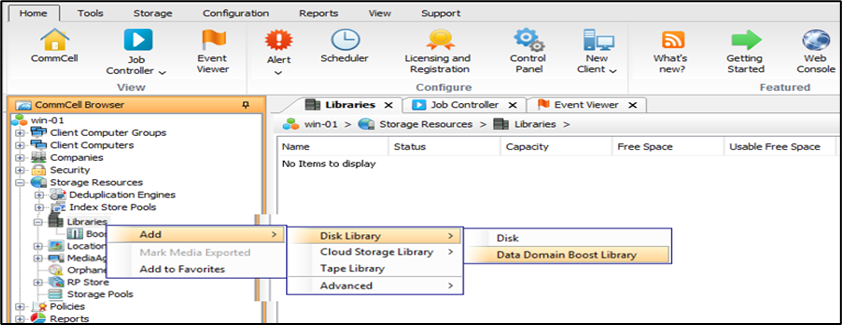
- The "
Add DD Boost Storage" dialog box is displayed. - In the Name box, type a name for the library.
- In the Type box, select
DD Boost Client. - From the Media Agent list, select the appropriate Client.
- In the DD appliance host box, type the IP address associated with the Data Domain library.
- From the Credentials list, choose a predefined credential or click
Create Newto create a credential to access the DD series appliance library. - In the Storage unit box, type the name of the storage unit provided in the DD series appliance console.
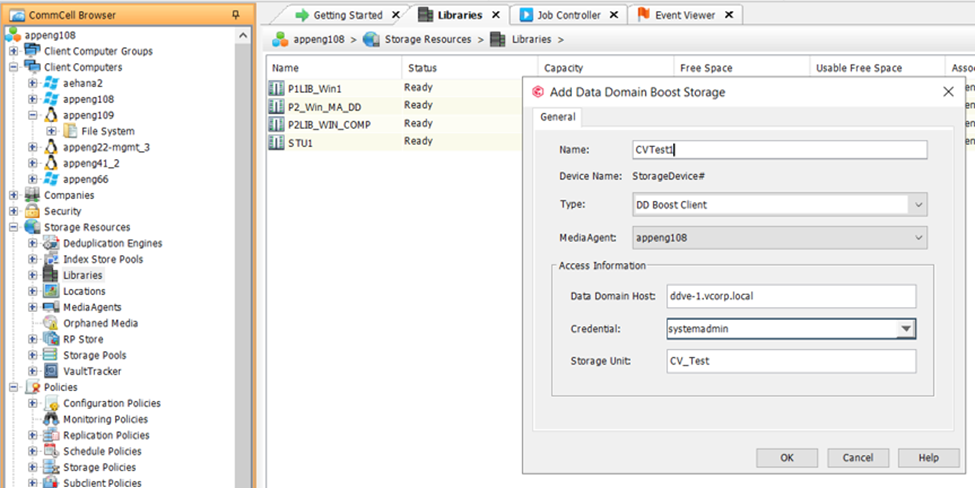
- Click
OK.
The new Client Direct DD Boost Storage Library is shown in the CommCell Browser under "Storage Resources | Libraries."
Betroffene Produkte
Data Domain, Data Domain BoostArtikeleigenschaften
Artikelnummer: 000219165
Artikeltyp: How To
Zuletzt geändert: 27 Jan. 2026
Version: 1
Antworten auf Ihre Fragen erhalten Sie von anderen Dell NutzerInnen
Support Services
Prüfen Sie, ob Ihr Gerät durch Support Services abgedeckt ist.